
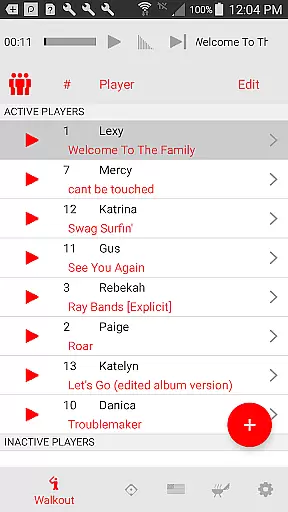
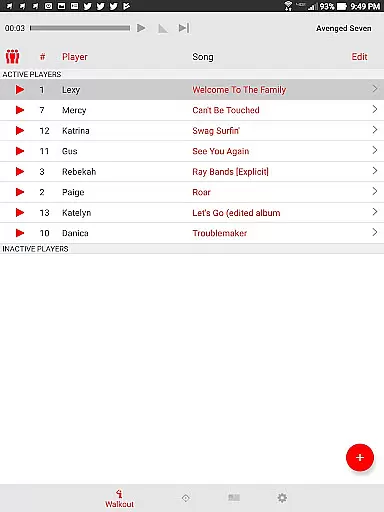
Walkout Song DJ is a specialized music application designed to enhance the ballpark experience by allowing users to easily play personalized walkout songs for each batter. The app simplifies the process of selecting and playing music tracks, making it as easy as tapping a button. With features like precise song segment selection, individual volume control, and integration with imported or recorded announcements, this app ensures that every athlete gets their pump-up moment without disrupting the game's flow.
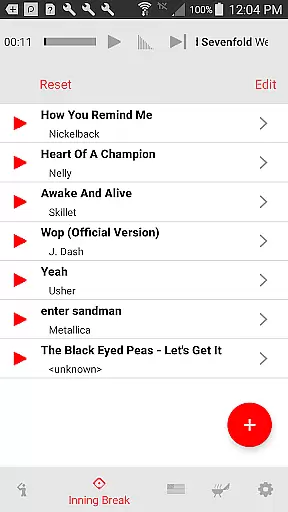
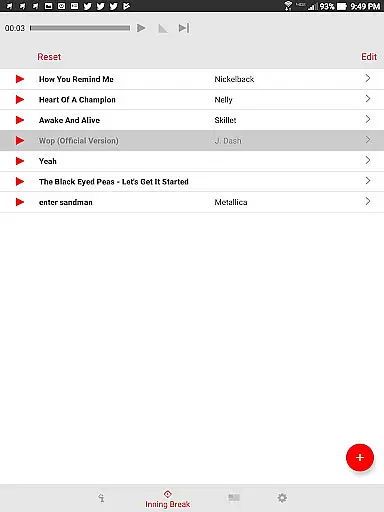
Beyond batter walkout songs, the app offers dedicated views for inning break music and situational music, ensuring continuous entertainment throughout the game. Users can create playlists for pre-game warm-ups and manage multiple teams' song preferences effortlessly. Whether you're managing a single team or multiple teams, Walkout Song DJ provides an intuitive interface to keep the energy high and the music flowing, all while maintaining professional audio management standards.
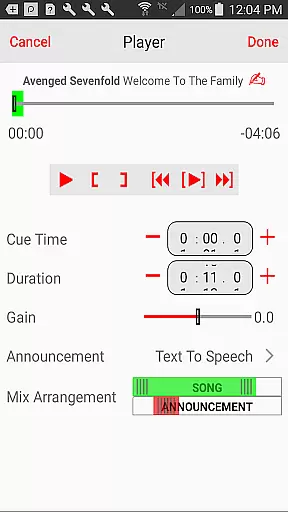
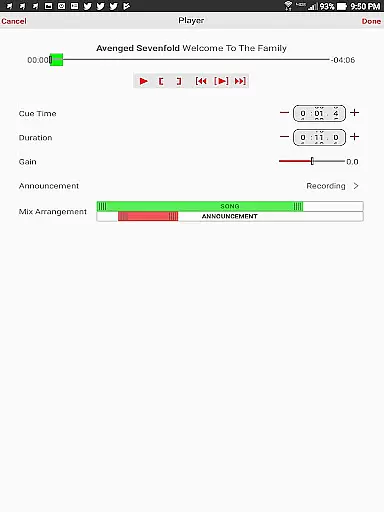
Walkout Song DJ stands out with its comprehensive feature set tailored specifically for sports events. The app allows users to input player names and numbers, then select specific songs from their personal music library. A unique editing view enables precise control over playback duration and starting position, ensuring perfect timing for each walkout. Individual volume settings for each song prevent audio imbalance, while customizable announcement options add a personal touch to player introductions.
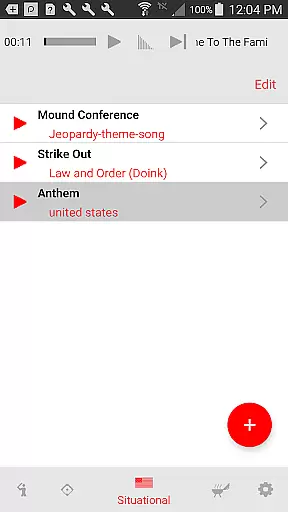
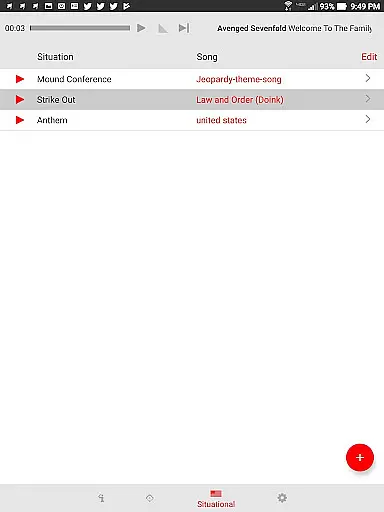
The app's inning break view is designed for seamless transitions between gameplay, automatically fading out songs before play resumes. Its situational music view provides instant access to essential game-time tracks like national anthems and sponsor mentions. Additionally, the pre-game view lets users create uninterrupted playlists to help athletes focus during warm-ups. With support for multiple team profiles, Walkout Song DJ proves to be an indispensable tool for any serious ballpark DJ looking to maintain consistent energy throughout various games and events.
When it comes to music applications like Walkout Song DJ, the size and variety of the music library play a crucial role in user satisfaction. A comprehensive music library ensures that users have access to a wide range of songs suitable for different scenarios, from individual player walkouts to inning breaks.
Walkout Song DJ allows users to import their own music files, giving them the freedom to use personally owned tracks without legal concerns. This approach emphasizes the importance of copyright authenticity, as users are responsible for using legitimately acquired music. The app supports various audio formats, making it versatile for different user preferences.
The ability to customize playback positions and durations for each song adds another layer of personalization. Users can precisely edit song segments, ensuring that only the most impactful parts are played during crucial game moments. This feature enhances the overall experience by allowing seamless transitions between different musical elements.
Furthermore, the app's support for multiple teams and song pages demonstrates its commitment to serving diverse user needs. Whether managing music for a single team or coordinating across multiple sports organizations, users can maintain distinct libraries while ensuring all content remains properly organized and easily accessible.
Audio quality is paramount in applications like Walkout Song DJ, where sound clarity can significantly impact the atmosphere of sporting events. The app provides users with control over volume levels for individual walkout songs, ensuring optimal audio balance throughout games.
Each song's volume can be independently adjusted, preventing situations where certain tracks overpower others or become lost in background noise. This granular control helps maintain consistent audio levels, keeping fans engaged without causing discomfort. The app's fade-out feature further enhances this experience by smoothly transitioning music as batters approach the plate.
For inning breaks and situational music, the application offers precise editing capabilities that preserve original audio integrity while enabling customized playback. Users can set specific start and end points for songs, maintaining high-quality sound reproduction even when playing partial tracks. This attention to detail ensures that national anthems, traditional game songs, and sponsor mentions sound their best.
Additionally, the app's support for different audio sources - including imported files, recorded announcements, and AI-generated speech - demonstrates its versatility in handling various audio formats while maintaining quality standards. This flexibility allows users to create rich, multi-layered audio experiences that enhance the overall sporting event atmosphere.
User-friendly interface
Precise audio controls
Multiple team management
Seamless inning transitions
Customizable announcements
No built-in music library
Limited streaming service support
Requires manual setup
Device storage dependent
Learning curve for new users

 4.70
4.70
Time Guru will strengthen your internal sense of musical time via random muting.
4.30
Full-featured, High-Quality Groovebox Workstation, perfect for Live Performance!
4.80
Save hundreds of dollars for a physical strobe tuner and instead use this app.
4.50
Simple & Intuitive Metronome
4.70
The only true audiophile music player with Hi-Fi audio rendering and DSP engine
3.90
A sleek, no-frills player designed for true music lovers.
4.20
Listen radio AM / FM Stations. Live AM / FM Radio App Station. Radio Com.
4.70
Enjoy singing any song, no matter how high or low it is
4.30
Responsive piano with great sounds, graphics, and songs
4.80
Guzheng Master supports many playing techniques as an acoustic Guzheng
4.50
Full featured mp3 and audio player with Chromecast and Android Auto support.
4.40
Equalizer, Bass Booster and Volume Booster (Eq & Bass) improve sound quality
4.30
Smart piano keyboard, Classical to Pop, Real-time multiplayer connection!
4.20
PowerAudio is a powerful offline music player.
4.20
The ultimate media player for Android devices
3.90
Powerful beat maker & DJ mixer to remix tracks, make music, & perform DJ mix
3.70
The Cubase remote control app
3.60
The Minimalistic Premium Music Player. Handmade with passion for music
2.20


User Reviews