
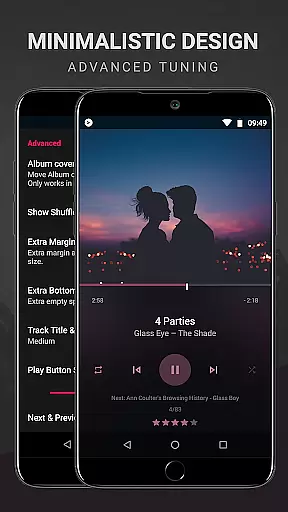
BlackPlayer EX is a premium music player tailored for audiophiles who appreciate both quality and customization. This advanced version removes ads while offering exclusive features such as Chromecast support, customizable crossfading, and an enhanced user interface with light themes, accent colors, and additional fonts.
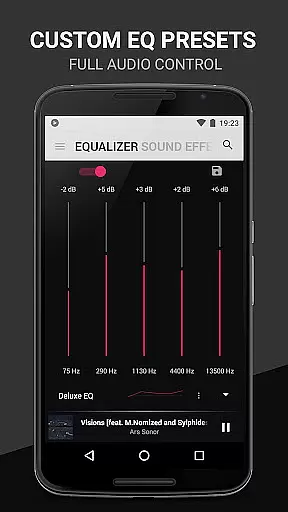
Designed for Android users, the app supports various audio formats including MP3, FLAC, and WAV. Its standout capabilities include gapless playback, a built-in equalizer, tag editing, and lockscreen controls. With BlackPlayer EX, you can personalize your library layout, track monthly played songs, and even discover new music through the innovative 'Zap' function.
Whether you're commuting or relaxing at home, BlackPlayer EX delivers a seamless listening experience that combines functionality with aesthetic appeal, making it ideal for those seeking a sophisticated music management solution.
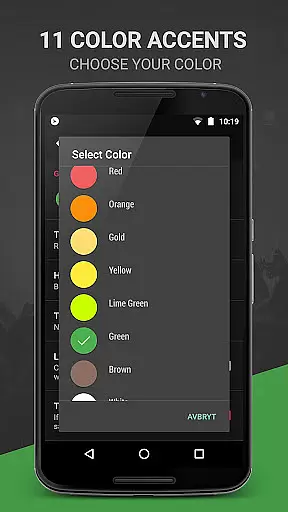
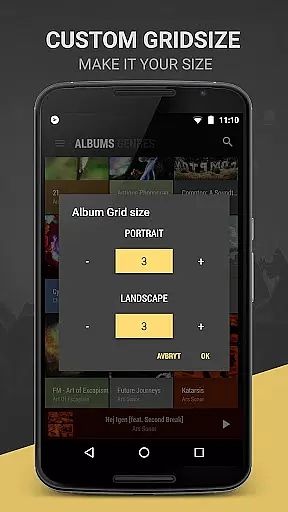
BlackPlayer EX distinguishes itself with a rich set of features designed to enhance music playback and user control. The app offers 11 color accents, 8 extra Now Playing themes, and complete library page customization, allowing users to tailor their interface precisely to their preferences.
Advanced functionalities include Chromecast integration, artist image customization, and a visualizer (beta) for immersive audio experiences. Users can blacklist folders, adjust widget transparency, and enable screen rotation lock for optimal usability. Additionally, the 'Zap' feature lets listeners sample tracks rapidly by playing each one for five seconds.
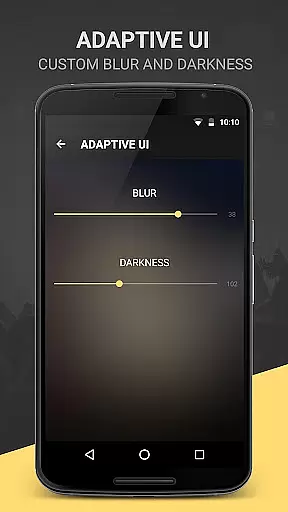
For those who value aesthetics, the app provides multiple text animations, transition effects, and blur effects for widgets and lock screens. These innovations ensure that BlackPlayer EX not only meets technical demands but also elevates the overall auditory and visual enjoyment of music.
BlackPlayer EX offers an extensive music library that supports various formats including MP3, FLAC, and WAV. This ensures users have access to a wide range of audio content without limitations on file type.
The application focuses on copyright authenticity by allowing users to play locally stored music files. This means users can manage their legally acquired music collection with confidence, knowing they are adhering to copyright laws.
With features like the tag editor and the ability to manually search and set artist images, users can maintain accurate metadata for their music files. This enhances the overall organization and presentation of their personal music library.
Additionally, BlackPlayer EX provides tools such as Blacklist Folders and Tracks, giving users control over which content is included or excluded from their library. This feature helps in managing a clean and personalized music collection.
One of the standout features of BlackPlayer EX is its customizable audio quality options. The built-in Equalizer, BassBoost, and Virtualizer allow users to fine-tune their listening experience according to their preferences.
Users can adjust sound settings with precision, thanks to options like Left/Right sound balance and gapless playback. These features ensure a high-quality audio experience that caters to audiophiles and casual listeners alike.
The application also includes 11 color accents and custom colors for the Actionbar, main, and popup windows. While these do not directly affect audio quality, they enhance the visual aspect of the user interface, contributing to a more immersive experience.
Furthermore, the availability of 8 Extra Now Playing Themes and other UI customization options ensures that users can tailor the appearance of their music player to match their style while enjoying superior audio performance.
Ad-free experience
Customizable UI
Chromecast support
Gapless playback
Innovative 'Zap' feature
Paid version only
No cloud streaming
Limited visualizer options
Complex settings
Fewer social features

 4.70
4.70
Time Guru will strengthen your internal sense of musical time via random muting.
4.30
Performance-Synthesizer & Multi-Track-Sequencer, polyphonic + multi timbral!
4.70
Most Advanced AI Song Generator and Music Creator. Rap, Pop, Rock, Gospel & more
4.70
The best music and audio player, with beautiful UI, music search and equalizer.
4.60
Record, Mix & Master with all n-Track effects, 64-bit audio and Stem Separation.
4.70
Super Sound Editor, Song Maker & Mixer, Vocal Remover, Voice Recorder & Changer!
4.60
Travel To The Music Universe
3.40
One-tap booster for max volume - enjoy powerful sound with this audio booster
4.50
Responsive piano with great sounds, graphics, and songs
4.80
Your song collections with lyrics and chords on Android smartphones and tablets.
4.80
Listen radio AM / FM Stations. Live AM / FM Radio App Station. Radio Com.
4.70
SqueezePlayer turns your Android phone or tablet into a SqueezeBox on its own!
4.60
Over 100 million tracks available for high quality streaming and download
4.60
Learn the notes on the guitar fretboard fast with this easy and fun app
4.60
Fun & Easy Voice Changer – Record, Edit & Add Hilarious Effects!
4.50
Your HD audio recorder on the go for music, meetings, ambience, animal sounds…
4.30
Sing, record, and create music together — enhanced by smart voice tools.
4.00
The ultimate media player for Android devices
3.90


User Reviews