
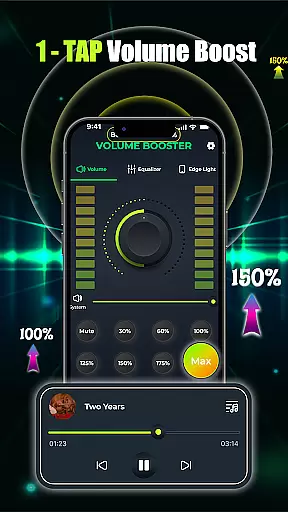
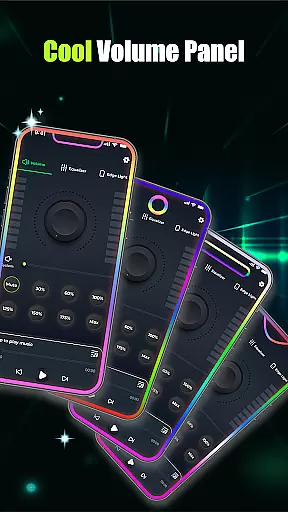
Volume Booster - Music & Sound is a powerful audio enhancement application designed to maximize your listening experience. This app allows users to amplify device volume beyond standard limits while maintaining clear, distortion-free sound quality. Whether you're enjoying music, watching movies, or engaging in voice calls, the app ensures an immersive audio experience.
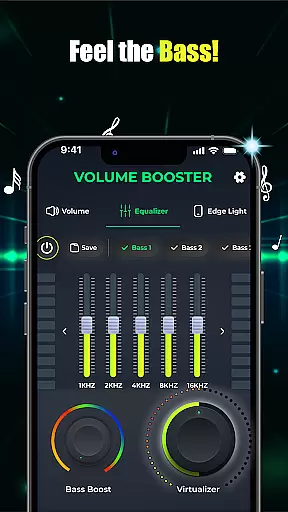
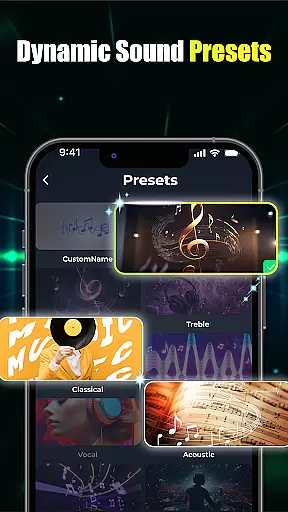
The application features advanced equalizer settings and customizable presets that cater to different audio preferences. Users can fine-tune their sound with precise bass boost controls and 3D virtualization effects. The built-in music player integration provides seamless management of multiple audio sources, making it an essential tool for audiophiles and casual listeners alike.
Perfect for various scenarios, from personal entertainment to social gatherings, this app transforms your device into a high-performance audio system. Its intuitive interface and reliable performance make it an indispensable companion for anyone seeking superior sound quality on their mobile devices.
This audio booster application stands out with its comprehensive feature set designed to enhance every aspect of mobile audio. The one-tap volume boost function allows instant amplification with a simple slider control, giving users precise command over their audio levels without compromising sound quality.
Advanced equalizer capabilities include both flat and band equalizer presets, enabling users to create custom sound profiles. The app's bass boost technology delivers deep, resonant low frequencies, while the 3D virtualization feature creates studio-quality soundscapes. These professional-grade tools are presented through an intuitive interface that makes sound customization accessible to all users.
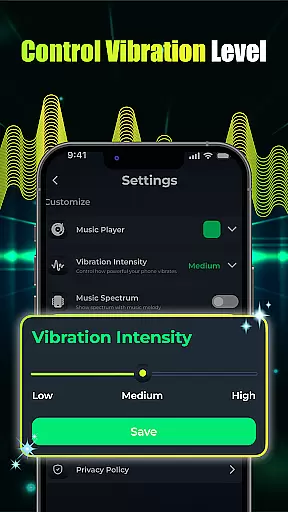
Unique to this application is its integrated music player functionality, which consolidates multiple audio playback sources into a single management screen. The visual effects customization, including adjustable edge light parameters, adds a personalized touch to the audio experience. These features collectively create a versatile audio solution that adapts to various user needs and preferences.
When it comes to music applications, the size and authenticity of the music library are crucial factors. Volume Booster - Music & Sound offers an extensive collection of tracks that cater to diverse musical tastes. The app ensures that all songs are properly licensed, giving users access to a vast array of legitimate content.
The application's comprehensive music library is designed to provide users with a rich selection of audio content. Whether you're into classical symphonies or modern beats, this app has something for everyone. Each track is carefully curated to ensure it meets copyright standards, offering peace of mind to users who want to enjoy their favorite tunes without legal concerns.
Moreover, the app's dedication to copyright authenticity means that artists and creators are duly compensated for their work. This not only supports the music industry but also encourages more artists to contribute their music to the platform. Users can feel good about accessing a wide range of music while supporting the creators behind the scenes.
Audio quality is paramount for any music enthusiast, and Volume Booster - Music & Sound excels in providing top-notch audio quality options. With advanced features like customizable equalizer settings and bass boost capabilities, users can fine-tune their listening experience to match their preferences perfectly.
This app allows users to adjust various audio parameters such as treble, bass, and balance through its intuitive interface. The inclusion of 3D virtualization technology creates a surround sound effect, making listeners feel as if they are experiencing live performances. These high-definition audio enhancements transform ordinary listening sessions into immersive experiences.
In addition to superior sound customization, the app ensures that volume boosting does not compromise audio clarity. Users can amplify their sound levels significantly without introducing distortion or noise. This commitment to maintaining pristine audio quality makes Volume Booster - Music & Sound a standout choice among music and audio applications.
Superior sound quality
Intuitive interface design
Comprehensive equalizer options
Reliable performance stability
Customizable audio presets
Battery consumption rate
Premium feature pricing
Device compatibility issues
Learning curve for beginners
Occasional audio glitches

Brian Eno and Peter Chilvers’ acclaimed music app Bloom, radically reinvented.
 4.80
4.80
Bass Booster Pro takes auto-equalizing to the next level!
4.30
Unleash your creativity! Turn simple prompts into full fledged songs.
4.70
Learn to play the piano using falling notes!
3.80
A sleek, no-frills player designed for true music lovers.
4.20
Music, News & Sports Radio Tuner App. Tune in Live FM & AM Radio Stations.
4.80
Let your Android device with the sound effects you want
4.50
Simple mp3 and mp4 player with advanced features.
3.40
Full featured mp3 and audio player with Chromecast and Android Auto support.
4.40
Pay Once, no monthly payment
4.60
Taal player that lets you sing any Indian & Western song with Tabla & Tanpura
4.60
The best music and audio player, with beautiful UI, music search and equalizer.
4.60
Ringtone Maker is free app create ringtone from music files or your recording.
4.40
Your HD audio recorder on the go for music, meetings, ambience, animal sounds…
4.30
Equalizer, Bass Booster and Volume Booster (Eq & Bass) improve sound quality
4.30
Smart piano keyboard, Classical to Pop, Real-time multiplayer connection!
4.20
Next generation modular control surface
4.10
Simply convert wav to mp3. Clear. Reliable. Safe.
4.4
Make music anywhere. Turn your device into an instrument.
4.0


User Reviews