
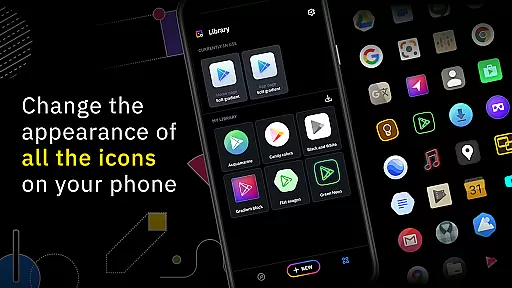
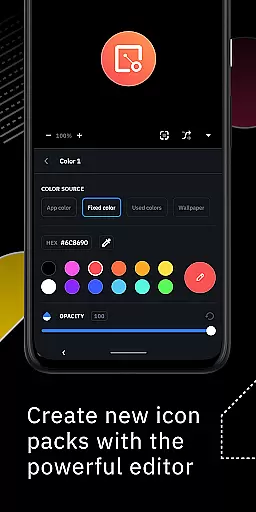
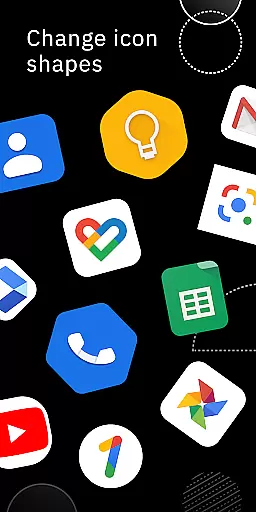
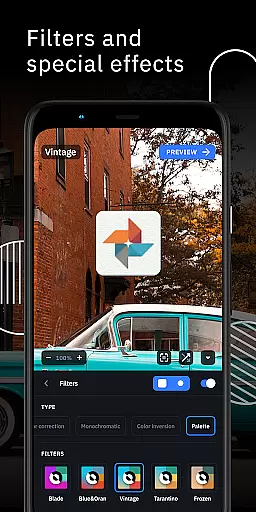
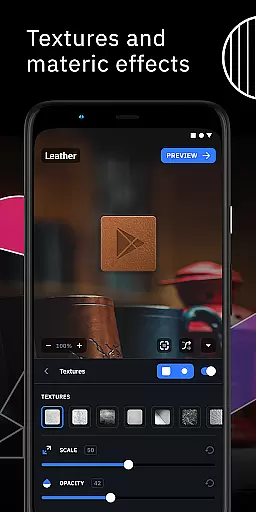
Icon Pack Studio is a unique personalization app that allows users to create their own custom icon packs from scratch. The app provides an advanced editor where users can resize and move elements of their icons, as well as apply special filters like lights, shadows, textures, and bezels. This level of customization ensures that no other icon pack fits your home screen better than the one you design yourself.
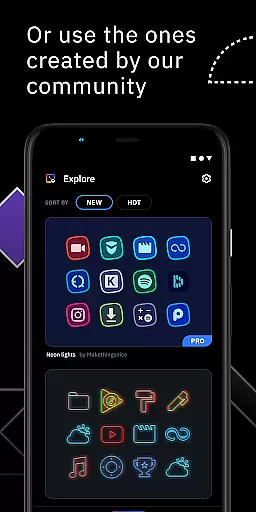
Beyond creating new icon packs, users can also download and apply thousands of community-uploaded icon packs every day. Starting from version 2, the app even supports importing and tweaking any installed icon pack on your device. Icon Pack Studio covers any app on your device, offering unparalleled customization options for enhancing your smartphone's aesthetics.
This app is designed to work seamlessly with Smart Launcher but is compatible with almost any launcher, including popular ones like Nova Launcher, Action Launcher, and more. Whether you're looking to personalize your Android device or seeking advanced tools for icon creation, Icon Pack Studio delivers both functionality and flexibility.
One of the standout features of Icon Pack Studio is its advanced icon editor. This tool allows users to customize every aspect of their icons, from resizing and moving elements to applying professional-grade filters such as lights, shadows, textures, and bezels. These capabilities ensure that each icon pack perfectly matches the user's desired aesthetic.
In addition to creating custom icon packs, the app offers access to thousands of community-generated packs uploaded daily. Users can download and apply these pre-made designs with just a few taps. Another notable feature is the ability to import and tweak existing icon packs installed on your device, starting from version 2. This makes it easy to modify current themes without starting over.
Icon Pack Studio is compatible with most launchers, including Nova Launcher, Action Launcher, Lawnchair Launcher, and many others. While some launchers are unsupported, the vast majority of popular options work seamlessly with this app, ensuring broad compatibility across devices.
Icon Pack Studio offers a wide array of customization options that allow users to create personalized icon packs from scratch. The advanced editor provides the ability to resize and move any element within your custom icons, ensuring that each icon fits perfectly on your home screen.
Beyond simple resizing, special filters such as lights, shadows, textures, and bezels can be applied to give your icons a unique look and feel. This level of detail ensures that no two icon packs need to be alike, offering endless possibilities for personal expression through your device's aesthetics.
The app also supports importing and tweaking existing icon packs, giving you even more flexibility in how you customize your device. Whether you're looking to make minor adjustments or completely overhaul your icons, Icon Pack Studio provides the tools necessary to achieve your vision.
One of the standout features of Icon Pack Studio is its broad theme compatibility. Designed primarily to work seamlessly with Smart Launcher, it also supports a wide range of other popular launchers including Nova Launcher, Action Launcher, and many more.
This extensive compatibility ensures that regardless of which launcher you prefer, you can apply your custom icon pack without worrying about inconsistencies or incompatibilities. The app has been tested with numerous launchers, providing reliable performance across different platforms.
While there are some unsupported launchers like Xperia Home Launcher and Pixel Launcher, the vast majority of popular options are covered. This makes Icon Pack Studio a versatile choice for anyone looking to enhance their deviceu2019s appearance while maintaining functionality across various launcher environments.
Highly customizable
User-friendly interface
Extensive icon library
Advanced editing tools
Cross-launcher compatibility
Some launchers unsupported
Advanced features require learning
Limited iOS support
Premium content costs extra
Occasional bugs reported

A launcher for Samsung Good Lock and Good Guardians modules without ads
 4.70
4.70
Unique Android Launcher
4.60
Try creating your own keyboard with "Keyboard theme for android" app now!
4.50 4.50
4.50
Stylish Pink Cute Hippo keyboard with 10000+ customized keyboard themes!
4.60
Modern Glass Icon Pack with glossy icons, clean minimal theme & aesthetic style
4.4
A minimalist productivity launcher. One-hand-friendly. Zero ads.
4.70
Customize phone with anime themes, 3D icons, aesthetic widgets & wallpapers
4.80
Amazing letter fonts in your messages and social statuses
4.70
Only for Wear OS devices!
4.90
Dark icon pack based on One 8
4.80
Enjoy a variety of amazing live wallpapers and colorful EDGE lighting borders!
4.80
Vertically oriented rectangular icons
4.70
400+ Beautifully crafted widgets inspired by NOTHING.
4.70
300+ Beautifully crafted widgets inspired by OneUI.
4.60
Turn text & photos into stunning AI videos, art, and creative visual stories.
4.50
Fingerprint Lock Screen & Live Animations with 4K Wallpapers as Live Wallpaper
4.40
Themes - Widget & Wallpaper: Customize home screen, icon changer w unique themes
4.30
Organize and manage your photos and videos effortlessly with Photo Gallery
4.20
Wallpaper Engine Android review—PC sync setup, crash issues, sound reactive limitations, and whether this free companion app is actually good.



User Reviews