
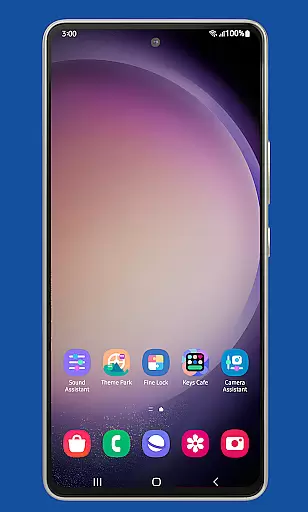
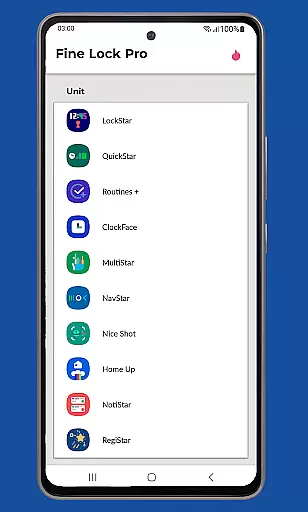
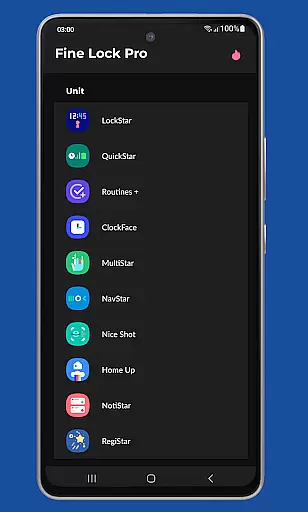
Fine Lock is a specialized launcher designed exclusively for Samsung devices running official One UI and Android versions 8 or later. It enables users to access and utilize Good Lock and Galaxy Labs modules, which are otherwise restricted to specific markets. The app acts as a bridge, allowing users to customize and optimize their Android experience without regional limitations.
One of the key features of Fine Lock is its ability to integrate with various modules, offering functionalities like dynamic wallpapers that adapt to Dark/Night modes, background update checks, and module shortcuts on the home screen. This makes it an essential tool for power users seeking enhanced control over their device's interface and performance.
The app targets advanced users who want to unlock the full potential of their Samsung devices. By sourcing APK modules from trusted platforms, users can enjoy a personalized Android experience while benefiting from PRO features that streamline module management and improve usability.
Fine Lock offers a range of innovative features tailored for Samsung device owners. Its primary function is to serve as a launcher for Good Lock and Galaxy Labs modules, enabling users to bypass regional restrictions. This ensures that customization tools like task managers, icon changers, and performance optimizers are accessible globally.
Among its standout features is the dynamic wallpaper functionality, which automatically adjusts based on the device's Dark or Night mode settings. Additionally, Fine Lock provides convenient shortcuts to module apps directly on the home screen, background update notifications, and the option to hide uninstalled modules. These features collectively enhance both aesthetics and efficiency.
For users who upgrade to the PRO version, Fine Lock unlocks advanced capabilities such as priority support and exclusive customization options. While the app does not provide direct downloads for modules due to Google Play policy compliance, it guides users to trusted sources like APKMirror, ensuring a secure and optimized user experience.
Fine Lock offers a unique approach to personalizing Samsung devices by acting as a launcher for Good Lock and Galaxy Labs modules. These modules provide an extensive range of customization options that allow users to tailor their Android experience on Samsung devices with official Oreo and One UI.
With Fine Lock, users can access features such as module app shortcuts on the home screen and dynamic wallpapers that adapt to the device's Dark/Night modes. This level of customization ensures that each user's device can reflect their personal preferences and style.
The availability of PRO features enhances the customization experience by allowing background checks for updates and the ability to hide uninstalled modules. This streamlines the user interface, presenting only the relevant options and reducing clutter.
While Fine Lock does not support downloading modules directly due to Google Play policy, it guides users to trusted sources for obtaining APK modules. This respects compliance rules while still providing pathways to fully customize the Samsung device experience.
Theme compatibility is at the heart of Fine Lock's functionality, ensuring that all visual and operational customizations are seamlessly integrated into the Samsung deviceu2019s One UI environment. The app is specifically tailored for Samsung devices running official Samsung's Android 8 and Android 9+ with One UI, offering a cohesive theming experience.
By focusing on Samsungu2019s ecosystem, Fine Lock guarantees that themes and customizations will not lead to instability or crashes that can occur with non-native solutions. This dedication provides peace of mind for users wanting to personalize their devices without compromising on system integrity.
Dynamic wallpapers represent a standout feature in theme compatibility, changing based on the device's Dark/Night mode settings. This requires Android 9 or later and scheduled Dark/Night mode, showcasing Fine Lock's commitment to modern theming capabilities.
Users should note that Fine Lock is incompatible with Samsung devices running AOSP OS builds like LineageOS, reinforcing its specialized compatibility with Samsungu2019s official software environment. This targeted approach ensures optimal performance and reliability when applying various themes and personalization options.
Enhances Samsung device UI
Dynamic wallpaper feature
Global module accessibility
PRO feature shortcuts
Background update checks
Limited to Samsung devices
No module downloads
Potential crashes on AOSP
Regional restrictions apply
Requires manual APK sourcing

A light in the dark, a unique style and an andless cutomization!
 4.30
4.30
Ultra realistic high quality analog watch face for Wear OS.
4.60
Bring adorable pets to life on your screen. Playful, interactive and full of fun
4.60
⭐ OneUI inspired Fluffy Icon Pack – Soft. Stylish. Standout. ⭐
4.4
Organize and manage your photos and videos effortlessly with Photo Gallery
4.20
Handcrafted pixel art icons, widgets & wallpapers
4.60
Struggling to find apps? Use this app to locate and open any app on your phone!
2.20
Enjoy a variety of amazing live wallpapers and colorful EDGE lighting borders!
4.80
Transform your phone with stylish zipper lock themes and 4D live wallpaper
4.10
Gun Chase - Let the chase begin.
4.80
350+ widgets with a premium glass-style finish, perfect for home & lock screens.
4.70
Classic analogue watch face. For wear os devices.
4.60
Want to make your phone more special than ever?
4.60
Ultimate Gallery Lock App - Hide Pictures, Videos and Lock Apps Instantly!
4.60
The definitive Icon pack maker and editor
4.30
Launcher OS™ Pro without ads help make your phone simple and pretty
4.30
Wear Os Watch Face - Seasonal - Animated Snow Effect - 9 Animals
4.20
Emoji Maker app - Design custom emojis and effortlessly blend them with Mixer
3.80
Turn your lock screen into fun with smile live wallpapers & animated wallpapers!
2.50
Wallpaper Engine Android review—PC sync setup, crash issues, sound reactive limitations, and whether this free companion app is actually good.



User Reviews