
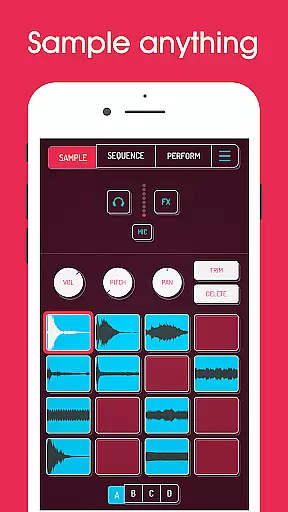
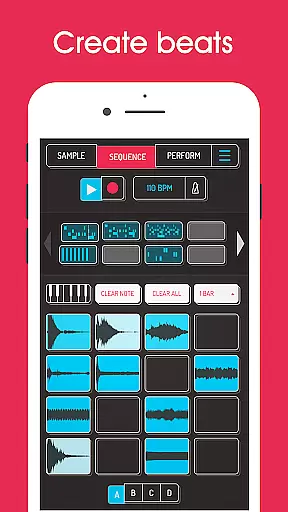
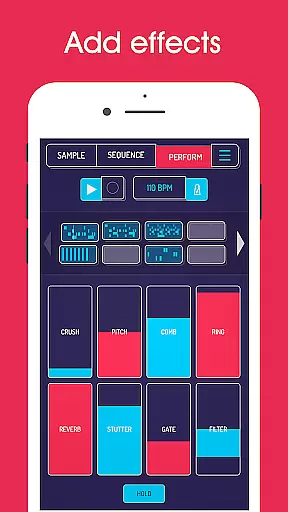
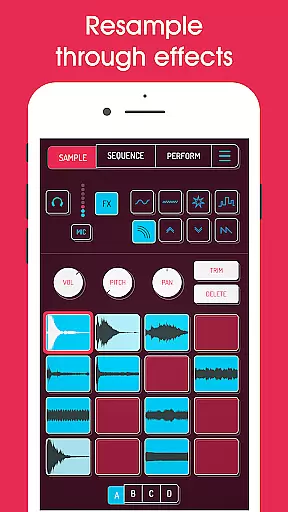
Koala Sampler is a pocket-sized music production tool that allows users to record sounds via their phone's microphone or import custom samples. Designed for both amateur and professional musicians, this app provides an intuitive interface for creating beats, applying effects, and producing tracks with ease.
The app features a high-resolution sequencer, 16 built-in effects, and the ability to separate samples into individual instruments using AI technology. With support for MIDI control and various playback modes, Koala Sampler ensures a seamless music-making experience while maintaining creativity and fun.
Whether you're transforming your voice, resampling audio, or crafting complex compositions, Koala Sampler keeps you in the flow with minimal distractions, making it ideal for quick track creation on the go.
Koala Sampler stands out with its comprehensive set of features tailored for music producers. The app supports up to 64 sample recordings and offers 16 superb built-in effects such as reverb, fuzz, and synthesizer options. Its AI-powered sample separation allows users to isolate drums, bass, vocals, and more.
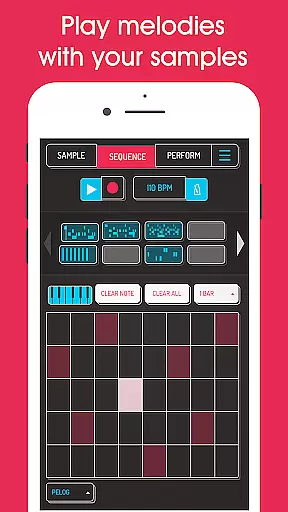
Advanced functionalities include a piano roll editor, pro-quality timestretch, and auto-chop modes available through in-app purchases. Users can also export loops or full tracks as WAV files, adjust parameters like attack and tone, and apply swing or quantization for precise rhythm control.
With MIDI compatibility and keyboard mode supporting chromatic scales, Koala Sampler delivers a versatile platform for beat-making and live performances, ensuring endless sonic possibilities.
When it comes to music creation apps like Koala Sampler, the size and variety of the music library play a crucial role in user experience. Koala Sampler offers an extensive collection of built-in effects and the ability to import your own samples, ensuring that users have access to a wide range of sounds.
The app includes 16 superb built-in microphone effects and 16 DJ mix effects, providing users with numerous options to transform their recordings. These include essential effects such as reverb, fuzz, and various filters, allowing for creative sound manipulation.
Regarding copyright authenticity, Koala Sampler enables users to record their samples using the phone's microphone or import personal audio files. This approach ensures that all content used within the app is original and owned by the user, thus avoiding any copyright infringement issues.
Additionally, the app features AI technology that can separate samples into individual instruments, which not only enhances creativity but also maintains the integrity of the original recordings. Users can export their creations as professional-quality WAV files, further emphasizing the app's commitment to authentic and high-quality audio production.
Audio quality is paramount in music production applications, and Koala Sampler excels in this area by offering multiple options to ensure pristine sound output. The app supports professional-quality WAV file exports, guaranteeing that users can produce tracks with industry-standard audio fidelity.
Koala Sampler provides adjustable parameters on each sample, including attack, release, and tone settings. These controls allow users to fine-tune their sounds precisely, ensuring optimal audio quality throughout the music-making process.
The inclusion of pro-quality timestretch features (available through in-app purchase) offers four different modes: Modern, Retro, Beats, and Re-pitch. These options enable users to manipulate tempo and pitch without compromising audio quality, maintaining clarity and definition even at extreme settings.
Furthermore, the app's 16 built-in DJ mix effects, including bit-crusher, pitch-shift, and resonant filters, provide additional tools for sound shaping while preserving the integrity of the original recordings. With these comprehensive audio quality options, Koala Sampler empowers users to create professional-grade music directly from their mobile devices.
Intuitive interface
Extensive effects library
AI sample separation
MIDI compatibility
Professional export options
Paid features required
Complex for beginners
Microphone input issues
Limited free content
Occasional bugs

 4.70
4.70
10-Band Audio Equalizer, Sound / Bass Booster for Spotify Users & Music Players
4.40
JBL PartyBox APP works with 110/310/710/120/320/520/Encore/Encore 2/Encore Ess 2
4.80
Permanently backup Now Playing. Maps, filters & listening stats.
4.00
Simple & Intuitive Metronome
4.70
The ultimate media player for Android devices
3.90
The alternative folder based music player.
4.20
Unleash your creativity! Turn simple prompts into full fledged songs.
4.70
Play your music offline without limits
4.80
Tune in to the greatest hits on UK Radio | The home of Capital, Smooth & Heart.
4.90
24,000 free audio books and no ads!
4.90
Play your hearts out on TouchTunes jukeboxes & connect with fellow music lovers.
4.80
Make songs with AI! Any genre, custom lyric, song generator for music creation!
4.80
Performance-Synthesizer & Multi-Track-Sequencer, polyphonic + multi timbral!
4.70
Reverse your voice & songs instantly! Fun singing challenge with cool effects.
4.60
DJ Music Mixer - DJ Remix: remix songs, make beat music & record mix of DJ.
4.40
Full featured mp3 and audio player with Chromecast and Android Auto support.
4.40
The original SP-1200 experience on your iPad
4.20
Simply convert wav to mp3. Clear. Reliable. Safe.
4.0


User Reviews