
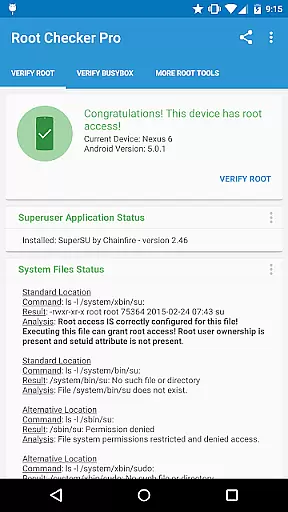
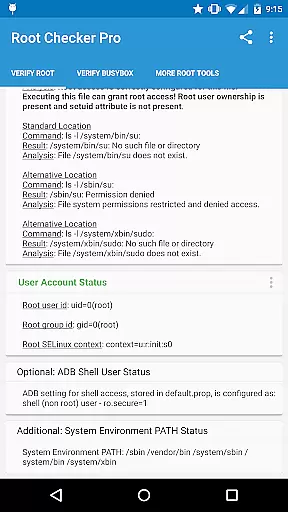
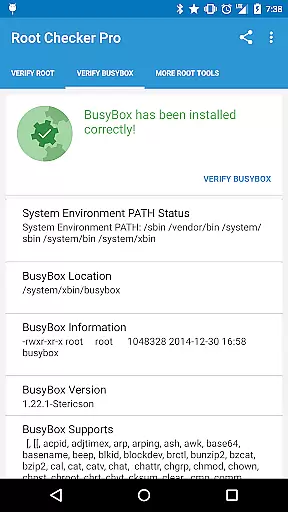
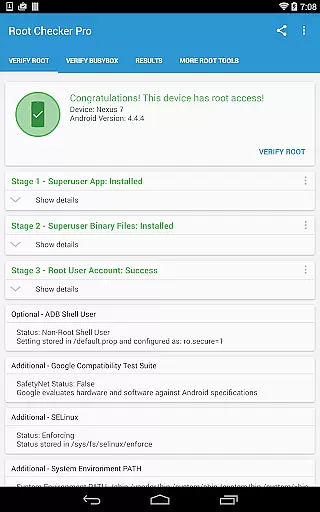
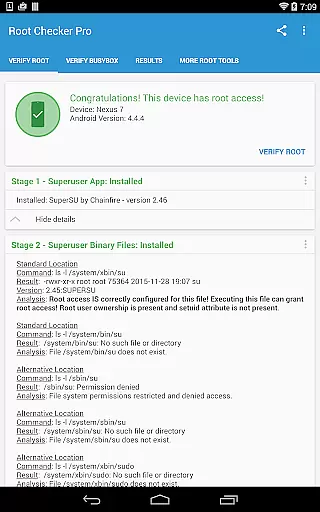
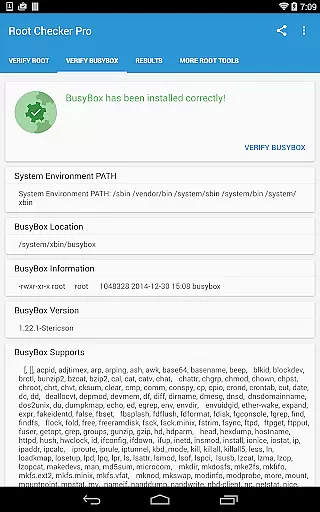
Root Checker Pro is a powerful Android tool designed to verify root access and BusyBox installation on your device. The app provides both basic and advanced users with detailed system information, including su binary locations, file permissions, SELinux status, and more. With its intuitive interface, even beginners can easily confirm whether their device has proper root access.
The application goes beyond simple root detection by offering comprehensive diagnostic data. It presents key details about Superuser installations, adb shell modes, and system PATH configurations. For troubleshooting, users can quickly export all diagnostic information via email or social media platforms. This makes it an essential tool for both casual users and technical experts who need reliable root verification.
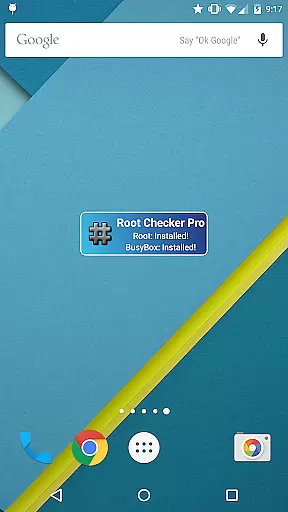
This app proves especially useful when resolving root-related issues. By summarizing critical system information in seconds, it helps users diagnose and fix problems with root access or BusyBox installations. The included widget adds real-time monitoring capabilities, ensuring you always know the current status of your device's root and BusyBox configurations.
Root Checker Pro stands out with its extensive feature set tailored for root management. The application checks all standard su binary locations while verifying file permissions and ownership details. It provides complete information about Superuser applications, including installed versions and their operational status.
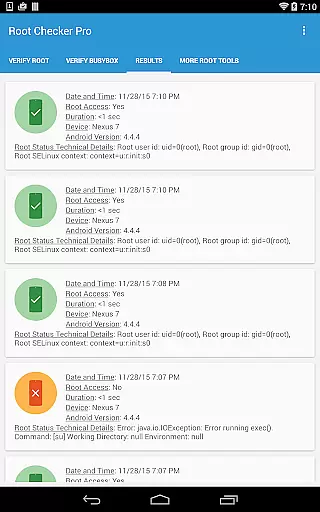
Advanced users will appreciate the detailed technical data presented in an organized manner. The app displays SELinux context results, uid/gid information, and system PATH configurations. Its unique export function allows users to share diagnostic details through various channels, facilitating easier collaboration and troubleshooting.
The integrated widget offers continuous monitoring of root and BusyBox status. Users can customize check intervals and receive instant notifications about any changes in their device's root configuration. This proactive approach to system monitoring ensures that users can maintain optimal root access conditions at all times.
Root Checker Pro delivers exceptional accuracy in verifying root access on Android devices. The application meticulously checks the presence and status of the su binary, which is critical for granting root permissions.
The app's effectiveness lies in its comprehensive analysis of various root-related parameters. It examines standard su binary locations, file permissions, root uid/gid settings, and SELinux contexts, providing users with a detailed overview of their device's root status.
For technically inclined users, the app offers advanced details about the root environment and BusyBox installation. This includes crucial information needed to troubleshoot any issues with root access or BusyBox functionality.
What sets this tool apart is its ability to quickly summarize complex technical data into an easily understandable format. Users can export these detailed results through email or social media, facilitating collaboration and support when resolving root-related issues.
The interface of Root Checker Pro has been designed with user-friendliness as a top priority. Even novice Android users can easily navigate through the application's straightforward layout and perform root checks without any technical expertise.
All essential functions are accessible through simple button presses. The main testing feature requires just one tap to verify root access and BusyBox installation, making it extremely convenient for users of all experience levels.
The inclusion of a widget enhances the intuitive nature of the application. This feature allows users to monitor root and BusyBox status continuously, with customizable timer intervals for automatic checks.
Despite its technical complexity, the app maintains an uncluttered interface that presents results clearly. Important information is organized in a logical manner, ensuring that both basic and advanced users can interpret the findings without confusion.
User-friendly interface
Detailed system diagnostics
Quick export functionality
Comprehensive root verification
Real-time monitoring widget
No automatic issue resolution
Requires manual checks
Limited visual customization
Basic users may find some data overwhelming
Doesn't provide rooting instructions

 4.50
4.50
Universal TV remote control all TVs, Roku, LG, Samsung, Fire, Vizio, Sony, TCL.
4.40
Smart and comfortable browsing experience.
3.80
Detect hidden spy camera with advanced scanning {{ Premium version }}
4.00
Unleash gamepad precision for ultimate mobile gaming dominance.
3.90
Mirror your screen to Chromecast and Android TV - Super fast and simple
4.60
Support Fossify apps with a warm thank you!
5.00
Mirror your screen to Fire TV - Super fast and simple
4.40
Clean up large files and similar photos, fast and easy to use
4.40
The ultimate tool for network analysis, wifi scanning and problem detection.
4.90
Easily install aab(Android App Bundle) files on your Android device with our app
4.80
ADB support Android 4.X-Android 13(Support wireless pair mode).No root required!
4.70
The one-and-only remote control for PC, Mac, and Linux
4.70
App to pay for FUTO Keyboard
4.60
Planner and Tracker for Stardew Valley
4.60
Forza Tuning Calculator App for Forza Horizon 5, Motorsport and Earlier Titles
4.40
Quickly & easily calculate the spacing of handrail balusters
4.20
A non-root local ADB shell client. READ BELOW!
3.40
Transfer Files, APK from Phone to Watch & Install.
4.2
Honest Scratch app review—is it actually good for teaching kids to code? Real user insights on features, limitations, and learning outcomes.



User Reviews