
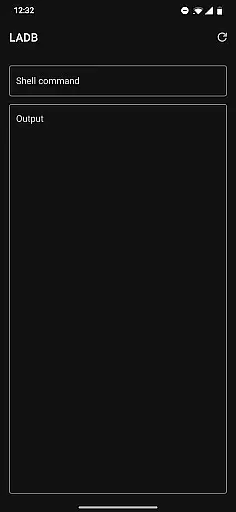
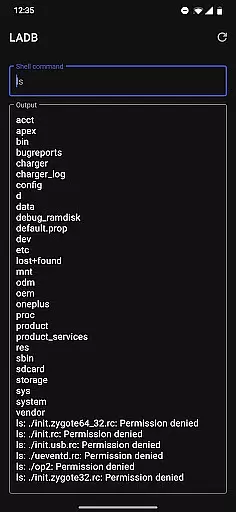
LADB — Local ADB Shell is a powerful tool designed for developers and advanced users who need to execute ADB commands directly on their Android devices without requiring a computer. The app bundles an ADB server within its libraries, enabling local shell access through Wireless ADB Debugging.
Key features include seamless integration with Android's Wireless ADB Debugging, allowing users to establish a connection using pairing codes and ports. It supports manual pairing for more reliable connections, making it suitable for various development and debugging scenarios. With LADB, users can efficiently manage their devices, run shell commands, and troubleshoot issues directly from their Android device.
This application is particularly useful for developers who require quick access to ADB functionalities while on the go. By eliminating the need for a computer, LADB streamlines workflows and enhances productivity, offering a versatile solution for device management and debugging tasks.
LADB offers a comprehensive set of features tailored for Android developers and power users. One of its standout capabilities is the integrated ADB server, which facilitates local shell access without the need for USB connections. This feature is especially beneficial for executing commands and scripts directly on the device.
The app provides a user-friendly interface for managing Wireless ADB Debugging connections. Users can easily input pairing codes and ports, ensuring a stable and secure connection. Additionally, LADB supports manual pairing, which is crucial for compatibility with newer Android versions that may present challenges with automatic pairing.
Another notable feature is the app's ability to operate independently of external tools like Shizuku, although this requires uninstalling such tools to avoid conflicts. With its robust functionality and reliability, LADB empowers users to perform a wide range of device management tasks efficiently.
For a tool like LADB, core function accuracy and effectiveness are paramount. This app bundles an ADB server within its libraries to facilitate local device connections typically requiring active USB. With Android's Wireless ADB Debugging feature, it enables communication between the server and client locally.
The app provides a reliable way to establish a connection by using split-screen mode or a pop-out window alongside settings. This ensures that pairing information remains valid during the initial setup process. Users can add a Wireless Debugging connection and input the necessary pairing code and port into LADB, maintaining both windows open until the process completes successfully.
Despite some compatibility issues with other tools like Shizuku, which may prevent proper connection, LADB offers troubleshooting steps. Clearing app data, removing all Wireless Debugging connections, and rebooting often resolve most errors, ensuring the tool functions effectively.
A simple and intuitive interface is crucial for tools like LADB. The app achieves this by providing clear instructions and an easy-to-follow setup process. Users can quickly understand how to pair their devices using either split-screen mode or a pop-out window, keeping both LADB and Settings accessible simultaneously.
Although there might be occasional challenges with newer Android versions, LADB includes a manual pairing tutorial. This tutorial helps users reliably pair their devices themselves when the Assisted Pairing mode encounters issues. By following straightforward steps, users can overcome any interface hiccups.
Moreover, LADB maintains transparency in its operations. It does not send any device data outside the app, reinforcing user trust. Such clarity in both functionality and privacy policy contributes to an overall intuitive user experience, making complex tasks more approachable for all users.
Integrated ADB server
Wireless ADB support
Manual pairing option
User-friendly interface
Standalone functionality
Incompatible with Shizuku
Requires initial setup
Occasional connectivity issues
No cloud backups
Limited to Android devices

Save any video in HD - paste the link, download fast and watch offline.
 4.0
4.0
Keep track of your Palia friendships, tasks, and inventory with Palia Notebook
4.60
Forza Tuning Calculator App for Forza Horizon 5, Motorsport and Earlier Titles
4.40
Smart and comfortable browsing experience.
3.80
Support Fossify apps with a warm thank you!
5.00
Planner and Tracker for Stardew Valley
4.60
Mobile Security with Scam Protection | Malware & Virus Cleaner | Safe Browser
4.70
A clean app.
4.50
The ideal app to be the digital eye of your family
3.40
Bedrock Together: Join any bedrock server on Xbox/PS
4.80
Just swipe the edge to do something!
4.40
Mirror your screen to Fire TV - Super fast and simple
4.40
Fluid navigation gestures for all of us!
4.30
Making emulation easy for everyone!
4.30
Automate everything from settings to photos, SMS to speech. ADC2 prize winner.
4.10
Fun lie-detection pranks for friends and parties.
3.80
This app unlocks the Pro features of the Central for DayZ app
3.60
A recovery soft,it features photo recovery, video recovery, file recovery.
3.40
Unlock your Essential Key. Create custom shortcuts to your favorite apps!
4.4
Honest Scratch app review—is it actually good for teaching kids to code? Real user insights on features, limitations, and learning outcomes.



User Reviews