
The Everything Key is a powerful utility app designed to unlock the full potential of your device's hardware button. With its intuitive interface and advanced remapping capabilities, this tool allows you to customize button actions, transforming your device into a personalized productivity powerhouse.
Key features include double and triple press action assignments, an elegant minimalist UI, and advanced control options like quick enable/disable and 'Toggle All' functionality. The app works seamlessly without requiring root access, using standard Android features to deliver a smooth user experience.
This app is particularly useful for users of specific Nothing Technology devices, offering a tailored experience that integrates beautifully with their device's design aesthetic while maintaining strict privacy standards.
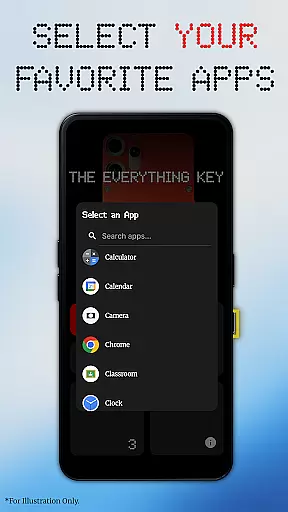
The Everything Key stands out with its powerful remapping capabilities, allowing users to assign specific apps to both double-press and triple-press actions of their device's hardware button. This feature alone significantly enhances device usability and personalization.
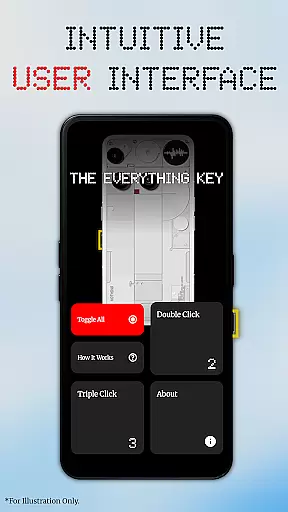
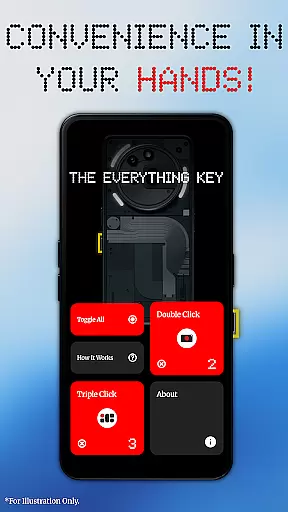
The app's intuitive UI provides clear visual feedback on mapped applications and their active status. Users can easily manage their mappings through the 'Tap to Enable/Disable' feature and the convenient 'X' icon for permanent un-mapping. The 'Toggle All' function adds another layer of control for power users.
What makes this app truly unique is its commitment to privacy and security. Utilizing Android's Accessibility Service strictly for hardware key detection, it ensures that no personal information or on-screen content is accessed or logged, giving users peace of mind while enjoying enhanced device functionality.
The Everything Key focuses on providing accurate and effective remapping of your device's hardware button. This app allows you to assign specific actions to both double-press and triple-press events, ensuring that each press is correctly detected and the corresponding app or function is launched without error.
Through its use of Android's Accessibility Service, The Everything Key listens for precise hardware key presses, translating them into user-defined actions. This precision ensures that whether you're launching your camera, a messaging app, or any other utility, the action is executed swiftly and accurately every time.
Users benefit from this reliable functionality by experiencing enhanced productivity and personalization. With no need for complex configurations or rooting, the app works seamlessly out of the box, offering an efficient way to utilize what was once a limited hardware feature.
This core functionality underscores the app's commitment to delivering a tool that not only promises customization but also guarantees performance, making it an essential utility for compatible devices.
The interface of The Everything Key is designed with simplicity and intuitiveness in mind, ensuring users can easily navigate and customize their hardware button settings. Inspired by the Nothing aesthetic, the app features a clean, minimalist design that makes it straightforward to see which apps are mapped and whether they are active.
With intuitive controls, users can tap a mapped card to quickly enable or disable its action, or use the 'X' icon to permanently un-map an app. The 'Toggle All' feature further simplifies management by allowing activation or deactivation of all mappings at once, streamlining the user experience.
This thoughtful design translates into practical benefits for users, who can enjoy a personalized yet hassle-free interaction with their device's hardware button. The ease of use encourages regular utilization of the remapping feature, enhancing overall device functionality.
By prioritizing an accessible and visually appealing interface, The Everything Key ensures that users of all technical backgrounds can take full advantage of their device's capabilities without a steep learning curve.
Intuitive minimalist interface
Advanced remapping options
No root access required
Strict privacy protection
Seamless device integration
Limited device compatibility
Requires accessibility service
No official brand affiliation
Specific use case focus
Potential learning curve

Learn the vast amount of system information about device and monitor it's state
 4.70
4.70
Canon PRINT is a companion app for your Canon printer.
4.60
Smart and comfortable browsing experience.
3.80
PC precision for mobile gaming: dominate with keyboard and mouse!
4.30
Mirror your screen to Chromecast and Android TV - Super fast and simple
4.60
Fast Video Downloader, Movie Downloader, Torrent Downloader & Adblock Browser
4.70
Introducing Smart Printer, your ultimate destination for printing solutions!
4.00
A clean app.
4.50
Fast VPN USA for any country. Super secure VPN for calls, streaming, games, TV.
4.40
The one-and-only remote control for PC, Mac, and Linux
4.70
The Ultimate Flex Drivers Utility App - Convenient Tapping & Block Filters
4.70
Creation, Learning, Entertainment & More — The All-in-One AI Search Engine
4.70
App to pay for FUTO Keyboard
4.60
Head tracking for PC sim games such as MSFS 2024 or Elite:Dangerous. No headset!
4.50
Quickly & easily calculate the spacing of handrail balusters
4.20
MS-DOS in your pocket. Play old DOS games anywhere you are ;)
4.10
A simple app to back up and restore SMS & MMS messages and call logs.
4.10
Amateur Radio app for APRS: Track friends, exchange messages, get tactical info.
3.90
Unleash gamepad precision for ultimate mobile gaming dominance.
3.90
Honest Scratch app review—is it actually good for teaching kids to code? Real user insights on features, limitations, and learning outcomes.


User Reviews