
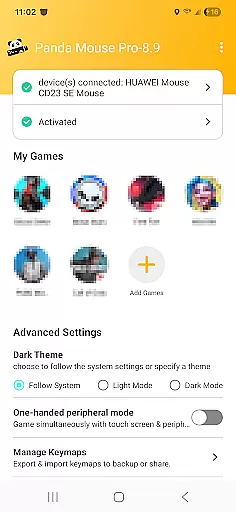
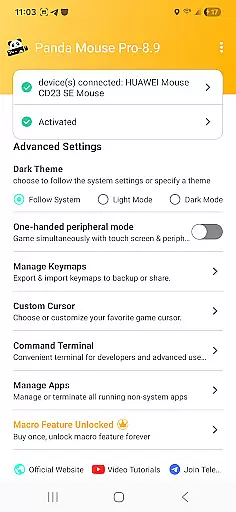
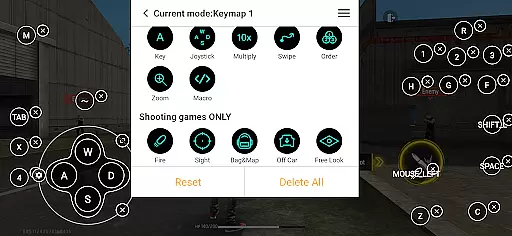
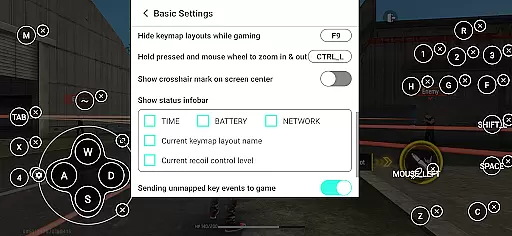
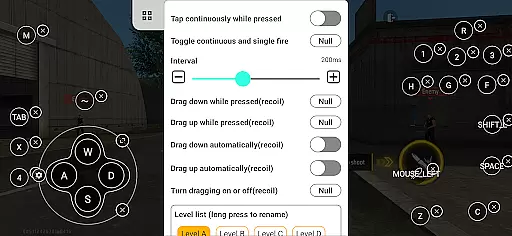
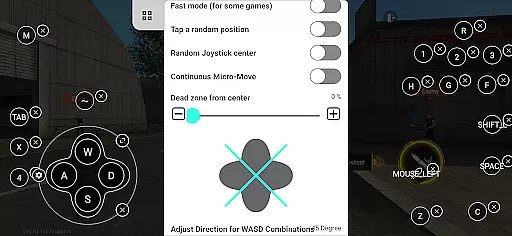
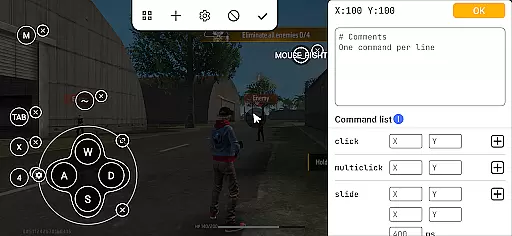
Panda Mouse Pro is a specialized keymapper tool that revolutionizes mobile gaming by enabling the use of keyboard and mouse controls. Designed for gamers seeking precision and control, this app allows users to enhance their gameplay experience across various game genres.
The application's core functionality lies in its ability to seamlessly connect peripheral devices to mobile platforms, providing pinpoint accuracy and faster response times. Whether playing shooters, MOBAs, or sports games, Panda Mouse Pro ensures optimal performance without the limitations of touch controls.
One notable feature is the direct game launch capability, which eliminates the need for cloning and enables instant access to games. This makes it particularly useful for competitive gamers who require quick access and consistent performance during crucial moments in gameplay.
Panda Mouse Pro stands out with several distinctive features that cater to both casual and professional gamers. The app supports universal compatibility with virtually all keyboard and mouse brands, ensuring that users can utilize their preferred peripherals without restriction.
A significant advantage is the secure Google Play login feature, allowing users to authenticate their accounts safely while enjoying enhanced gaming control. Additionally, the ban-proof technology provides peace of mind for players concerned about potential account restrictions in games that typically discourage duplication running.
For ease of use, the app offers hassle-free activation methods depending on the Android version or device status. Users with Android 11 and above can activate directly on their devices, while those with older versions can quickly set up via PC or Mac. Rooted devices benefit from automatic activation, streamlining the setup process for advanced users.
Panda Mouse Pro is designed to provide unparalleled precision and control for mobile gaming through keyboard and mouse integration. The core functionality lies in its ability to map keyboard keys and mouse actions to touchscreen inputs, allowing gamers to execute commands with pinpoint accuracy.
The application supports a wide range of games including shooters, MOBAs, and sports games, ensuring that each genre benefits from the enhanced control scheme. This versatility demonstrates the app's commitment to delivering an effective solution across various gaming environments.
Users can expect fast response times and reliable performance, which are crucial during intense gaming sessions. With Panda Mouse Pro, every click and keystroke translates into immediate in-game actions, providing a seamless experience that could make all the difference in competitive scenarios.
Achieving a balance between powerful features and user-friendly design, Panda Mouse Pro offers an intuitive interface that caters to both novice and experienced gamers. Upon launching the app, users are greeted with a straightforward setup process that gets them ready to play with minimal hassle.
The direct game launch feature eliminates unnecessary steps, allowing players to jump straight into their favorite titles without any cloning procedures. This streamlined approach not only saves time but also reduces complexity, making it easier for anyone to enhance their gaming setup.
Additionally, the app provides resources such as video tutorials and activation guides, ensuring that even those new to keymapping technology can quickly get up to speed. These educational materials contribute to an overall positive user experience by simplifying what might otherwise be a daunting technical task.
Enhanced precision
Universal compatibility
Ban-proof technology
Secure authentication
Hassle-free setup
Limited to compatible devices
Requires initial setup
Premium features may cost extra
Dependent on peripheral quality
Learning curve for new users

Connect instantly to a fast, encrypted VPN with one tap
 4.60
4.60
Complete kernel toolbox with features to manage and tweak your rooted device
4.30
Remote for Roku, Fire TV, Samsung TV, LG TV, Android TV, Chromecast and VIZIO TV
4.20
Unlock your Essential Key. Create custom shortcuts to your favorite apps!
4.2
eXtended Permission Manager - a small app to manage permissions and AppOps
4.50
Keep track of your Palia friendships, tasks, and inventory with Palia Notebook
4.60
VESC Tool can monitor and configure VESC-compatible devices over BLE and Wifi
4.20
The Ultimate Flex Drivers Utility App - Convenient Tapping & Block Filters
4.70
Clean up your phone, find files, play media, and share files offline
4.50
Extremely fast, secure, and protects your privacy
4.80
Optimize your WiFi network, turn your phone into Wifi Analyzer
4.70
Quickly switch to an encrypted DNS server on Android TV
4.50
Game Booster, GFX Tool is now compatible with newer game update
4.50
Universal TV remote control all TVs, Roku, LG, Samsung, Fire, Vizio, Sony, TCL.
4.40
Fluid navigation gestures for all of us!
4.30
Automate everything from settings to photos, SMS to speech. ADC2 prize winner.
4.10
A convenient photo, video, and file recovery tool.
4.00
Detect hidden spy camera with advanced scanning {{ Premium version }}
4.00
Fun lie-detection pranks for friends and parties.
3.80
Honest Scratch app review—is it actually good for teaching kids to code? Real user insights on features, limitations, and learning outcomes.



User Reviews