
Vivid Navigation Gestures revolutionizes the way you interact with your Android device by replacing traditional button presses with intuitive gesture controls. This app allows users to execute a variety of actions through simple swipes and taps, offering a more fluid and visually appealing navigation experience.
With support for multiple gesture triggers across different areas of the screen, users can customize their navigation to suit personal preferences. Whether launching the Google Assistant, toggling split-screen mode, or taking screenshots, this app provides an extensive range of programmable actions that enhance usability without the need for hardware buttons.
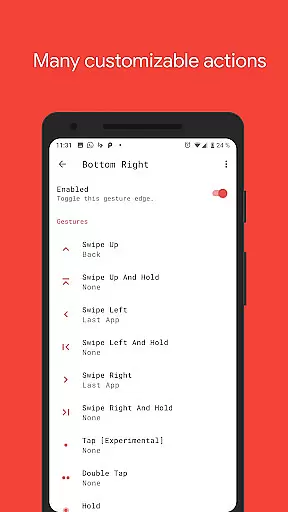
The app boasts an impressive array of features designed to maximize convenience and efficiency. Users can choose from various gesture types including swipe up, double tap, and hold, each capable of triggering specific functions like opening notifications or controlling media playback.
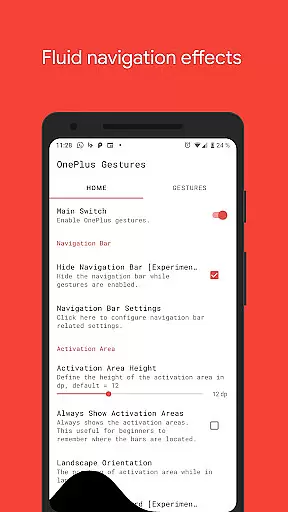
One standout feature is the ability to hide the stock navigation bar when gestures are enabled, creating a cleaner, full-screen experience. Although this requires ADB or root access, it demonstrates the app's commitment to providing advanced customization options for power users seeking a next-gen smartphone interface.
Gestures have become an essential part of modern mobile device interaction, and Vivid Navigation Gestures excels in this domain. The app allows users to control their Android devices through intuitive gestures instead of traditional button presses, offering a seamless alternative to conventional navigation methods.
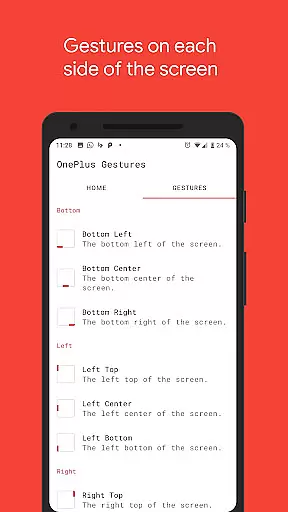
The app supports multiple gesture triggers from various points on the screen, such as bottom left, bottom center, and more, ensuring that users can interact with their device in a way that feels natural and comfortable. With available gestures like swipe up, swipe left, double tap, and hold, users are provided with a comprehensive set of controls that cater to different preferences and usage styles.
Each gesture can be mapped to specific actions, ranging from launching the Google Assistant to taking screenshots or toggling the navigation bar. This level of customization empowers users to tailor their navigation experience according to their workflow, enhancing both productivity and ease of use.
By utilizing accessibility services, the app programmatically executes actions such as back, home, or quick settings without collecting any personal data, thus maintaining user privacy while delivering core functionality.
A hallmark of an effective tool is its ability to offer powerful features through a simple and intuitive interface, which is where Vivid Navigation Gestures truly shines. The app provides fluid visual effects during gesture interactions, creating a dynamic and engaging user experience that makes navigation feel responsive and alive.
Despite the complexity of the underlying technology, the app maintains an accessible design that does not require advanced technical knowledge to operate. Users can easily configure gesture controls through a straightforward setup process, allowing them to quickly adapt to this new method of device interaction.
For those who wish to hide the stock navigation bar, the app offers additional options that can be enabled with ADB or root access. While these features cater to more experienced users, they do not detract from the overall simplicity of the main interface, ensuring that all users can benefit from the app's core offerings.
With clear instructions and links provided for setting up ADB on a PC, even users new to Android development tools are guided through the process with minimal hassle, further reinforcing the app's commitment to approachable design and ease of use.
Intuitive gesture controls
Customizable action mapping
Beautiful visual effects
Extensive gesture options
Advanced accessibility features
ADB setup required for some features
Root access may be needed
Complex for beginners
Limited iOS compatibility
Performance may vary on devices

Amateur Radio app for APRS: Track friends, exchange messages, get tactical info.
 3.90
3.90
Effortlessly run ADB commands directly on your device without a PC.
4.20
Bedrock Together: Join any bedrock server on Xbox/PS
4.80
WiFi Signal Strength Meter help you detect WiFi Signal Strength in real time.
4.80
The Ultimate Bluetooth Keyboard & Mouse. Securely control your PC, Mac, and more
4.50
Planner and Tracker for Stardew Valley
4.60
Powerful collection of electronics tools and reference.A must for any enthusiast
4.90
Create your own custom widget with endless possibilities
3.90
Fast VPN USA for any country. Super secure VPN for calls, streaming, games, TV.
4.40
Best leveling tool for your Android device. Hang paintings like a pro.
4.90
Easily install aab(Android App Bundle) files on your Android device with our app
4.80
ADB support Android 4.X-Android 13(Support wireless pair mode).No root required!
4.70
HD Video player and downloader for all formats, fast & smooth 4K video playback.
4.60
Play your X-Box games remotely in 1080p with any controller and zero latency
4.60
Just swipe the edge to do something!
4.40
Quickly & easily calculate the spacing of handrail balusters
4.20
MS-DOS in your pocket. Play old DOS games anywhere you are ;)
4.10
This app unlocks the Pro features of the Central for DayZ app
3.60
A recovery soft,it features photo recovery, video recovery, file recovery.
3.40
Honest Scratch app review—is it actually good for teaching kids to code? Real user insights on features, limitations, and learning outcomes.



User Reviews