
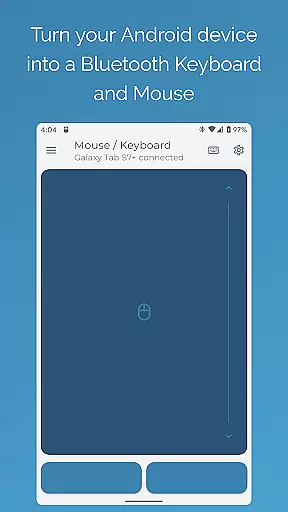
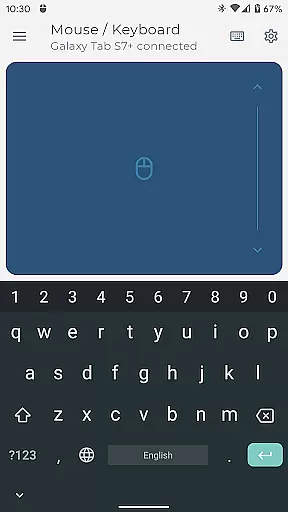
Bluetooth Keyboard & Mouse Pro revolutionizes the way you interact with your devices by turning your Android phone into a versatile remote control tool. This powerful application establishes a direct Bluetooth connection to seamlessly control computers, tablets, and media centers without requiring additional software or server connections.
The app offers an extensive toolkit including precision mouse control, keyboard functionality with over 100 international layouts, presentation navigation, multimedia controls, and even QR code scanning. These features ensure users can maintain workflow continuity while enjoying enhanced productivity and security.
Ideal for professionals who need reliable remote access during presentations or extended work sessions, this app provides the perfect solution for controlling multiple devices from a single mobile interface. Its universal compatibility across Windows, iOS, Android, and Chrome OS platforms makes it an indispensable tool for modern digital workflows.
Bluetooth Keyboard & Mouse Pro stands out through its comprehensive feature set designed to enhance user control and productivity. The app's standout characteristic is its serverless operation - it connects directly via Bluetooth to any compatible device without needing intermediary software.
Among its innovative features are Keep-Alive/Jiggler mode to prevent system lockouts during long work sessions, full PC keyboard emulation supporting multiple language layouts, and specialized Presenter Mode for confident slide navigation. The integrated scanner functionality streamlines inventory management by enabling direct barcode scanning to connected devices.
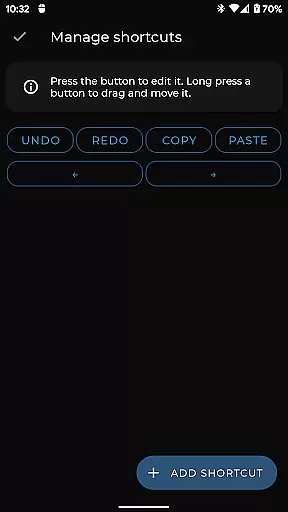
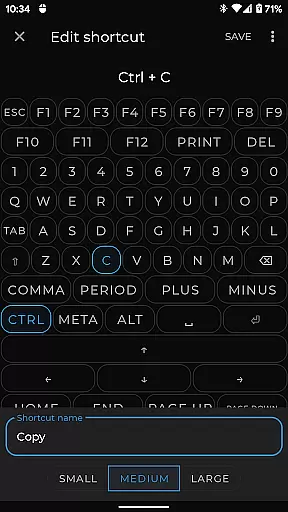
Advanced customization options allow users to create personalized control interfaces tailored to specific applications or games. This flexibility, combined with voice-to-text input and clipboard synchronization capabilities, positions the app as a complete remote control solution for both professional and personal use cases.
Bluetooth Keyboard & Mouse Pro delivers exceptional precision and reliability in its core functions, making it a powerful tool for both productivity and entertainment. The app transforms your Android device into a versatile Bluetooth remote, offering a highly responsive keyboard, mouse, and multi-touch trackpad that ensures every interaction is smooth and accurate.
The app's direct Bluetooth connection eliminates the need for additional software or server intermediaries, providing instant response times and maintaining a secure, private link between devices. This seamless integration allows users to control their computers, tablets, or media centers with confidence, knowing their commands are executed exactly as intended.
With features like Keep-Alive / Jiggler Mode, Full PC Keyboard support, and Presenter Mode, the app caters to professionals who require efficient workflow solutions. These tools not only enhance productivity but also offer peace of mind by preventing interruptions such as system lockouts during critical tasks or presentations.
Ultimately, Bluetooth Keyboard & Mouse Pro stands out through its ability to deliver precise, reliable performance across multiple platforms without compromising on security or ease of use. Whether you're typing, presenting, or managing multimedia content, this app ensures all operations are carried out with maximum efficiency and accuracy.
Achieving an optimal balance between functionality and user experience, Bluetooth Keyboard & Mouse Pro boasts an interface designed for simplicity and intuitiveness. The app removes unnecessary complexity, allowing users to quickly adapt to its environment without a steep learning curve. Its straightforward setup process ensures that even those unfamiliar with advanced tech can easily establish a Bluetooth connection and begin using the app within minutes.
The layout includes familiar elements such as a standard keyboard format, recognizable mouse controls, and intuitive scrolling options via the multi-touch trackpad. Users can effortlessly switch between over 100 international language layouts, catering to global audiences while maintaining clarity and ease of navigation throughout the appu2019s various features.
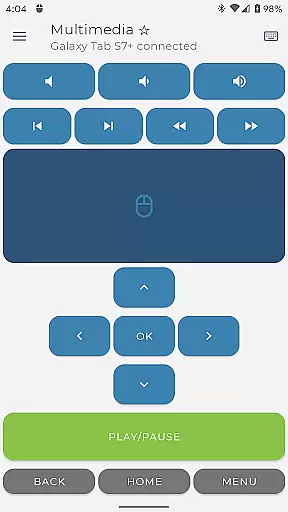
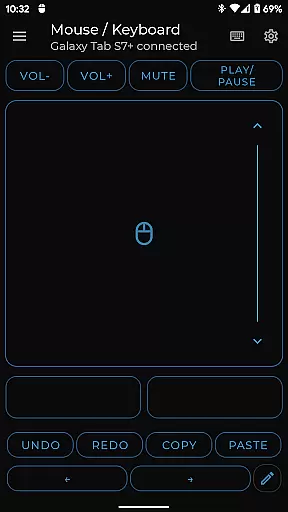
Additional functionalities like Multimedia Control, Integrated Scanner, and Voice & Clipboard Sync further enhance usability without cluttering the interface. Each feature is strategically placed to ensure quick access and efficient operation, streamlining workflows rather than complicating them. This thoughtful design extends to customizable control options tailored specifically for different applications or games, empowering users to engineer their ideal remote interface.
By prioritizing clean design principles alongside robust functionality, Bluetooth Keyboard & Mouse Pro creates an engaging yet stress-free user journey. It combines powerful capabilities with an accessible interface, ensuring that all levels of usersu2014from novices to expertsu2014can harness its full potential with minimal effort.
Serverless connection
Multi-device support
Customizable interface
International layouts
Presentation tools
Premium features locked
Complex setup required
Limited free version
Occasional disconnection
High battery usage

 4.10
4.10
Just swipe the edge to do something!
4.40
Remote for Roku, Fire TV, Samsung TV, LG TV, Android TV, Chromecast and VIZIO TV
4.20
Monitor car performance in real time and troubleshoot malfunctions.
4.80
Undelete and recover your lost or deleted files with DiskDigger!
3.40
Support Fossify apps with a warm thank you!
5.00
Mirror your screen to Fire TV - Super fast and simple
4.40
Remote Play with FSR upscaling, low latency & full controller support
4.80
Mobile Security with Scam Protection | Malware & Virus Cleaner | Safe Browser
4.70
Connect wirelessly to your computer to watch movies, browse the web, play games
5.00
The ultimate tool for network analysis, wifi scanning and problem detection.
4.90
Best leveling tool for your Android device. Hang paintings like a pro.
4.90
HD Camera captures every special moment.
4.60
Mirror your screen to Chromecast and Android TV - Super fast and simple
4.60
Button mapper, mouse toggle, sleep timer and a lot of another features
4.50
Universal TV remote control all TVs, Roku, LG, Samsung, Fire, Vizio, Sony, TCL.
4.40
VESC Tool can monitor and configure VESC-compatible devices over BLE and Wifi
4.20
A simple app to back up and restore SMS & MMS messages and call logs.
4.10
Smart and comfortable browsing experience.
3.80
Honest Scratch app review—is it actually good for teaching kids to code? Real user insights on features, limitations, and learning outcomes.



User Reviews