
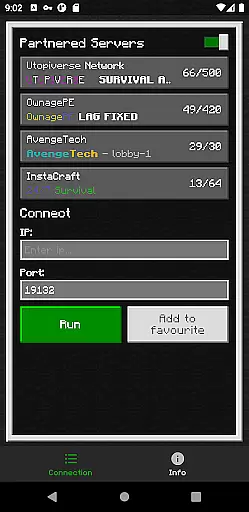
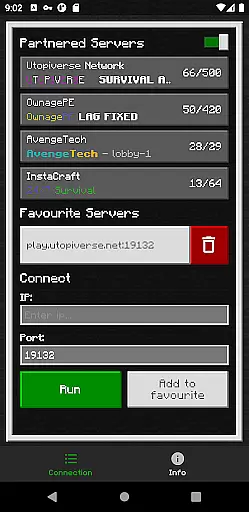
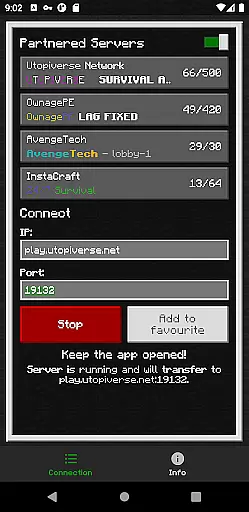
BedrockTogether (Pro) is an innovative networking tool designed to simplify server connections for Minecraft Bedrock Edition players. This ad-free version allows any Bedrock Edition server to appear as a LAN server on Xbox or PlayStation clients, enabling seamless connections without DNS rerouting.
The application facilitates direct server access through the game's Friends tab, making multiplayer gaming more accessible. While it currently doesn't support Realms or Nintendo Switch compatibility, its streamlined connection process makes it an essential tool for Minecraft enthusiasts looking to enhance their multiplayer experience.
BedrockTogether (Pro) offers several distinctive features that set it apart from standard server connection methods. The app's core functionality lies in its ability to transform any Bedrock Edition server into a LAN-visible entity, eliminating complex network configurations.
Its user-friendly interface requires only server IP and port information before establishing the connection. The app's automated process handles the technical aspects, allowing gamers to focus on their Minecraft experience. This professional-grade solution is particularly valuable for creating private gaming sessions with friends and family within the same local network environment.
BedrockTogether (Pro) delivers exceptional core functionality by enabling seamless LAN server connections for Minecraft Bedrock Edition users. The app allows Xbox and PlayStation clients to connect effortlessly without DNS rerouting, ensuring a smooth and reliable connection process.
The application's effectiveness is demonstrated through its straightforward operational steps. Users simply input the desired server IP and port, click 'Run', and navigate to the 'Friends' tab in their game. This streamlined approach eliminates unnecessary technical complexities, making it accessible even for less tech-savvy players.
While providing this essential service, the app maintains clear limitations regarding Realms support and Nintendo Switch compatibility. These transparent boundaries help users understand the app's scope and set appropriate expectations for its performance.
The troubleshooting guidelines further enhance the app's reliability by addressing common connectivity issues. By verifying LAN network connections and offering dedicated support channels through Discord and Telegram, the app ensures users can resolve potential problems efficiently.
The interface design of BedrockTogether (Pro) prioritizes simplicity and intuitive navigation. The main screen presents only essential elements - server IP and port fields, along with a prominent 'Run' button, minimizing user confusion and streamlining the connection process.
This minimalist approach extends to the connection procedure itself. Users can easily follow the four-step process: entering server details, initiating the connection, accessing the 'Friends' tab, and joining through the LAN option. Such straightforward sequencing reduces cognitive load during setup.
The app's learning curve is notably gentle, as it avoids overwhelming users with complex settings or unnecessary features. Even those new to network configurations can quickly grasp the basic operations required to establish a successful connection.
Additional support resources are thoughtfully integrated through clearly marked links to Discord and Telegram channels. This strategic placement of help options maintains interface cleanliness while ensuring assistance remains readily accessible when needed.
Seamless LAN integration
User-friendly interface
Ad-free experience
Efficient connection setup
Reliable performance
No Nintendo Switch support
Realms compatibility issues
Requires same network
Third-party application
Basic troubleshooting needed

Just one-tap to easy translate in any language after calls within seconds.
 4.20
4.20
1-Click close all background apps on Android TV
3.90
This app unlocks the Pro features of the Central for DayZ app
3.60
VESC Tool can monitor and configure VESC-compatible devices over BLE and Wifi
4.20
Small and simple app to Verify Root Access and BusyBox Install!
4.70
MS-DOS in your pocket. Play old DOS games anywhere you are ;)
4.10
PC precision for mobile gaming: dominate with keyboard and mouse!
4.30
Screen Mirroring with sound for Samsung TV, LG TV, Sony TV, Smart TV and Browser
4.20
Button mapper, mouse toggle, sleep timer and a lot of another features
4.50
Connect wirelessly to your computer to watch movies, browse the web, play games
5.00
Change your GPS location instantly. Simulate routes anywhere in the world.
4.90
The ultimate tool for network analysis, wifi scanning and problem detection.
4.90
Play your X-Box games remotely in 1080p with any controller and zero latency
4.60 4.50
4.50
Mirror your screen to Fire TV - Super fast and simple
4.40
pdf merge, word to pdf, jpg to pdf, edit pdf, convert to pdf and much more!
4.20 4.10
4.10
Fun lie-detection pranks for friends and parties.
3.80
Transfer Files, APK from Phone to Watch & Install.
4.0
Honest Scratch app review—is it actually good for teaching kids to code? Real user insights on features, limitations, and learning outcomes.



User Reviews