
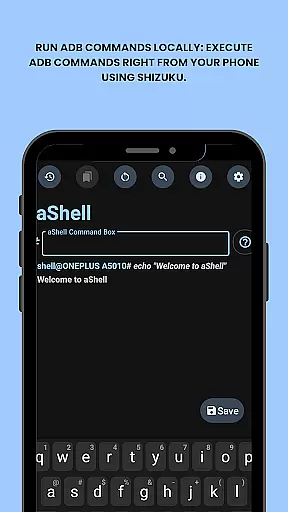
aShell is a specialized mobile application designed for Android users who require direct access to ADB commands without the need for a PC. This tool leverages the Shizuku environment, allowing developers and power users to execute complex operations directly from their devices.
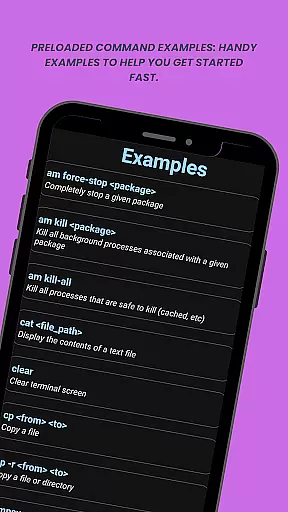
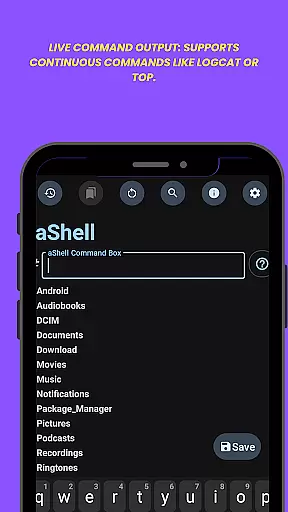
The app's core functionality includes running ADB commands locally, providing preloaded examples for quick execution, and supporting continuous commands like logcat or top. Its intuitive interface also features live command output, search capabilities within results, and options to save outputs to files.
With its adaptability to system themes and ability to bookmark frequently used commands, aShell proves invaluable for those seeking efficient device management. Whether you're debugging applications or exploring Android internals, this tool streamlines the process significantly.
aShell distinguishes itself through several notable features that cater specifically to tech-savvy users. First and foremost, it enables local execution of ADB commands, which traditionally required a computer setup. This feature alone transforms how developers interact with their devices.
In addition to command execution, aShell provides practical examples of common ADB commands, making it easier for users to get started. The app supports real-time command output, including resource-intensive operations like logcat monitoring. Users can also search within these outputs and export them as text files for documentation or sharing purposes.
Other distinguishing features include automatic dark/light mode adaptation based on system settings and a command bookmarking system for frequently used operations. These thoughtful additions enhance both usability and efficiency, making aShell an indispensable tool for Android power users.
aShell is designed to provide accurate and effective execution of ADB commands directly on Android devices. This eliminates the need for a PC and allows users to interact with their device's internals seamlessly.
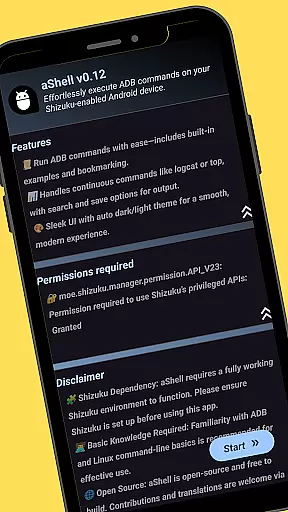
The app leverages a fully functional Shizuku environment, ensuring that each command is processed correctly within the system. Its preloaded command examples help users quickly understand and utilize its capabilities without extensive technical knowledge.
With features like live command output and search functionality within results, aShell ensures users can efficiently manage continuous processes such as logcat or top commands. The ability to save outputs enhances its utility by allowing reference or sharing of important data.
aShell offers an intuitive interface that simplifies interaction with complex ADB operations. Despite requiring basic ADB knowledge, the design ensures ease of use through clear navigation and accessible tools.
Users benefit from dark/light mode support which automatically adapts to their system theme, providing comfort during extended usage sessions. Additionally, bookmarking frequently used commands streamlines workflows significantly.
The inclusion of handy examples and resources such as source code links further aids in making the application approachable even for those new to ADB operations. Overall, aShell balances powerful functionality with user-friendly design principles.
User-friendly interface
Live command output
Dark mode support
Command bookmarking
Open-source availability
Requires Shizuku
ADB knowledge needed
Limited target audience
No standalone functionality
Potential compatibility issues

Extremely fast, secure, and protects your privacy
 4.80
4.80
A recovery soft,it features photo recovery, video recovery, file recovery.
3.40
Fluid navigation gestures for all of us!
4.30
This app unlocks the Pro features of the Central for DayZ app
3.60
Signal Strength, Mobile, Wifi, Speed Test, Bad Signals, Cellular, 5G, LTE, 4G
4.20
Making emulation easy for everyone!
4.30
WiFi Signal Strength Meter help you detect WiFi Signal Strength in real time.
4.80
Create your own custom widget with endless possibilities
3.90
Your personal health butler
3.60
NFC Tools can read and write NFC tags.
4.70
Optimize your WiFi network, turn your phone into Wifi Analyzer
4.70
Head tracking for PC sim games such as MSFS 2024 or Elite:Dangerous. No headset!
4.50
Clean up large files and similar photos, fast and easy to use
4.40
Complete kernel toolbox with features to manage and tweak your rooted device
4.30
A convenient photo, video, and file recovery tool.
4.00
Create your own live wallpaper or check out thousands already made presets
3.90
Smart and comfortable browsing experience.
3.80
Save any video in HD - paste the link, download fast and watch offline.
4.0
Download any file easily and quickly with Downloader
4.4
Honest Scratch app review—is it actually good for teaching kids to code? Real user insights on features, limitations, and learning outcomes.



User Reviews