
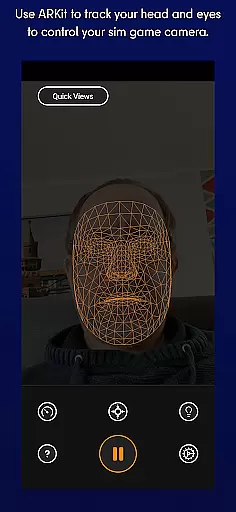
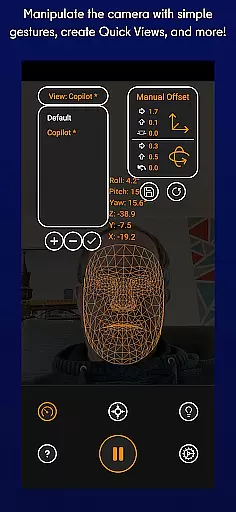
SmoothTrack is an innovative tool that transforms your mobile device into a 3D head tracking controller for sim games. By leveraging the AR capabilities of your device, it allows you to intuitively control game camera perspectives through simple head movements.
The app supports any game compatible with TrackIR, including popular titles like Microsoft Flight Simulator and Elite: Dangerous. Whether you want to lean forward to inspect your cockpit or tilt your head to view different angles, SmoothTrack delivers a seamless and immersive experience without requiring additional equipment.
This application is particularly valuable for flight and space simulation enthusiasts who seek more natural and responsive camera controls. Its precise head-tracking technology enhances gameplay by translating slight head motions into in-game perspective shifts, offering a near-magical level of immersion.
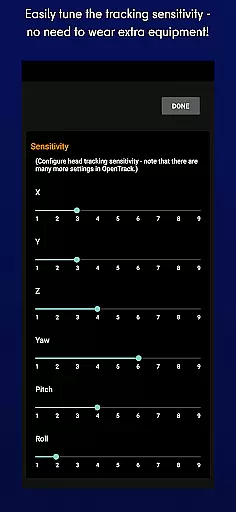
SmoothTrack stands out with its advanced AR-based head tracking system, which enables users to control their sim game's camera effortlessly. The app magnifies your head movements, allowing you to achieve significant in-game perspective changes with minimal physical motion.
One of the key features is its compatibility with a wide range of games supporting FreeTrack or TrackIR protocols. This includes major titles such as Microsoft FSX, IL2: Sturmovik, and Kerbal Space Program. Additionally, SmoothTrack offers both dark and bright modes, catering to different lighting environments while conserving battery life on OLED screens.
Another notable aspect is its ease of use. No extra hardware is required—just position your device to capture your face, and you're ready to go. With dedicated support available via Discord and email, SmoothTrack ensures users can maximize their experience with reliable assistance when needed.
SmoothTrack's core functionality lies in its ability to provide precise 3D head tracking for controlling simulation game cameras. This is achieved through the device's AR capabilities, ensuring accurate detection of even the slightest head movements.
The app employs advanced algorithms that translate these subtle motions into responsive in-game camera perspectives. Whether you're leaning forward to inspect your Flight Simulator cockpit or glancing left before a turn in Euro Truck Simulator 2, the response is immediate and reliable.
This level of accuracy enables users to intuitively interact with their games without any additional equipment. The slight exaggeration of head movements allows for complete environmental awareness, making virtual experiences more immersive and controllable than ever before.
By supporting industry-standard protocols like FreeTrack and TrackIR, SmoothTrack ensures compatibility with numerous popular simulation titles while maintaining exceptional tracking precision across different gaming scenarios.
SmoothTrack demonstrates exceptional interface design by offering an intuitive user experience that requires no extra equipment or complex setup procedures. Users can simply position their device to capture facial movements, eliminating the need for specialized hardware.
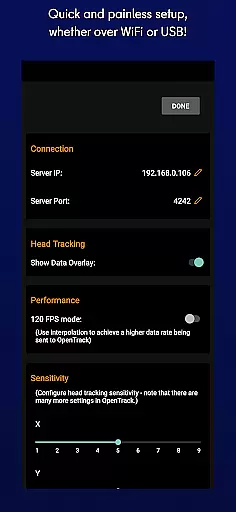
The application features a straightforward configuration process where users can quickly calibrate basic settings. Its intelligent system automatically adjusts parameters to optimize tracking performance based on environmental conditions and user positioning.
In addition to its functional simplicity, SmoothTrack provides practical display modes including a battery-saving dark mode and a bright mode for low-light environments. These options enhance usability while maintaining visual clarity during extended gaming sessions.
With dedicated support channels available via Discord and email, users can easily resolve any issues or suggest new features, ensuring that the interface remains both simple and responsive to community needs over time.
Intuitive head tracking
Wide game compatibility
No extra equipment needed
Battery-saving dark mode
Responsive customer support
Limited to AR-enabled devices
Requires stable device positioning
Dependent on good lighting conditions
Potential learning curve
Not suitable for all game genres

Easily install aab(Android App Bundle) files on your Android device with our app
 4.80
4.80
Transfer Files, APK from Phone to Watch & Install.
4.4
Connect instantly to a fast, encrypted VPN with one tap
4.60
Extremely fast, secure, and protects your privacy
4.80
A recovery soft,it features photo recovery, video recovery, file recovery.
3.40
1-Click close all background apps on Android TV
3.90
Fluid navigation gestures for all of us!
4.30
Game Booster, GFX Tool is now compatible with newer game update
4.50
Clean up large files and similar photos, fast and easy to use
4.40
Monitor car performance in real time and troubleshoot malfunctions.
4.80
Optimize your WiFi network, turn your phone into Wifi Analyzer
4.70
HD Camera captures every special moment.
4.60
Just swipe the edge to do something!
4.40
Use your phone as a webcam on your computer over WiFi or USB.
4.40
VESC Tool can monitor and configure VESC-compatible devices over BLE and Wifi
4.20
Effortlessly run ADB commands directly on your device without a PC.
4.20
View detailed information about your Nissan Leaf the dealer never shows you.
4.10
Introducing Smart Printer, your ultimate destination for printing solutions!
4.00
Create your own live wallpaper or check out thousands already made presets
3.90
Honest Scratch app review—is it actually good for teaching kids to code? Real user insights on features, limitations, and learning outcomes.



User Reviews