
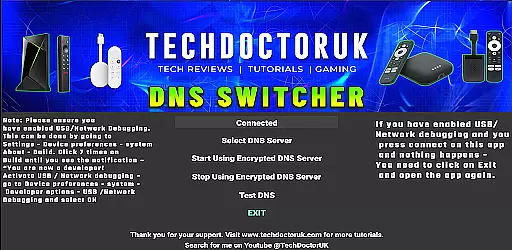
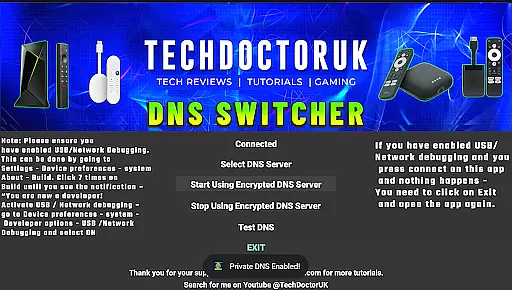
TDUK DNS Switcher is a specialized tool designed to enhance your Android TV's security by enabling encrypted DNS usage. This application allows users to select from trusted encrypted DNS servers or configure custom ones, ensuring privacy protection and secure DNS requests. By using this app, you can safeguard your online activities against potential threats and data breaches.
The setup process requires enabling USB or Network Debugging on your device before launching the app. Once configured, TDUK DNS Switcher provides a seamless experience in managing DNS settings, making it an essential utility for tech-savvy users who prioritize digital security.
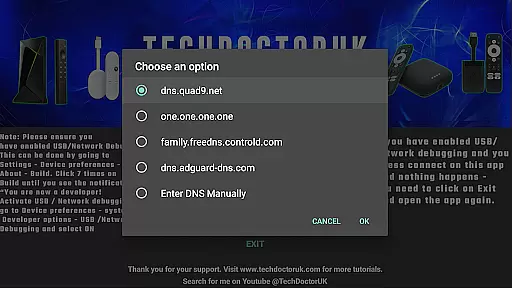
TDUK DNS Switcher offers a range of features that cater to users seeking enhanced privacy controls. The primary feature is the ability to switch between various encrypted DNS servers with ease. You can choose from pre-configured options or input your own server details for personalized security.
Another notable feature is the requirement of USB or Network Debugging activation, which ensures that only authorized users can modify DNS settings. This adds an extra layer of security, preventing unauthorized access to critical network configurations. Overall, these features make TDUK DNS Switcher a powerful tool for maintaining a secure and private internet connection on your Android TV.
TDUK DNS Switcher provides a reliable solution for Android TV users seeking to enhance their privacy through encrypted DNS settings. The application enables precise configuration of DNS servers, ensuring that each request is handled securely and efficiently.
The core functionality allows users to select from pre-configured encrypted DNS servers or input custom ones. This flexibility guarantees optimal performance while maintaining security standards. The app verifies each connection, providing assurance that your DNS requests are processed accurately.
By using this tool, users can protect their browsing activities from potential threats and eavesdropping. The app's effectiveness lies in its straightforward approach to securing DNS traffic, making it an essential utility for privacy-conscious individuals.
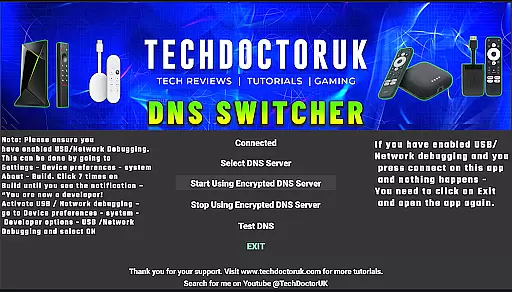
A user-friendly interface is crucial for managing technical settings like DNS configurations. TDUK DNS Switcher excels in providing an intuitive control panel that simplifies the process of switching DNS servers on Android TV devices.
The layout is designed for ease of use, with clear options and minimalistic design elements that guide users through the setup process. Even those with limited technical knowledge can navigate the app effortlessly, thanks to its logical structure and straightforward instructions.
This simplicity does not compromise functionality; instead, it enhances the overall user experience by reducing complexity. Users can quickly enable USB or Network Debugging as required, ensuring seamless integration with their existing systems while maintaining complete control over their DNS settings.
Enhances privacy
Easy to use
Custom DNS options
Secure configuration
Trusted servers
Requires debugging
Limited to Android TV
No automatic updates
Basic interface
Manual setup needed

 4.10
4.10
Connect instantly to a fast, encrypted VPN with one tap
4.60
Unlock your Essential Key. Create custom shortcuts to your favorite apps!
4.3
Safely recover deleted photos, videos, and files with a single easy tap.
3.70
An open-source APK explorer for Android!
4.10
Excellent scientific calculator with symbolic algebra, integrals, derivatives
4.80
Connect wirelessly to your computer to watch movies, browse the web, play games
5.00
Download any file easily and quickly with Downloader
4.2
Enjoy a smooth mobile reading experience!
3.60
The ultimate tool for network analysis, wifi scanning and problem detection.
4.90
The Ultimate Flex Drivers Utility App - Convenient Tapping & Block Filters
4.70
Just swipe the edge to do something!
4.40
Forza Tuning Calculator App for Forza Horizon 5, Motorsport and Earlier Titles
4.40
PC precision for mobile gaming: dominate with keyboard and mouse!
4.30
Effortlessly run ADB commands directly on your device without a PC.
4.20
Family Locator, Share location, StayConnect with your family in real time
3.90
Unleash gamepad precision for ultimate mobile gaming dominance.
3.90
Smart and comfortable browsing experience.
3.80
Clean the junk files on your device
3.40
Honest Scratch app review—is it actually good for teaching kids to code? Real user insights on features, limitations, and learning outcomes.



User Reviews