
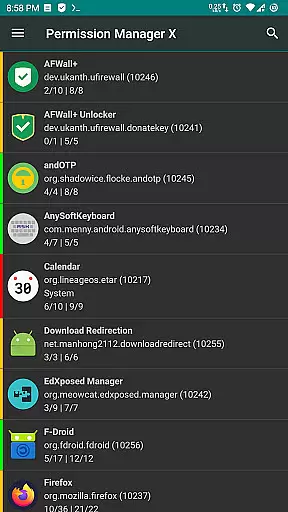
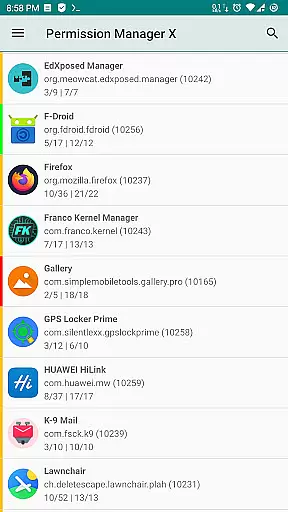
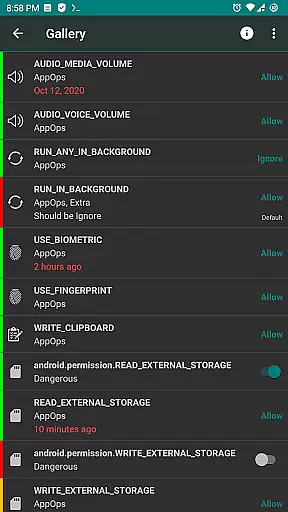
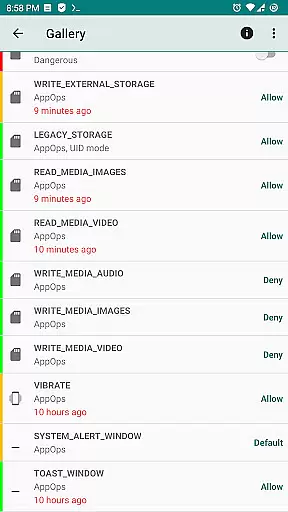
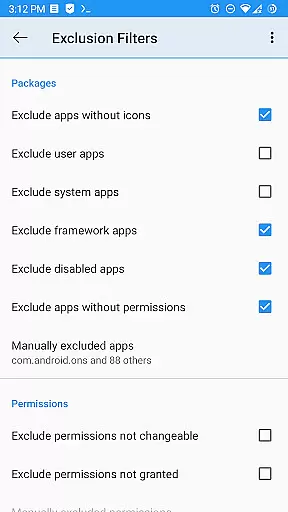
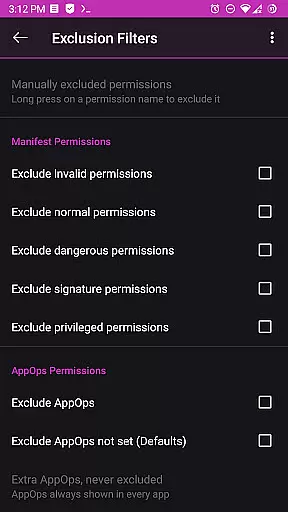
Permission Manager X is a comprehensive tool designed to manage app permissions on Android devices. It allows users to view, grant, or revoke both manifest and AppOps permissions from a single interface. The application provides fine-grained control over various permissions such as storage, camera, location, and more, ensuring enhanced privacy and security.
Beyond basic permission management, the app offers advanced features like setting reference values for permissions, scheduled checks, and auto-revoke capabilities. These functionalities are particularly useful when reinstalling apps, changing devices, or upgrading the operating system. Permission Manager X also supports multi-user profiles and work profiles, making it suitable for both personal and professional environments.
One of the standout features of Permission Manager X is its ability to control both manifest permissions and AppOps. Manifest permissions include commonly known permissions like storage and camera access, while AppOps provide deeper control over these permissions and additional ones like background execution and clipboard access. This dual control allows users to manage their app permissions more effectively.
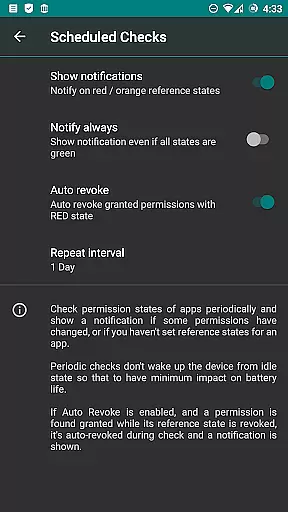
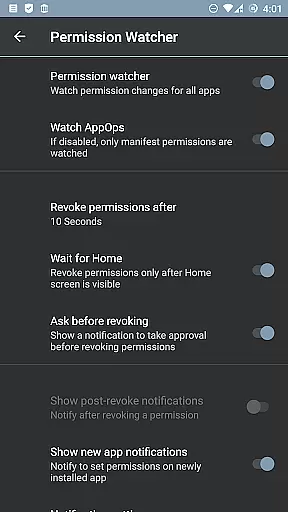
The app includes paid features such as sorting options, scheduled checks, and permission watcher functionalities. These tools help maintain optimal permission settings by notifying users of any discrepancies and automatically revoking unwanted permissions. Additionally, the app supports theming options, search suggestions, and batch operations, enhancing user experience and productivity.
For devices that are rooted or have ADB enabled, Permission Manager X offers extended capabilities, including managing critical app permissions and creating automatic backups. The app respects user privacy, with no data collection, and is open-source, allowing for transparency and community contributions.
Permission Manager X offers a comprehensive suite of tools designed to manage app permissions with precision and control. The core functionality allows users to view, grant, or revoke manifest permissions for each installed application on a single screen. This granular control extends to AppOps permissions, enabling users to choose from multiple modes, thus ensuring that the management of permissions is both thorough and user-centric.
The app's robust framework leverages Android's backend access control system, providing fine-grained control over manifest permissions while also introducing additional controls such as background execution and clipboard access. This dual-layer approach ensures that users can effectively manage how applications interact with their device, promoting enhanced privacy and security.
For users reinstalling apps, changing devices, or upgrading their ROM, Permission Manager X streamlines the process of reviewing and adjusting permissions. By setting reference states for permissions, users can quickly back up and restore these settings, simplifying the management process. Visual indicators, like colored bars, further assist in the swift review of packages and permissions, making it an invaluable tool for maintaining control over one's digital privacy.
Despite its powerful capabilities, Permission Manager X maintains an interface that is both simple and intuitive. Users are presented with a straightforward dashboard where they can easily navigate through different apps and their respective permissions. This ease of use ensures that even those with limited technical knowledge can effectively manage their app permissions without feeling overwhelmed by complex menus or options.
The design philosophy behind Permission Manager X emphasizes clarity and accessibility. Each feature is laid out in a manner that promotes quick understanding and efficient interaction. Whether users need to sort apps by various parameters, schedule checks for permission states, or utilize advanced features like Permission Watcher, the path to these functions is clear and direct.
Additionally, the app provides extensive help resources, including FAQs and detailed guides, ensuring that users have the necessary support to make informed decisions about their privacy settings. With options for theming and permission summary views, users can customize the interface to suit their preferences, enhancing the overall user experience while maintaining focus on the primary goal of safeguarding personal data.
Comprehensive permission control
Advanced AppOps management
Privacy-focused design
Open-source and free
Multi-user support
Limited functionality without root
Complex for beginners
Requires ADB setup
No built-in tutorials
Paid features needed for full control

Change your GPS location instantly. Simulate routes anywhere in the world.
 4.90
4.90
Quickly switch to an encrypted DNS server on Android TV
4.50
Connect instantly to a fast, encrypted VPN with one tap
4.60
Use your phone as a webcam on your computer over WiFi or USB.
4.40
Canon PRINT is a companion app for your Canon printer.
4.60
Undelete and recover your lost or deleted files with DiskDigger!
3.40
With videos, electrical calculators, and built-in ebook, Ugly’s has your answer.
4.50
The Ultimate Bluetooth Keyboard & Mouse. Securely control your PC, Mac, and more
4.50
A clean app.
4.50
Head tracking for PC sim games such as MSFS 2024 or Elite:Dangerous. No headset!
4.50
An easy-to-use calculator designed to save time calculating and bending conduit
4.30
Just one-tap to easy translate in any language after calls within seconds.
4.20
Signal Strength, Mobile, Wifi, Speed Test, Bad Signals, Cellular, 5G, LTE, 4G
4.20
An open-source APK explorer for Android!
4.10
View detailed information about your Nissan Leaf the dealer never shows you.
4.10
1-Click close all background apps on Android TV
3.90
Amateur Radio app for APRS: Track friends, exchange messages, get tactical info.
3.90
A powerful, easy-to-use flight computer on your phone or tablet!
3.80
Fun lie-detection pranks for friends and parties.
3.80
Honest Scratch app review—is it actually good for teaching kids to code? Real user insights on features, limitations, and learning outcomes.



User Reviews