
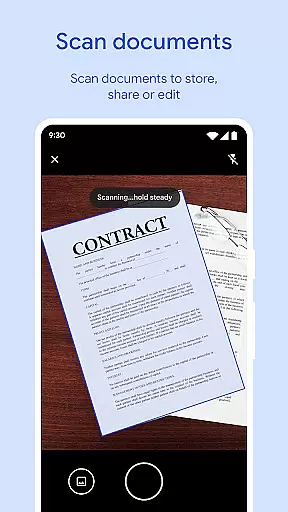
Files by Google is a powerful file management tool designed to help users efficiently organize, secure, and optimize their mobile device storage. The app provides comprehensive features for file management, including cleaning recommendations, offline file sharing, cloud backup, and advanced media controls.
One of the standout capabilities is its intelligent space-saving recommendations, which identify duplicate files, old photos, and cached data that can be removed to free up valuable storage space. Additionally, Files by Google offers fast and secure file sharing through Quick Share, allowing transfers at speeds up to 480 Mbps without requiring an internet connection. Its intuitive interface makes it easy to browse, search, and sort files while ensuring sensitive data remains protected with customizable lock settings.
This app is particularly useful for users who frequently manage large media files or need to share content quickly in environments with limited connectivity. By combining practical tools with a lightweight design, Files by Google ensures both efficiency and convenience for everyday file management tasks.
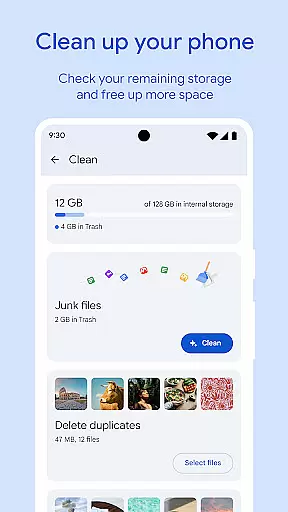
Files by Google stands out with its robust set of features tailored for efficient file handling. First, the app excels in providing detailed insights into device storage usage, enabling users to monitor available space across internal memory, SD cards, and USB drives. It employs smart algorithms to recommend deletions of unnecessary items such as chat app photos, duplicates, and cached files, making it easier than ever to maintain optimal performance.
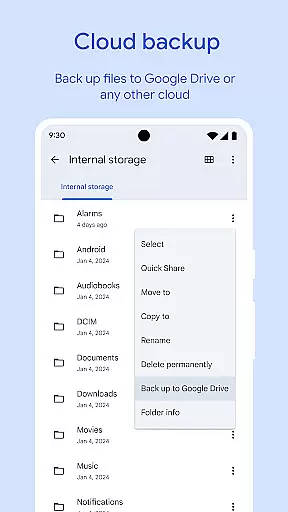
Another key feature is its advanced file-sharing functionality. Through Quick Share, users can transfer various types of content—photos, videos, apps, and more—to nearby Android and Chromebook devices. With end-to-end encryption, these transfers remain private and secure even when conducted offline. Furthermore, the app supports backing up important files to Google Drive or other cloud services, ensuring critical data is safeguarded against loss.
For media enthusiasts, Files by Google includes playback controls like adjustable speed and shuffle options, enhancing the experience of consuming offline media. Smart recommendations further enhance usability by offering personalized tips based on user behavior. These thoughtful additions make Files by Google not just a utility but a versatile companion for modern digital lifestyles.
Files by Google excels in providing accurate and effective core functions that cater to users' file management needs. The app offers precise recommendations for freeing up space by identifying old photos, duplicate files, and cache data that are safe to remove.
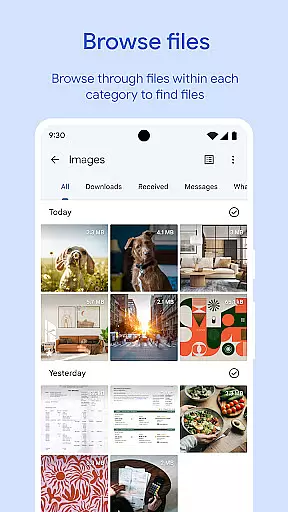
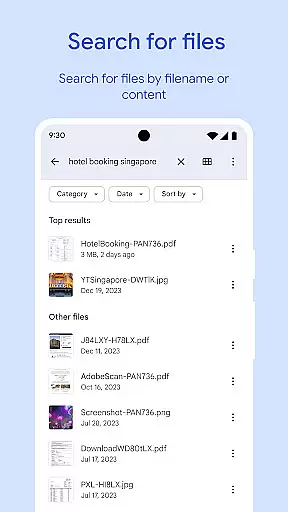
In addition to space management, the app allows for efficient file searching and browsing. Users can quickly locate photos, videos, and documents with advanced search features and sorting options. This ensures that files can be found and managed without wasting time, thus enhancing productivity.
Another highlight is its Quick Share feature, enabling fast offline file sharing with speeds up to 480 Mbps. This functionality is secured with end-to-end encryption, ensuring that file transfers are not only quick but also private and protected from unauthorized access.
By delivering these well-executed features, Files by Google proves to be a reliable tool for managing and optimizing the storage on your device effectively.
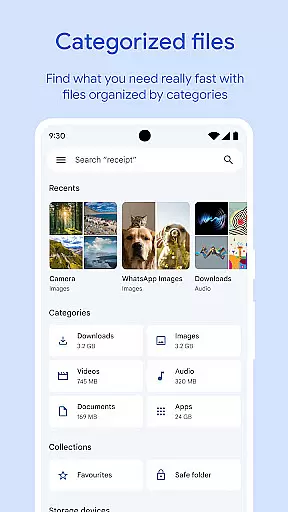
A standout aspect of Files by Google is its simple and intuitive interface, designed to make file management accessible even to those who aren't tech-savvy. Upon opening the app, users are greeted with a clean layout that clearly displays available storage space on their device, SD card, and USB drives.
The app categorizes files into easily navigable sections such as images, videos, and documents, allowing users to browse through their files effortlessly. Sorting options by file size or type further simplify the process of understanding what's consuming storage space.
Moreover, the offline file-sharing feature is straightforward to use. With just a few taps, users can share files securely with nearby devices without needing an internet connection. This seamless experience is enhanced by clear instructions and feedback during the sharing process.
Overall, Files by Google combines essential tools with an easy-to-use interface, ensuring that users can manage their files efficiently without a steep learning curve.
User-friendly interface
Fast offline sharing
Smart cleaning suggestions
Secure file protection
Lightweight design
Limited cross-platform support
No built-in antivirus
Dependent on Google services
Occasional bugs reported
Basic media editing tools

Easily install aab(Android App Bundle) files on your Android device with our app
 4.80
4.80
A powerful, easy-to-use flight computer on your phone or tablet!
3.80
Learn the vast amount of system information about device and monitor it's state
4.70
Unlock your Essential Key. Create custom shortcuts to your favorite apps!
4.2
Best leveling tool for your Android device. Hang paintings like a pro.
4.90
Effortlessly run ADB commands directly on your device without a PC.
4.20
MS-DOS in your pocket. Play old DOS games anywhere you are ;)
4.10
Detect hidden spy camera with advanced scanning {{ Premium version }}
4.00
Play your X-Box games remotely in 1080p with any controller and zero latency
4.60
Change your GPS location instantly. Simulate routes anywhere in the world.
4.90
Fast Video Downloader, Movie Downloader, Torrent Downloader & Adblock Browser
4.70
FV File Manager Pro, Fast and powerful file manager for Android
4.60
Canon PRINT is a companion app for your Canon printer.
4.60 4.50
4.50
Screen Mirroring for Roku Sticks, Roku TCL TV and Roku Hisense TV
4.50
Universal TV remote control all TVs, Roku, LG, Samsung, Fire, Vizio, Sony, TCL.
4.40
Carry a FTP server in your pocket and avoid USB cables for file transfer
4.20
Automate everything from settings to photos, SMS to speech. ADC2 prize winner.
4.10
Create your own live wallpaper or check out thousands already made presets
3.90
Honest Scratch app review—is it actually good for teaching kids to code? Real user insights on features, limitations, and learning outcomes.


User Reviews