
AutoPad is a versatile ambient pad loop application designed to enhance live performances and recordings with seamlessly looped drones. The app provides musicians with tasteful soundscapes that can be triggered instantly and played for any duration, making it ideal for both practice sessions and professional gigs.
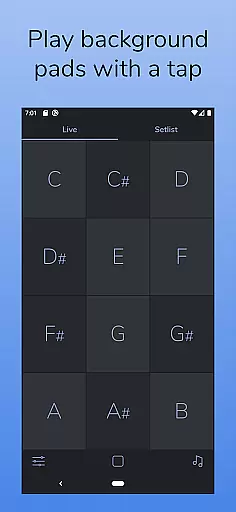
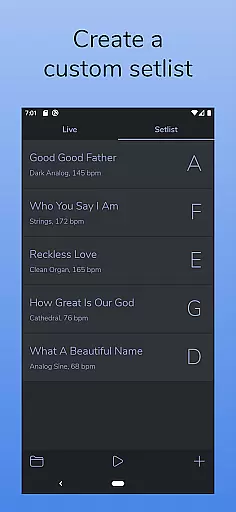
The app features two distinct modes - LIVE mode for instant access to all twelve keys, and SETLIST mode for creating customized song lists. With its natural crossfading capability between keys, AutoPad ensures smooth transitions during performances. Additionally, the built-in metronome helps keep your band in sync without the need for external equipment.
Whether you're performing on stage or recording in the studio, AutoPad's carefully designed pad sounds provide subtle structure and atmosphere to elevate your music production.
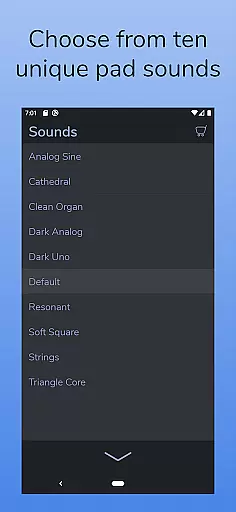
AutoPad stands out with its rich feature set tailored for musicians. The app comes with 10 expertly crafted pad sounds, each offering a unique atmosphere across all 12 musical keys. These pads are specifically designed to be played softly and continuously, providing a perfect backdrop for live musicians.
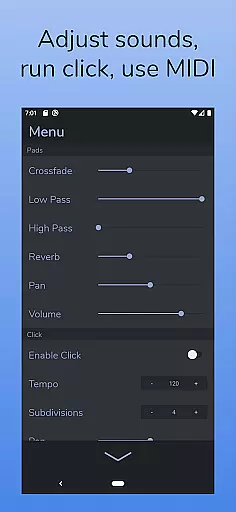
Expandability is another key feature of AutoPad. Users can purchase additional in-app sound packs or import their own WAV files (Android version only supports WAV format currently). The app also includes essential audio controls such as crossfade time, dual filters, reverb amount, pan, and volume adjustments through an intuitive menu system.
For enhanced performance, AutoPad supports MIDI functionality, allowing users to trigger pads with an external keyboard controller. The app's dark color scheme not only looks professional but also performs exceptionally well in low-light stage environments, ensuring optimal visibility during performances.
AutoPad offers a diverse music library that includes 10 carefully designed pad sounds, each providing a unique atmosphere in all 12 keys. These sounds are crafted to be played softly and continuously behind live musicians.
In addition to the built-in sounds, AutoPad allows users to expand their sound library by purchasing in-app sound packs or importing their own pad files. This flexibility ensures that musicians have access to a wide range of high-quality audio options tailored to their specific needs.
All sounds provided by AutoPad are original compositions, ensuring copyright authenticity. Users can confidently incorporate these ambient pad loops into their mixes without concerns about copyright infringement.
The app features superior audio quality options with natural crossfades between keys handled automatically. This seamless transition enhances the listening experience during live performances and recordings.
AutoPad's menu gives users control over various parameters such as crossfade time, two filters, reverb amount, pan, and volume. These controls allow for precise adjustments to achieve the desired sound quality.
Furthermore, AutoPad responds to MIDI, enabling musicians to trigger pads with a keyboard using a MIDI controller. This feature adds another layer of audio customization and control, enhancing both convenience and performance quality.
User-friendly interface
Seamless looping capability
Versatile sound library
Intuitive MIDI integration
Professional stage design
Limited file format support
No virtual MIDI on Android
Basic free sound pack
Occasional latency issues
Steep learning curve

Make music anywhere. Turn your device into an instrument.
 4.4
4.4
VB-AUDIO Software / VBAN-Receptor allows listening to any VBAN Streams
4.10
Most Advanced AI Song Generator and Music Creator. Rap, Pop, Rock, Gospel & more
4.70
Next generation modular control surface
4.10
Unleash your creativity! Turn simple prompts into full fledged songs.
4.70
Listen radio AM / FM Stations. Live AM / FM Radio App Station. Radio Com.
4.70
No wifi music app. Mp3 offline. Tuner radio, young radio music. Music downloader
4.20
Learn and play 2M+ music tabs & chords on guitar, ukulele, bass, and more
4.30
Offline Tunes, Unlimited Vibes
3.90
The best music and audio player, with beautiful UI, music search and equalizer.
4.60
Learn the notes on the guitar fretboard fast with this easy and fun app
4.60
Fun & Easy Voice Changer – Record, Edit & Add Hilarious Effects!
4.50
Enhance the sound quality of your devices, listen to what you want
4.50
Visualize the guitar fretboard, master scales & play through changes like a pro!
4.50
Full featured mp3 and audio player with Chromecast and Android Auto support.
4.40
The Music Journey in Your Hands
4.30
Time Trainer: accurate metronome w tools to help you develop your internal time!
4.20
The official Sonos app
4.10
Sing, record, and create music together — enhanced by smart voice tools.
4.00


User Reviews