
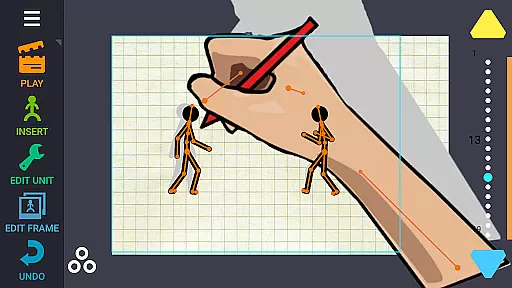
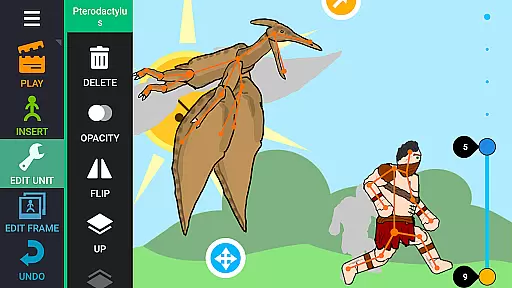
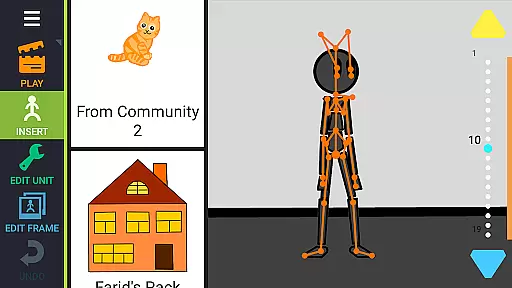
Draw Cartoons 2 PRO is a comprehensive 2D animation app that simplifies the complex process of cartoon creation. Using motion smoothing techniques, users only need to set start and end positions for characters, allowing the program to generate smooth transitions automatically. The app provides a complete library of pre-made characters and objects, including dragons, people, and vehicles, while also offering a character editor for custom creations.
Advanced tools like dramatic camera close-ups and speed effects enable professional-level animations. Users can add music or voiceovers to their cartoons, and export projects as MP4 videos or GIFs for sharing on platforms like YouTube using the #drawingcartoons2 tag. The app also supports saving and sharing individual elements, fostering a creative community where animators can exchange resources and collaborate on projects.
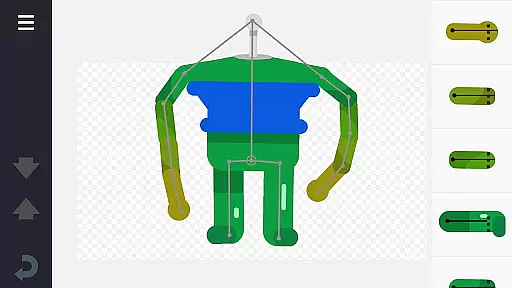
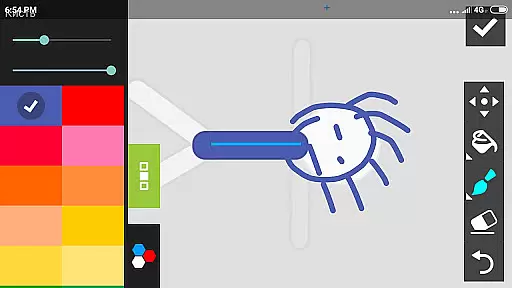
The application stands out with its innovative motion smoothing technology that automates complex animation processes. Its skeleton-based character system allows for easy manipulation of pre-made elements or custom creations using the built-in editor. Users can draw directly within the app or import images from photos, providing maximum creative flexibility.
Professional-grade features include a virtual camera system for dynamic shots, speed control for creating dramatic slow-motion effects, and comprehensive audio integration options. The app's robust export capabilities support both video (MP4) and animated GIF formats, while its community-sharing features enable collaboration through element exchanges. These features make Draw Cartoons 2 PRO suitable for both beginners and experienced animators seeking professional results.
In the realm of 2D animation, Draw Cartoons 2 PRO stands out by offering a comprehensive suite of creative tools tailored for both beginners and advanced animators. The application provides an extensive library of pre-made characters and objects, ranging from mythical creatures like dragons to everyday items such as cars, all constructed with a skeletal bone structure that simplifies the animation process.
For those seeking more customization, the built-in character editor empowers users to design unique creatures and objects by arranging bones and even importing images to create truly one-of-a-kind animations. This level of creative freedom ensures that artists are only limited by their imagination.
Beyond basic animation capabilities, the app includes advanced features such as dramatic camera angles for intense close-ups and speed effects that allow manipulation of time within animations, perfect for creating dynamic scenes like slow-motion bullet dodges. These tools collectively enhance the storytelling potential of each project.
Draw Cartoons 2 PRO excels in providing canvas and format flexibility, ensuring that creators can bring their visions to life without constraints. Users have the ability to draw directly within the app or import images to be used as part of their animations, allowing for a seamless blend of hand-drawn art and digital elements.
The software supports exporting animations in multiple formats including MP4 video and GIF, making it easy to share creations on platforms like YouTube using the dedicated tag #drawingcartoons2. This versatility in output options caters to various distribution channels and audience preferences.
Moreover, individual components created within the app can be saved separately and shared with other users, fostering a collaborative community where animators exchange resources. Whether you're crafting a standalone piece or contributing to a larger collective work, Draw Cartoons 2 PRO adapts to your needs.
User-friendly interface
Extensive library
Powerful editing
Smooth animations
Community sharing
Steep learning
High system
Limited free
Occasional bugs
Complex tools

Vidu is an AI video generator made for creators and aspiring makers.
 3.30
3.30
Easy 3D drawing design maker & creator. Model designing, Sculpting. Create&paint
4.00
Digital Drawing: Draw & Paint
4.10
Your Essential Color Theory Guide: Red, Yellow, Blue (RYB)
4.1
Create stunning video, photo & magic from text with FlixAI GPT video generator.
3.10
Powerful home decoration & house design that allows you to design dream home.
3.80
Image resizer to resize, crop, rotate, flip, change dpi photo or picture in bulk
4.60
Art of Combination Wear OS Watch faces (for Wear OS 5+ devices)
3.90
Everything you need to create hand drawn animation, anywhere you go!
4.40
See Color, Paint Color
4.90
Draw on screen: FP sDraw is a simple and lightweight drawing app
4.70
Draw beautiful mandala's very easily
4.60
Turn your drawings into flipbook-style animations with simple creative tools
4.60
The perfect place to start sketching! Use Sketchbook to draw and paint sketches.
4.50
Text to Image, Image to Video & AI Chat
4.20
Unleash Your Creativity with Draw Cartoon - AR Drawing App
4.10
Get creative and make art with your Sesame Friends!
4.00
AI Assistant, powered by ChatGPT GPT-4 & GPT-4o. Your intelligent companion.
3.50
Download now for a stylish and functional timepiece
4.5


User Reviews