
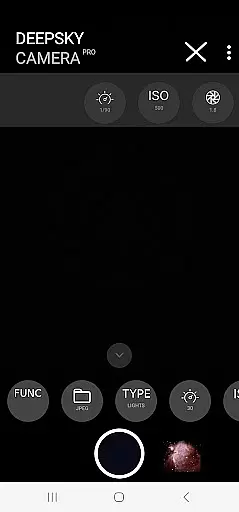
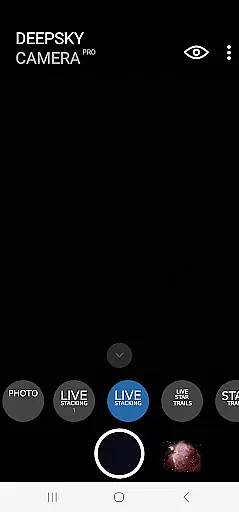
DeepSkyCamera Pro is an advanced astrophotography application designed for smartphone users who are passionate about capturing the night sky. The app offers a comprehensive suite of features that cater to both amateur and professional astronomers, allowing them to take stunning photos of celestial objects with long exposure times, similar to using a DSLR or CCD/CMOS camera.
One of the standout capabilities of DeepSkyCamera Pro is its photo live stacking function, which works with both tracked and untracked images. This feature enables users to stack multiple images in real-time, enhancing the clarity and detail of their astrophotographs. Additionally, the app supports various formats including RAW and JPEG, and outputs stacked results in TIFF or JPEG, depending on the input format. Users can also create animated star trails and timelapse videos in mp4 format, utilizing codecs such as AVC and HEVC.
Designed for devices running Android 6 or higher, DeepSkyCamera Pro requires a minimum of 3 GB RAM and 64 GB flash storage. However, for optimal performance, it is recommended to use the app on devices with Android 8 or higher, 8 GB RAM, and 128 GB flash storage. This ensures smooth operation, especially during memory-intensive operations like RAW photo live stacking. With these capabilities, DeepSkyCamera Pro provides a powerful toolset for those looking to delve deeper into the art of astrophotography.
DeepSkyCamera Pro stands out with its robust set of features tailored specifically for astrophotography enthusiasts. At the core of its functionality is the ability to capture photos of the night sky with long exposure times, akin to traditional astrophotography methods using DSLR or specialized cameras. This feature allows users to take high-quality images in RAW format, which can be further processed using well-known stacking software.
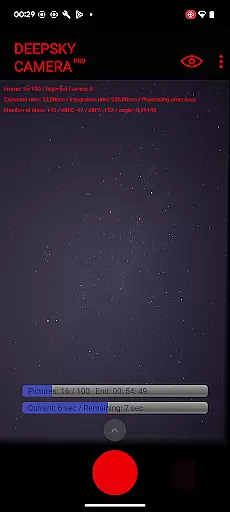
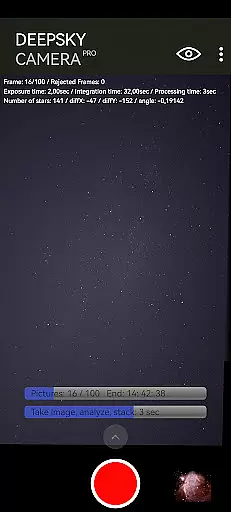
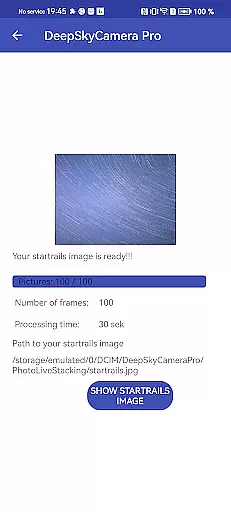
The app's photo live stacking capability is particularly noteworthy. It supports both tracked and untracked images, analyzing and aligning them for optimal stacking. During this process, essential information such as the number of frames, exposure time, integration time, and processing time is displayed on-screen, providing users with real-time feedback. Furthermore, the app offers a viewfinder live stacking function that breaks the limitation of 1-second max shutter speed, allowing for longer exposures up to 10 seconds.
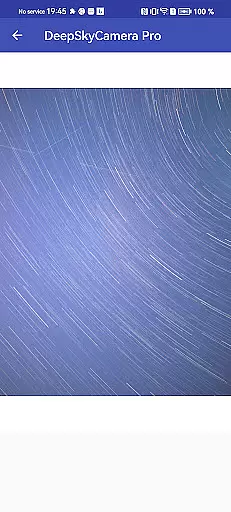
Additional features include the creation of live star trails, animated star trails videos, and timelapse videos in mp4 format with codecs AVC and HEVC. These functionalities enable users to produce visually captivating content that showcases the beauty of the night sky. While the app is powerful, it is important to note that it is best suited for those with prior knowledge of astronomy and astrophotography, as it requires familiarity with concepts such as RAW files and post-processing techniques.
Real-time capture and preview functionality is essential for astrophotography enthusiasts who need to frame and focus their shots accurately. DeepSkyCamera Pro offers advanced live stacking features that allow users to see the results of long exposure photography in real time, breaking the typical one-second shutter speed limitation found in most smartphone cameras.
The app supports both tracked and untracked images, aligning and analyzing each frame to create a stacked image that reveals celestial objects with greater clarity. This process provides immediate feedback on exposure settings and helps photographers make necessary adjustments before capturing the final image.
With its ability to handle RAW and JPEG formats, the app ensures that users can work with high-quality images suitable for post-processing. The live viewfinder supports shutter speeds up to ten seconds, allowing astronomers to detect faint objects like galaxies and nebulae directly through their smartphone screens when attached to a telescope.
This feature not only enhances the user's ability to capture stunning night sky images but also streamlines the workflow by providing critical data such as frame count, exposure time, and axis shifts during the stacking process.
While primarily designed for astrophotography, DeepSkyCamera Pro also incorporates advanced image processing capabilities that enhance the natural beauty of captured scenes without artificial over-processing. The app achieves this by leveraging sophisticated algorithms that maintain the authenticity of star trails, timelapse videos, and deep-sky objects.
Users can produce animated star trail videos and timelapse sequences in MP4 format using codecs like AVC and HEVC. These formats preserve the quality of the original images while ensuring compatibility across various devices and platforms. The resulting videos showcase the natural movement of stars and celestial events, offering an immersive viewing experience.
Although the app does not rely on traditional AI beauty enhancements common in portrait photography, its stacking and alignment processes effectively reduce noise and improve image clarity. This approach ensures that the intricate details of astronomical phenomena are preserved and presented in their true form.
By focusing on maintaining the integrity of the night sky's natural beauty, DeepSkyCamera Pro empowers users to create visually compelling content that remains true to the wonders of the universe.
User-friendly interface
Advanced photo stacking
Supports multiple formats
Real-time feedback
High-quality output
Requires technical knowledge
Memory-intensive operations
Limited to Android devices
Not ideal for beginners
Potential stability issues

Natural Beauty, Selfie Retouch
 4.30
4.30
Perfect body tune & face app - photo retouch, makeup, slim body & beautify face.
4.80
Photo prints, cards, & gifts at Walgreens. Easy ordering & fast local pickup !
4.80
Take videos and pictures with the popular TikTok TIME WARP SCAN filter.
4.60
Light-weight Media Gallery app for Android made with Jetpack Compose
4.60
HD Camera Pro with HD Video shooting, Panorama, Photo editor , Beauty Camera.
4.50
Create AI photos & videos with Enhancer; restore, fix, beautify, enhance photos
4.50
See your baby AI baby face generator AI baby maker Face generator babymaker fun!
4.70
Use AI Video Generator to turn your words to ai generated videos.
4.50
Safe & smart flight with Go Fly drone controller for 40+ drone camera, zone map
4.50
Create collages easily! Nice pic collage maker & background eraser for Instagram
4.50
AI photo enhancer with Sora 2! Enhance, descratch, and colorize your old photos.
4.50
Effortlessly organize, view and share your photos & videos with Gallery app!
4.40
Search, tag and rate your way to an organized image gallery
4.40
Easily stitch panoramas from multiple photos or video.
4.40
RAW video capture with advanced controls
4.40
Hair color changer, AI haircut app, fun hair editor and buzz cut filter for all!
3.80
Professional video recording application with manual controls for filmmakers!
2.80
Over 800 film simulation recipes for Fujifilm. Black Friday Offer!
4.3


User Reviews