


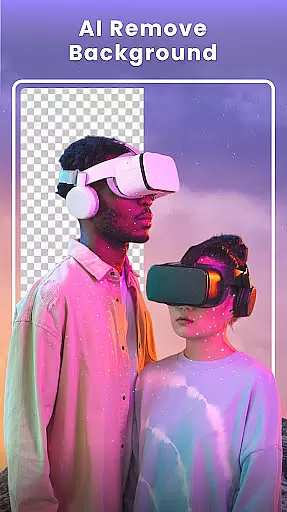



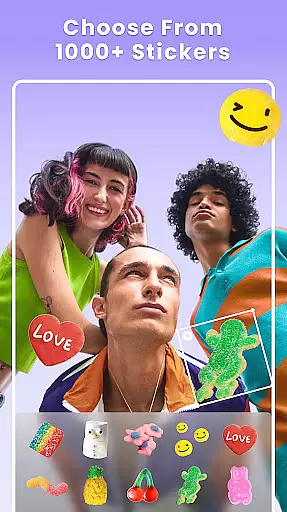

Photo Collage Maker - FunPic is a versatile photography app designed to help users create stunning photo collages and video stories. With over 300 layouts, the app allows you to combine photos into eye-catching arrangements while offering creative tools like filters, text, stickers, and brushes. The AI-powered features enable effortless background removal and object erasing, ensuring your photos are flawless.
Beyond basic collage creation, FunPic provides advanced functionalities such as video collages, slideshow makers with music, and freestyle design options. Whether you're crafting an Instagram feed or reliving memories through dynamic videos, this app caters to every style and occasion. Its intuitive interface and rich material library make it perfect for both casual users and creative professionals.
The app's value lies in its ability to transform ordinary photos into personalized works of art. From themed templates for special events to seamless integration of photos and videos, Photo Collage Maker empowers users to tell their unique stories visually. Suitable for social media enthusiasts and memory keepers alike, it ensures your creations stand out in any digital space.
Photo Collage Maker - FunPic stands out with its extensive range of features tailored for creativity and convenience. One notable feature is the inclusion of over 300 customizable layouts, ranging from regular grids to intricate shapes, allowing users to arrange photos according to their preferences. Additionally, the app offers weekly updates on materials like stickers, backgrounds, and templates, ensuring fresh content for every project.
Another highlight is the AI-driven editing tools, which simplify complex tasks such as background removal, object erasure, and avatar creation. These innovations save time while delivering professional-quality results. Moreover, the app supports mixed media projects by combining photos and videos into cohesive narratives, complete with music and decorative elements.
FunPic also excels in providing specialized modes like slideshow makers and freestyle collage designs. Users can add transitions, animations, and text overlays to craft engaging presentations or break free from grid constraints to experiment with unique compositions. This versatility makes the app suitable for various use cases, from casual sharing to professional portfolios.
Real-time capture and preview functionality is essential for any photography app as it allows users to see exactly what the camera sees before taking a shot. This ensures that users can make necessary adjustments to framing, lighting, and composition instantly.
Photo Collage Maker - FunPic offers an intuitive real-time preview feature that lets users experiment with different collage layouts, filters, stickers, and text overlays while seeing the changes applied to their photos immediately. The app's interface provides a seamless experience where modifications are reflected without delay.
With this capability, users gain precise control over their creative process. Whether combining multiple photos into one collage or editing individual images, the ability to preview results in real time enhances user satisfaction by reducing guesswork and allowing for instant refinement of their artistic vision.
This feature not only saves time but also elevates the overall quality of the final product, making photo editing more accessible and enjoyable for both amateur photographers looking to enhance social media posts and professionals seeking efficient tools for quick edits.
AI beauty and enhancement features have become increasingly popular in photography apps, offering users the ability to refine and beautify their images with minimal effort. The naturalness of these enhancements is crucial, as overly processed photos can appear artificial and lose their authenticity.
FunPic's AI-powered tools provide sophisticated yet subtle enhancements that preserve the original character of the photograph while improving its aesthetic appeal. Users can leverage advanced AI to remove unwanted objects, change backgrounds seamlessly, or apply artistic filters that enhance mood without compromising realism.
The appu2019s automatic background removal tool exemplifies this balance between enhancement and naturalness. By utilizing cutting-edge algorithms, it intelligently identifies and removes backgrounds with precision, allowing users to replace them with custom options or blur effects that maintain visual harmony.
Ultimately, FunPic empowers users to create polished, professional-looking collages and edited photos that retain their genuine essence. This approach not only meets but exceeds user expectations by delivering high-quality results that feel both enhanced and authentically representative of the captured moment.
User-friendly interface
Extensive layout options
AI-powered editing tools
Weekly updated materials
Versatile mixed media support
Premium features locked behind paywall
Occasional ads in free version
High storage requirement
Limited offline functionality
Learning curve for advanced tools

Shooting photos and records video easily and efficient with professional Camera
 4.30
4.30
An interval timer to automate photo taking process for timelapse
2.90
All-in-One Editor & AI Photo Enhancer, Collage, Cartoonify, Funny Stickers & BGS
4.10
Professional photography on your mobile phone
4.20
Luminar: Photo Editor - easy picture editing with AI
4.20
AI photo enhancer with Sora 2! Enhance, descratch, and colorize your old photos.
4.50
Hair color changer, AI haircut app, fun hair editor and buzz cut filter for all!
3.80
Snap photos remotely using your Garmin watch as the camera trigger
4.1
Discover How to Plan any Sun, Moon and Milky Way Photo You Imagine in Seconds
4.70
The original Rarevision VHS look seen everywhere!
4.70
1M influencer's special filter
4.60
Effortlessly organize, view and share your photos & videos with Gallery app!
4.40
A reflected light meter with spot metering and incident light metering.
4.40
RAW video capture with advanced controls
4.40
Smart, light, and fast photo and video gallery
4.30
What celebrity do you look like? Celebs will find your celebrity match!
4.10
Photobooth mini FULL app will allow you to add more fun to your parties
4.00
Create amazing frames with up to five photos. Rounded corners, effects and more!
3.60
HD Photo gallery and photo manager to edit, hide private photos, videos & albums
4.4


User Reviews