


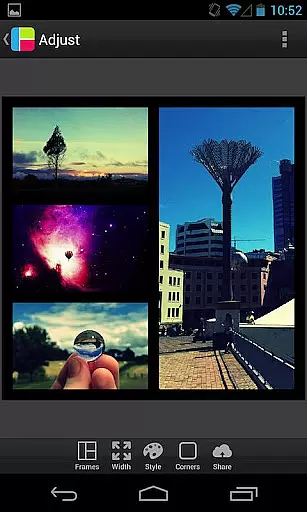
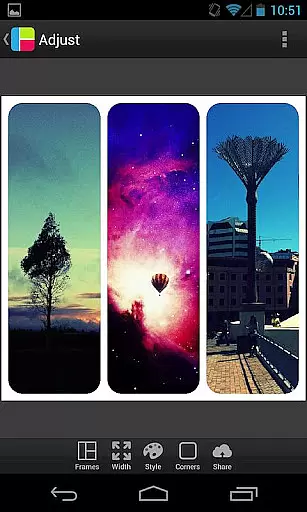

PicFrame is a versatile photography app that allows users to create stunning photo collages by combining multiple images into customizable frames. With 36 adjustable frame layouts, users can include up to five photos in a single frame, offering endless creative possibilities. The app provides advanced editing tools such as rounded corners, shape customization, and precise control over border width and color.
Designed for both casual users and photography enthusiasts, PicFrame supports various aspect ratios including square format, making it ideal for social media sharing. Its intuitive interface enables easy zooming, rotating, and repositioning of photos. Users can further enhance their creations with 52 background patterns and adjustable photo effects like brightness, contrast, and saturation. Whether you're looking to preserve memories or showcase your artistic flair, PicFrame delivers a unique and professional touch to your photo projects.
PicFrame stands out with its comprehensive set of features tailored for creative photo editing. The app offers 36 fully adjustable frames, allowing users to customize layouts by dragging inner borders for endless personalization. Each photo within the frame can be individually edited, with options to adjust brightness, contrast, saturation, and apply rotation as needed.
One of the app's key strengths is its design flexibility. Users can change the shape of their photos to circles, hearts, hexagons, and more, while also selecting from 52 distinctive background patterns. The border customization feature includes adjustable width and a user-friendly color picker for a personalized look. Additional practical features include support for multiple aspect ratios, pinch-to-zoom functionality, and seamless integration with social media platforms for easy sharing.
The app maintains high-quality output resolutions, ensuring professional-grade results. Its combination of creative freedom and technical precision makes PicFrame an excellent choice for anyone looking to elevate their photo presentation, whether for personal albums or social media content creation.
Real-time capture and preview functionality is essential for photography applications as it allows users to see exactly what the camera is capturing. This ensures that users can make necessary adjustments before taking a photo, resulting in better quality images.
PicFrame offers an intuitive interface where users can adjust various settings such as brightness, contrast, and saturation of each photo in real time. The ability to rotate photos and pinch to zoom further enhances the user's control over the final composition, providing a seamless experience from capture to frame creation.
With PicFrame, users can instantly see how their adjustments affect the overall look of the combined photos within frames. This immediate feedback loop empowers users to create visually stunning collages with confidence, knowing precisely how the end result will appear.
The app's real-time preview feature not only saves time but also enhances creativity by allowing users to experiment with different effects and layouts on the fly. Whether sharing memories with friends or creating professional-looking portfolios, PicFrame's real-time capabilities ensure that every detail is perfect.
AI beauty and enhancement features have become increasingly popular in photography apps, offering tools that automatically improve image quality while maintaining a natural look. These enhancements help users achieve polished results without sacrificing authenticity.
PicFrame incorporates advanced AI algorithms that allow users to adjust photo effects like brightness, contrast, and saturation with precision. By providing 36 fully adjustable frames and numerous background patterns, the app ensures that every collage looks unique yet cohesive, enhancing the visual appeal naturally.
One standout feature of PicFrame is its ability to change the shape of photos into circles, hearts, hexagons, and more. Combined with rounded corners and customizable borders, these options enable users to add artistic touches that enhance the overall aesthetic without appearing artificial.
Ultimately, PicFrame strikes a balance between automated enhancements and manual controls, giving users the flexibility to create beautiful, natural-looking collages. This blend of technology and personal touch makes PicFrame a go-to choice for both casual photographers and professionals seeking high-quality photo editing solutions.
User-friendly interface
Extensive customization options
High-quality output
Social media integration
Versatile frame designs
Limited advanced editing tools
No cloud backup
Occasional ads
Pro features locked
Learning curve for beginners

Trendy TikTok time warp scan funny filter app brings you unique photos & videos.
 4.40
4.40
Professional video recording application with manual controls for filmmakers!
2.80
Photobooth mini FULL app will allow you to add more fun to your parties
4.00
AI photo editor with hair editor, retouch tools, hair color changer & filters!
4.50
Create AI Photos, Improve and restore quality of blurry, old or damaged pics.
4.20
Create Business Headshots, Polaroid Filter, Retake Photos,Profile Pics,AI Photos
4.50
Professional quality photo edits with the new Snapseed.
4.00
live datamoshing
4.00
RAW video capture with advanced controls
4.40
Create funny photos and videos with the popular Time Warp Scan filter.
4.90
Take videos and pictures with the popular TikTok TIME WARP SCAN filter.
4.60
Easily create custom gifts, cards, photo books & more on the Shutterfly app!
4.60
AI photo enhancer with Sora 2! Enhance, descratch, and colorize your old photos.
4.50
Fit multiple photos on one post. Create carousels & scroll layouts for Instagram
4.50
Edit like a pro with Hypic. Apply filters, AI effects, & magic touch.
4.40
AI portrait generator and polaroid AI selfie, fun AI generated AI photo creator!
4.30
How would you look like with a differently shaped nose, chin or lips?
3.90
Be your best in every shot! Fix, edit and retouch your face in selfies & photos.
3.70
Application for remote controlling DSLR
3.00


User Reviews