

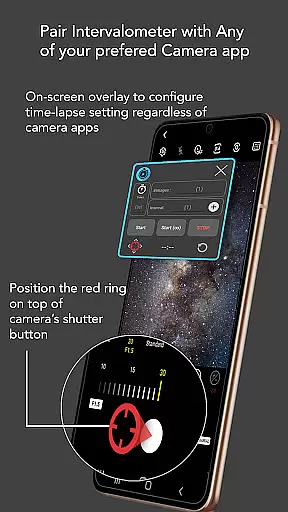
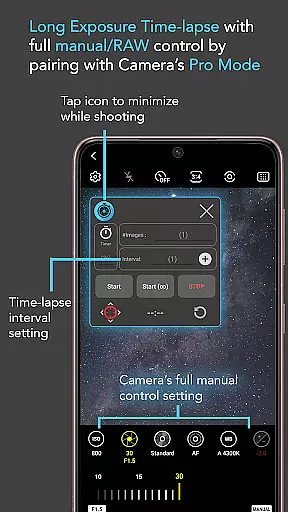
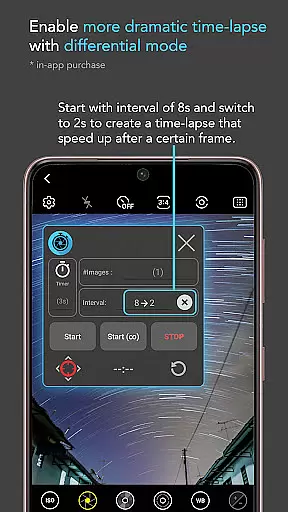
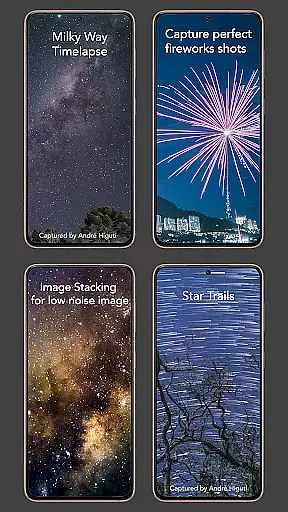
Intervalometer for TimeLapse is a powerful photography tool designed to automate the process of capturing time-lapse sequences. This app allows photographers to configure specific time intervals for triggering the camera shutter, enabling greater control over exposure settings and supporting RAW format capture.
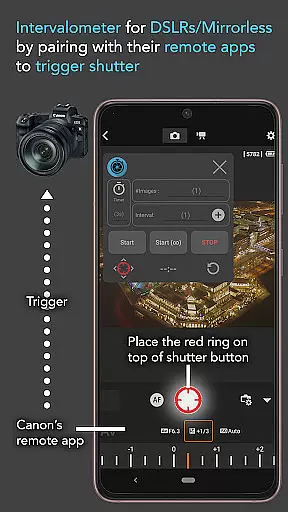
The application works seamlessly with any camera app on Android devices (version 7 and above), including specialized modes like HDR, night mode, and ultra-wide angle. It also integrates with dedicated camera remote apps from brands like Canon, Sony, and Nikon, functioning as a true intervalometer for both smartphones and professional cameras.
With its flexible configuration options, users can create stunning low-light time-lapses, star trail sequences, and even holy grail transitions from day to night. The app's versatility extends beyond time-lapse photography, supporting techniques like image stacking and lightning stacking for enhanced post-processing quality.
Intervalometer for TimeLapse offers an impressive set of features that cater to both amateur and professional photographers. The app provides complete control over time-lapse configurations, allowing users to customize delay timers, interval times, and the number of shots.
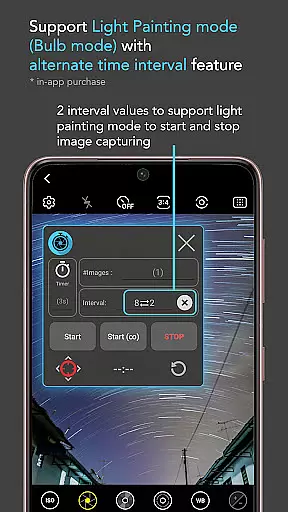
One of the standout capabilities is its infinite mode, which enables continuous shooting until manually stopped. Additionally, the bulb mode supports long-exposure photography, making it possible to capture stunning light trails and astrophotography scenes. The app's compatibility with any camera app ensures flexibility in choosing preferred photography tools.
Advanced users will appreciate the ability to reconfigure shutter button positions and work with specialized camera modes. Whether you're capturing Milky Way time-lapses or experimenting with light painting techniques, this app provides the necessary tools to execute complex photographic projects with precision.
Real-time capture and preview functionality is essential for photographers who need to ensure their shots are perfectly composed and exposed. Intervalometer for TimeLapse offers this by integrating seamlessly with any camera app, allowing users to automate the shutter release process while maintaining full visibility of what's being captured.
This application leverages the AccessibilityService API to trigger the camera shutter at user-defined intervals, ensuring that every moment is recorded without manual intervention. This feature is particularly useful when shooting time-lapse sequences that require consistent timing between shots, such as capturing star trails or the transition from day to night.
Users benefit from the ability to configure various settings including delay timers, interval times, and the number of shots. This flexibility ensures that whether you're capturing low light scenes, long exposures, or HDR images, the results will be precisely as intended. The app also supports bulb mode for extended exposure photography, making it a versatile tool for creative expression.
While Intervalometer for TimeLapse does not focus on AI beauty enhancements typically found in portrait or selfie applications, its precision in automating the photo-taking process brings a different kind of natural enhancement to photography. By enabling precise control over time-lapse configurations, it allows photographers to capture scenes exactly as they unfold, preserving the authenticity of the moment.
The app works harmoniously with dedicated camera remote apps from brands like Canon, Sony, and Nikon, functioning as an external intervalometer. This means that even when using professional-grade equipment, users can rely on Intervalometer to trigger the shutter with exact timing, enhancing the overall quality of the final time-lapse video through consistency and accuracy.
For advanced techniques such as image stacking or creating star trail effects, Intervalometer provides the necessary tools to capture multiple frames that can later be processed for stunning results. Although it doesn't apply digital enhancements directly, the app's ability to reliably capture high-quality source material contributes significantly to achieving professional-looking outcomes.
Flexible time-lapse options
Wide camera compatibility
Supports advanced techniques
User-friendly interface
Professional-grade results
Requires careful setup
Device compatibility issues
No built-in camera
Complex for beginners
Limited automation features

Remote control of the phone camera from your Wear OS smartwatch
 3.70
3.70
Long exposure camera with computational photography
2.60
All-in-One Editor & AI Photo Enhancer, Collage, Cartoonify, Funny Stickers & BGS
4.10
Gallery Slideshow is slideshow maker app for slideshow from your gallery photos.
3.90
Raw Image Viewer. Gallery with support of raw images (.cr3, .cr2, .nef, .raf).
2.00
USB Storage Access for Photos, Videos, Music and Documents
3.80
Create AI photos & videos with Enhancer; restore, fix, beautify, enhance photos
4.50
Use AI Video Generator to turn your words to ai generated videos.
4.50
Effortlessly make high-quality GIFs from images & videos without any watermarks.
4.70
Easily view, share, delete photos with Gallery.
4.70
Cartoon and artistic effects for your photos and videos
4.70
1M influencer's special filter
4.60
Take videos and pictures with the popular TikTok TIME WARP SCAN filter.
4.60
Safe & smart flight with Go Fly drone controller for 40+ drone camera, zone map
4.50
Photo Exif Editor allows to view, add and modify EXIF data of multiple photos
4.50
Movie camera, supports pro recording settings for filming. Try it and be amazed!
4.50
Easily stitch panoramas from multiple photos or video.
4.40
Natural Beauty, Selfie Retouch
4.30
Hair color changer, AI haircut app, fun hair editor and buzz cut filter for all!
3.80


User Reviews