
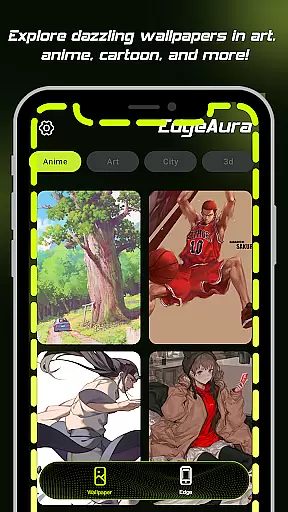
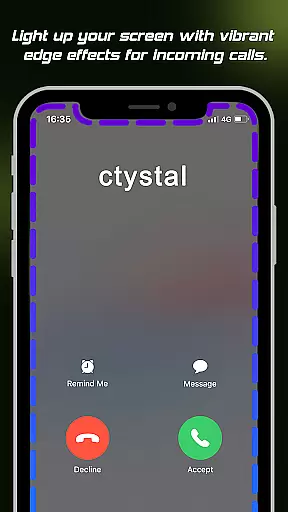
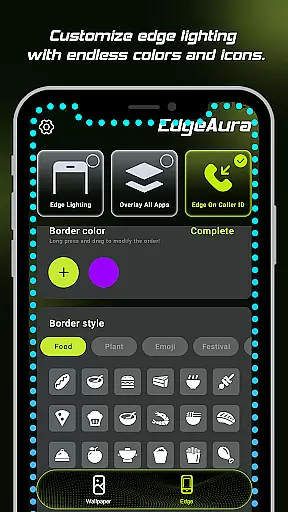
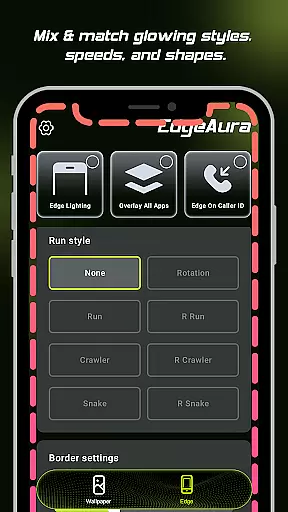
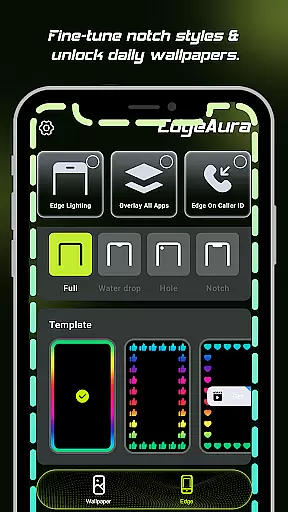
EdgeAura is a personalization app that enhances your device's visual appeal with stunning edge glow effects and dynamic live wallpapers. The app allows users to customize their screen edges with colorful, floating overlays that react to activities like incoming calls. This creates a uniquely vibrant look that works seamlessly over other applications without disrupting normal phone use.
The app offers an extensive collection of high-quality animated wallpapers, ensuring your home and lock screens remain fresh and personalized. EdgeAura requires the Android Accessibility Service permission to deliver its core features, but it strictly uses this permission to enhance visual functionality without compromising user privacy or security.
EdgeAura stands out with its Dynamic Edge Glow feature, allowing users to customize color, width, and intensity for a perfect match with their style. The Floating Overlay Effect ensures the glow remains present across all apps, providing an immersive experience. Additionally, the Incoming Call Alert visually notifies users with glowing screen edges.
Another key feature is the Extensive Live Wallpaper Collection. Users can choose from a regularly updated library of high-quality, animated wallpapers. These elements combine to create a modern, personalized aesthetic that enhances both functionality and visual appeal, setting EdgeAura apart in the realm of device personalization.
EdgeAura offers a rich array of customization options that allow users to tailor their device's visual experience with precision. The app provides dynamic edge glow effects that can be adjusted in terms of color, width, and intensity, ensuring that each user can find the perfect match for their personal style and current wallpaper.
This level of customization extends beyond static settings; it includes an extensive live wallpaper collection. Users can explore a wide variety of high-quality, animated live wallpapers from a regularly updated library, which keeps the home screen and lock screen fresh and engaging.
The ability to customize is not just about aesthetics; it also enhances functionality. For instance, EdgeAurau2019s Incoming Call Alert feature lights up the screen edges with a chosen color when a call is received, offering both a visually striking notification and a personalized touch to everyday interactions.
By providing these diverse customization options, EdgeAura empowers users to create a device that truly reflects their personality and meets their specific needs, making every interaction with their phone a unique and enjoyable experience.
Theme compatibility is a crucial aspect of EdgeAura, ensuring that its stunning visual effects integrate seamlessly with the user's chosen themes and apps. The app employs a floating overlay effect that works elegantly on top of other applications without disrupting normal phone use, maintaining visual consistency across different interfaces.
EdgeAura achieves this through the responsible use of Androidu2019s Accessibility Service, which allows the app to detect screen content and application windows. This ensures that the colorful glow effect frames the screen perfectly, regardless of the underlying theme or application, preserving the intended visual harmony.
Moreover, EdgeAura is committed to transparency and security. While utilizing powerful tools like the AccessibilityService API, the app strictly limits its use to drawing the glow effect and identifying incoming call events. It does not collect or store personal data, ensuring that theme compatibility does not come at the expense of user privacy.
With EdgeAura, users can enjoy a cohesive and immersive visual experience that respects their choice of themes while adding a layer of personalized sophistication to their device.
Stunning visual effects
Highly customizable options
Non-intrusive overlay
Privacy-focused design
Regular content updates
Requires specific permissions
Potential battery drain
Limited to Android devices
May not suit all tastes
Dependent on Accessibility Service

Fingerprint Lock Screen & Live Animations with 4K Wallpapers as Live Wallpaper
 4.40
4.40
Art & Emoji Keyboard with Cool Fonts, Cute Themes and Custom Designs.
4.40
Personalize your phone with stunning HD and 4K wallpapers!
4.70
Ultimate Gallery Lock App - Hide Pictures, Videos and Lock Apps Instantly!
4.60
Customize your home screen with stunning themes, blur, widgets & icons.
4.60
Crystal-clear, square icon provides a sleek and sophisticated visual upgrade
4.00
Struggling to find apps? Use this app to locate and open any app on your phone!
2.20
Emoji Maker app - Design custom emojis and effortlessly blend them with Mixer
3.80
Transform your phone with stylish zipper lock themes and 4D live wallpaper
4.10
100+ Stylish Fonts, Emojis, Symbols keyboard for Instagram & TikTok!
4.80
Gun Chase - Let the chase begin.
4.80
Make your phone look simple & luxury, like iDevice
4.60
Turn text & photos into stunning AI videos, art, and creative visual stories.
4.50
AI-powered Copilot. Personalized keyboard with gifs, stickers & themes
4.40
Yandex Browser — stylish and secure, with voice search and data compression
4.40
The definitive Icon pack maker and editor
4.30
Run multiple accounts of the same app on a single device
4.10 4.10
4.10
Capture moments that pass like a storm, second by second.
4.5
Wallpaper Engine Android review—PC sync setup, crash issues, sound reactive limitations, and whether this free companion app is actually good.



User Reviews