
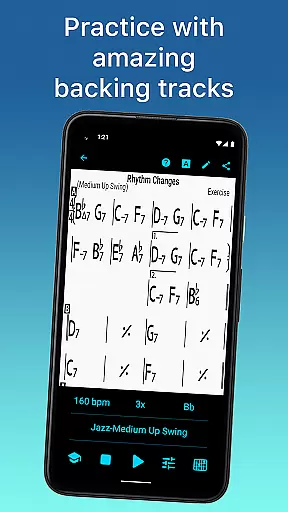
iReal Pro is a comprehensive music practice tool designed to help musicians of all levels improve their skills. The app simulates a realistic band accompaniment, allowing users to practice with high-quality piano, guitar, bass, and drum sounds across 51 different music styles. It also provides an intuitive platform for creating, editing, and collecting chord charts of your favorite songs.
One of Time Magazine's 50 Best Inventions of 2010, iReal Pro is widely used by music students, teachers, and top institutions like Berklee College of Music. Whether you're practicing scales, transposing keys, or recording your performances, this app serves as both a virtual band and a digital chart repository, making it an essential tool for any musician looking to master their craft.
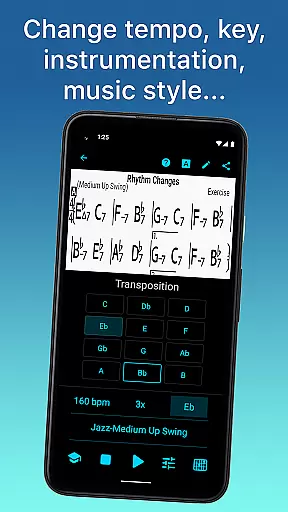
iReal Pro offers an extensive set of features that cater to musicians' needs. The app includes 51 accompaniment styles such as Swing, Ballad, and Bossa Nova, with additional styles available via in-app purchases. Each style can be personalized with various instrument sounds, including electric and acoustic guitars, pianos, organs, and more.
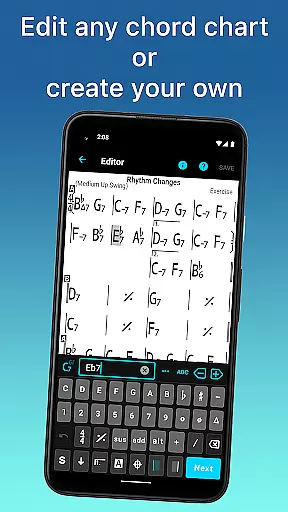
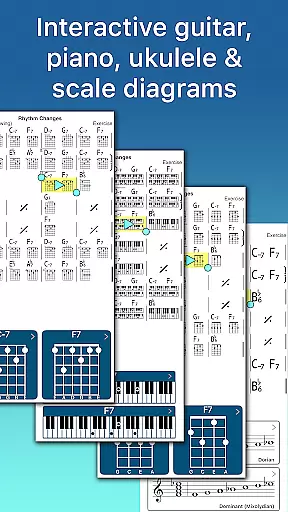
The built-in editor allows users to create and edit unlimited chord charts while providing helpful tools like scale recommendations, chord diagrams, and transposition options. Advanced practice settings include automatic tempo increase and key transposition, ensuring steady progress during practice sessions. With export capabilities for PDFs, MusicXML, WAV, AAC, and MIDI files, musicians can seamlessly integrate their work into other platforms or share them with fellow artists.
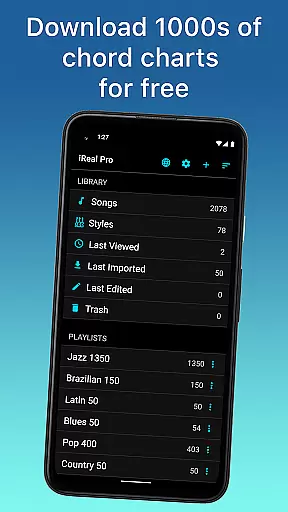
Having a comprehensive music library is essential for any musician looking to practice and improve their skills. iReal Pro offers access to thousands of songs that can be downloaded directly from the forums, providing users with an extensive repertoire to choose from.
The app ensures copyright authenticity by allowing users to create, edit, and collect chord charts of their favorite songs. This feature not only supports practicing musicians but also respects the intellectual property of songwriters and composers.
Users can take advantage of the included 50 exercises for practicing common chord progressions, which are designed to enhance musical abilities while maintaining compliance with copyright laws.
With the ability to share and export music in various formats such as PDF, MusicXML, WAV, AAC, and MIDI, iReal Pro makes it easy for musicians to carry their personalized music library wherever they go, ensuring both convenience and legal integrity.
Audio quality is paramount when it comes to realistic practice sessions. iReal Pro simulates a real-sounding band accompaniment with high-quality audio output, making practice sessions as authentic as possible.
Musicians can personalize each accompaniment style with a variety of sounds including piano, Fender Rhodes, acoustic and electric guitars, basses, drums, vibraphone, organ, and more, ensuring that the audio experience is rich and varied.
The option to record oneself playing or singing along with the accompaniment provides valuable feedback on performance, while the advanced settings allow for automatic tempo increase and key transposition, enhancing the practice experience.
Furthermore, iReal Pro's capability to export audio files in multiple formats like WAV, AAC, and MIDI allows users to maintain high standards of audio fidelity across different platforms and uses.
User-friendly interface
High-quality sound library
Versatile accompaniment styles
Comprehensive editing tools
Extensive sharing options
Additional styles cost extra
Steep learning curve for beginners
Limited free song downloads
No video tutorials included
Occasional syncing issues

Time Guru will strengthen your internal sense of musical time via random muting.
 4.30
4.30
JBL PartyBox APP works with 110/310/710/120/320/520/Encore/Encore 2/Encore Ess 2
4.80
Visualize the guitar fretboard, master scales & play through changes like a pro!
4.50
The only true audiophile music player with Hi-Fi audio rendering and DSP engine
3.90
Super Sound Editor, Song Maker & Mixer, Vocal Remover, Voice Recorder & Changer!
4.60
Enjoy singing any song, no matter how high or low it is
4.30
Learn the notes on the guitar fretboard fast with this easy and fun app
4.60
Ringtone Maker is free app create ringtone from music files or your recording.
4.40
Sing, record, and create music together — enhanced by smart voice tools.
4.00
24,000 free audio books and no ads!
4.90
Gorgeous UI, Powerful music Search and Equalizer, the great choice for you!
4.70
Walkout Song DJ is the most intuitive app to manage your sports music.
4.70
SqueezePlayer turns your Android phone or tablet into a SqueezeBox on its own!
4.60
A complete sound package for the sound engineer or enthusiast
4.60
Save hundreds of dollars for a physical strobe tuner and instead use this app.
4.50
Bass Booster Pro takes auto-equalizing to the next level!
4.30
PowerAudio is a powerful offline music player.
4.20
USB audio recording and playback finally possible on Android 3.1 or higher!
3.90
Slow music down without changing pitch.
3.70


User Reviews