
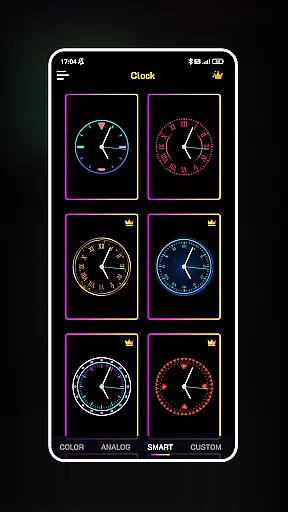
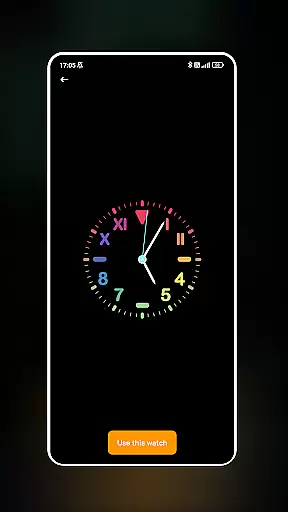
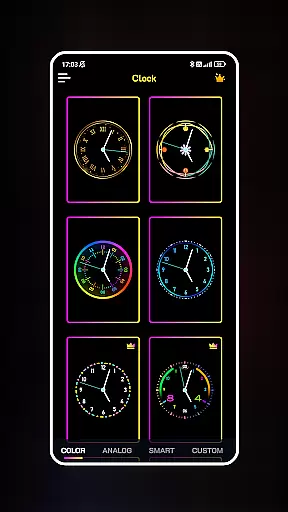
Neon Clock Wallpaper is a dynamic personalization app that allows users to design and display unique, customizable clocks on their mobile screens. This app caters to those who wish to express their individuality through creative digital timepieces.
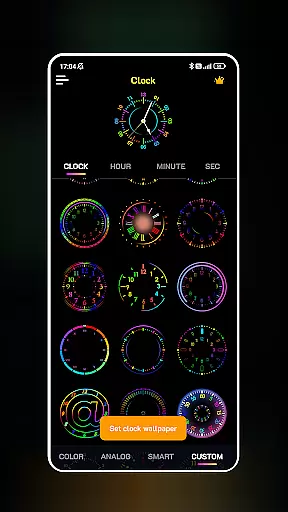
The core functionality includes diverse clock templates with various designs and colors, enabling users to craft personalized neon-style clocks. Users can customize every aspect of the clock's appearance, from colors and sizes to styles, ensuring each creation is truly one-of-a-kind.
Ideal for enhancing both home screens and lock screens, Neon Clock Wallpaper transforms any smartphone into a vibrant canvas of self-expression. The stunning neon effects add an artistic flair, making it not just a utility but also a style statement.
Neon Clock Wallpaper stands out with its rich feature set tailored for customization enthusiasts. The app offers an extensive selection of pre-designed clock templates, each with unique aesthetics, catering to different tastes and preferences.
One of the key highlights is the ability to create fully custom clocks. Users can mix and match components, adjust color schemes, modify sizes, and experiment with styles to build a clock that perfectly matches their personality. The inclusion of vivid neon effects adds an eye-catching element to each design.
Practical usability is ensured by allowing these creations to be set as both wallpapers and lock screens. This dual functionality provides seamless integration into daily device usage while maintaining visual appeal and practical timekeeping utility.
Customization is at the heart of Neon Clock Wallpaper, allowing users to express their unique style through diverse clock designs. The app offers a wide array of pre-made templates that cater to different tastes and preferences.
With the ability to create custom clocks, users can mix and match components, adjust colors, resize elements, and choose from various styles. This level of personalization ensures that each clock is a reflection of the user's individuality.
The inclusion of stunning neon effects adds another layer of creativity, making each clock not just a time-telling device but also a vibrant piece of art. These effects can be tailored to suit any mood or theme, further enhancing the personal touch.
Whether it's for the home screen or lock screen, the customization options provided by Neon Clock Wallpaper ensure that users can always have a background that is both functional and expressive.
Neon Clock Wallpaper excels in theme compatibility, ensuring that the clocks you design will look great on any device and screen size. The app is optimized to provide a seamless experience across different Android devices.
Users can set their uniquely designed clocks as wallpapers on both home screens and lock screens without worrying about resolution or aspect ratio issues. This compatibility ensures that your personalized design retains its quality and appeal.
The app also takes into account various Android themes, ensuring that the neon colors and effects complement the overall aesthetic of your deviceu2019s interface. This attention to detail guarantees a cohesive look and feel.
By prioritizing theme compatibility, Neon Clock Wallpaper allows users to enjoy their creations without limitations, providing a versatile and reliable customization tool for personalizing digital spaces.
User-friendly interface
Highly customizable designs
Vibrant neon effects
Wide template selection
Unique personalization
Limited to clock designs
Premium features may cost extra
May consume more battery
Design options could overwhelm beginners
Some features require technical know-how

Fingerprint Lock Screen & Live Animations with 4K Wallpapers as Live Wallpaper
 4.40
4.40
Gun Chase - Let the chase begin.
4.80
Want to make your phone more special than ever?
4.60
Romantic Kiss Stickers App. Start romantic messaging now!
4.30
Nothing Icon pack with more than 3750+ highly crafted icons.
4.70
Icons made of colorful linear lines
4.60
Stylish Pink Cute Hippo keyboard with 10000+ customized keyboard themes!
4.60
300+ Stunning and well-designed widgets inspired by NOTHING.
4.70
Handcrafted pixel art icons, widgets & wallpapers
4.60
Sparkle your screen with Glitter Wallpapers For Girls and Cute Backgrounds!
4.80
Wallpaper HD 4K Live - Thousands of high-quality Anime backgrounds for you.
4.80
Customizable Glass widgets. Over 360+ stunning widgets and more!
4.70
Over 28,000 high quality icons to bring color & homogeneity to your phone.
4.60
Transform your phone with Launcher iOS 26 - Smooth & elegant iOS experience
4.50
Yandex Browser — stylish and secure, with voice search and data compression
4.40
Organize and manage your photos and videos effortlessly with Photo Gallery
4.20
Realistic animated snow on your wrist, with 10 images landscapes to choose from
4.00
Create unique, fun emojis with Funny Emoji Maker! Unlimited creativity!
4.00
Your go to Weather App & Home Screen. Get your weather at a swipe of a finger!
3.80
Wallpaper Engine Android review—PC sync setup, crash issues, sound reactive limitations, and whether this free companion app is actually good.



User Reviews