
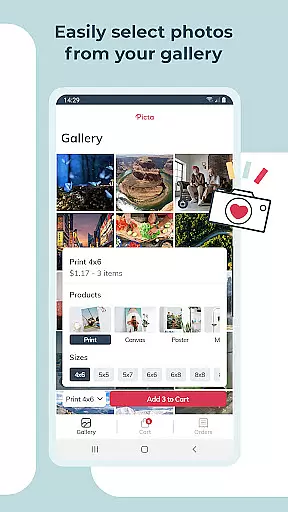
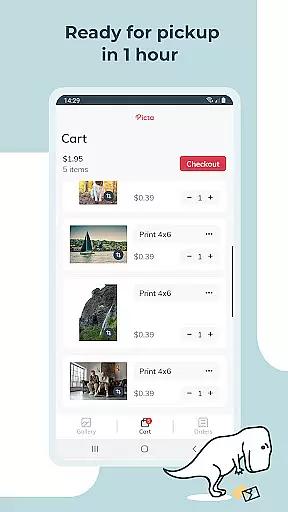
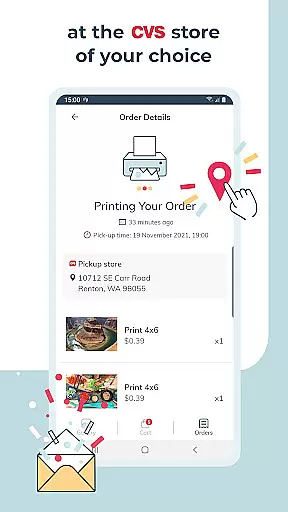
Picta x CVS Photo Print is a mobile application designed to simplify the photo printing process. Users can effortlessly print photos directly from their smartphones by selecting images, choosing print sizes (4x6, 5x7, square, etc.), and specifying quantities. The app supports ordering prints for same-day pickup at the nearest CVS store, streamlining the entire process to be completed within an hour.
With features like real-time order tracking, users can monitor their print status until pickup. Additionally, the app offers options for creating personalized gifts such as magnets and greeting cards, enhancing its utility beyond basic photo printing. This makes it an ideal tool for preserving cherished memories in high-quality prints.
The app boasts a range of features that cater to both convenience and quality. It provides professional-grade photo printing services on glossy paper in various sizes, including 4x6, 5x7, and 8x10 prints, along with square formats perfect for social media photos. Users can also create custom products like magnets and greeting cards, adding a personal touch to their prints.
Other notable features include an intuitive cropping and zooming tool, a gallery that organizes photos by date, and a store locator to find nearby CVS locations. All products are manufactured in the United States, ensuring high standards. These functionalities not only enhance user experience but also offer fast and secure photo transfers, making it a comprehensive solution for all photo printing needs.
Real-time capture and preview functionality is essential for ensuring that users can accurately select and edit their photos before printing. With Picta x CVS Photo Print, the app provides an intuitive interface where users can instantly see the results of their photo selections and edits.
The app allows users to crop and zoom each picture easily, providing a precise preview of how the final print will look. This feature ensures that every detail of the photo is captured correctly, maintaining the quality and integrity of the original image.
By offering real-time previews, the app enhances user satisfaction as customers can make necessary adjustments before confirming their print orders. This saves both time and resources, avoiding the disappointment of receiving incorrectly formatted or low-quality prints.
Overall, the real-time capture and preview feature in Picta x CVS Photo Print empowers users with greater control over their photo printing process, resulting in professional-quality prints that meet their expectations every time.
AI beauty and enhancement features are increasingly popular in photography apps, allowing users to improve their photos with natural-looking effects. Picta x CVS Photo Print incorporates advanced AI technology to enhance photos while maintaining their authenticity and natural appearance.
The app's AI algorithms analyze each photo and apply enhancements that boost color accuracy, contrast, and sharpness without over-processing. This ensures that the final prints reflect the true essence of the captured moments, preserving the original emotions and details.
Users benefit from this feature by achieving high-quality prints that look polished yet genuine. Whether printing standard 4x6 photos or custom-sized prints, the AI enhancements ensure that every image looks its best, making it ideal for creating personalized gifts such as magnets and greeting cards.
Ultimately, the AI beauty and enhancement capabilities of Picta x CVS Photo Print provide users with the tools to elevate their photos naturally, enhancing their overall photo printing experience and delivering stunning, professional-grade results.
User-friendly interface
High-quality prints
Fast processing times
Multiple print sizes
Custom gift options
Limited to CVS stores
App-only deals
Notification opt-in required
US manufacturing only
Facebook integration needed

AI portrait generator and polaroid AI selfie, fun AI generated AI photo creator!
 4.30
4.30
Application for remote controlling DSLR
3.00
Movie camera, supports pro recording settings for filming. Try it and be amazed!
4.50
GCamera allows all GCam features on all phone models! Better photos with GCamera
3.30
Smart, light, and fast photo and video gallery
4.30
Collage your moments in one tap: 1000+ layouts, filters, stickers, and texts.
4.90
Unblur, enhance & restore photos with powerful AI photo enhancer tools.
4.60
Snap photos remotely using your Garmin watch as the camera trigger
4.1
A unique animation app. Powerful, easy to use, and lots of fun.
4.30
Photo prints, cards, & gifts at Walgreens. Easy ordering & fast local pickup !
4.80
Your personal guide to the sun and moon. Plan ahead, visualize and predict!
4.70
Easily create custom gifts, cards, photo books & more on the Shutterfly app!
4.60
Create Business Headshots, Polaroid Filter, Retake Photos,Profile Pics,AI Photos
4.50
Edit like a pro with Hypic. Apply filters, AI effects, & magic touch.
4.40
RAW video capture with advanced controls
4.40
Shooting photos and records video easily and efficient with professional Camera
4.30
Catch sunlight, sunrise sunset times and sun phases with the AR sun tracker.
4.10
Professional quality photo edits with the new Snapseed.
4.00
Pet Camera
3.70


User Reviews