
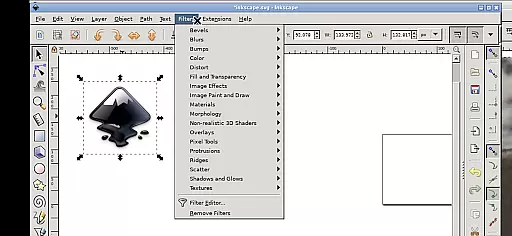
Inky is a powerful vector graphics editor that brings the full functionality of Inkscape to Android devices. This app allows users to create and edit vector images in Scalable Vector Graphics (SVG) format, with support for importing and exporting other formats. It offers professional-grade tools for rendering primitive shapes, text manipulation, and raster graphic tracing.
The application supports various transformations like moving, rotating, scaling, and skewing of created shapes. With adjustable transparency options for both fill and stroke, users can achieve precise design control. The intuitive touch-based interface enables smooth zooming, panning, and scrolling through simple gestures, making it suitable for both tablets and smartphones.
Inky stands out with its comprehensive set of vector editing tools that rival desktop applications. Users can create complex designs using primitive shapes, bezier curves, and text elements. The app supports advanced features like radial and linear gradients, pattern fills, and stroke customization with adjustable transparency.
A unique aspect of Inky is its seamless integration with Android's file system. Through helpful directory links, users can easily access their Documents, Pictures, and other files without cumbersome import/export processes. The app also maintains compatibility with the original Inkscape's features while adapting them for mobile use through an innovative touch-based interface.
The application runs under GPLv3 licensing, ensuring open-source integrity while providing professional-grade vector editing capabilities on mobile devices. Its adaptation from Linux version preserves the core functionality while optimizing it for Android platforms.
Inky provides a comprehensive suite of creative tools that cater to both professional designers and hobbyists. The app includes all the essential vector graphic creation features found in its desktop counterpart, Inkscape.
Users can create primitive shapes such as rectangles, ellipses, polygons, arcs, spirals, stars, and even 3D boxes. These elements are fundamental for designing logos, illustrations, and complex artwork.
Beyond basic shapes, Inky supports advanced functionalities like filling objects with solid colors, patterns, or gradients. Users can also adjust transparency levels, offering extensive control over the aesthetic aspects of their designs.
The ability to embed and trace raster graphics enables users to transform photographs and other raster images into scalable vector formats. This feature expands the creative possibilities, allowing for versatile design adaptations.
Inky offers remarkable canvas and format flexibility, empowering users to work on projects of varying sizes and complexities. The app supports Scalable Vector Graphics (SVG) as its primary format, ensuring high-quality output that remains sharp at any scale.
Designers can import and export various file formats, facilitating seamless integration with other design tools and workflows. This interoperability is crucial for collaborative projects and cross-platform design consistency.
The app allows precise manipulation of created shapes through transformations like moving, rotating, scaling, and skewing. These capabilities ensure that users can fine-tune every aspect of their artwork with accuracy.
Additionally, Inky's interface adapts well to different devices, from phones to tablets, maintaining functionality without compromising on quality or performance. This adaptability makes it an invaluable tool for designers who work on-the-go.
User-friendly interface
Comprehensive vector tools
Seamless file integration
Open-source flexibility
Cross-platform capability
Steep learning curve
Complex interface
High system requirements
Limited mobile optimization
No cloud integration

Discover Cartoon Dream : Unleash Your Creativity with CuttingEdge AI
 4.50
4.50
Pose and morph realistic male and female models! 3D poser app
3.00
Learn how to draw with step-by-step tutorials, fun lessons & multiplayer drawing
4.70
Design your dream room with AI. Get decor ideas & plan home interiors
3.90
AI Assistant, powered by ChatGPT GPT-4 & GPT-4o. Your intelligent companion.
3.50
AI Face Swap, Video Effects Editor, Realtime Morph, Funny Video FX,AI Filters
3.70
Draw anime easily with AR guidance, sketch templates & trace tools!
3.10
Novices can also easily complete diamond painting masters
4.70
AI Tattoo Generator: Create Tattoo Designs & Get Ideas! Ink & Stencil Maker
4.50
See Color, Paint Color
4.90
Photo stitcher for automatically screenshot stitching into a long screenshot
4.70
Digital, Abstract, Classic - all types of color wheels in one app!
4.60
Digital illustration drawing & painting pad app to paint Anime and Manga art
4.50
Unleash your drawing and painting potential
4.50
Video AI: Revolutionize Your Content Creation with Advanced Video Generation
4.50
Image/ Text to Video Generator
4.40
Beauty Camera - Selfie Camera is the ultimate beauty camera and selfie app
4.30
Sketch, plan, take notes and illustrate on an infinite canvas.
4.20
Download now for a stylish and functional timepiece
4.0


User Reviews