
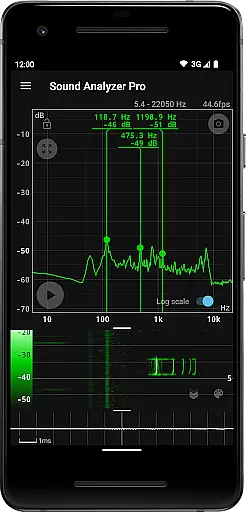
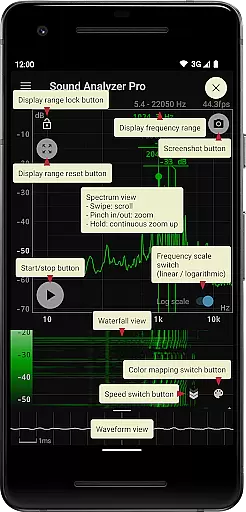
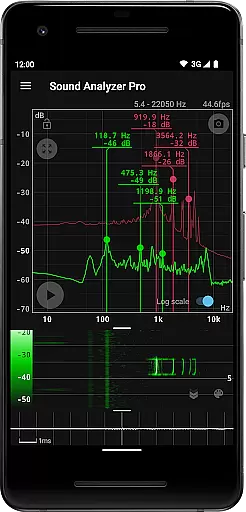
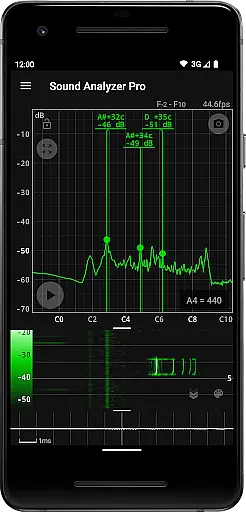
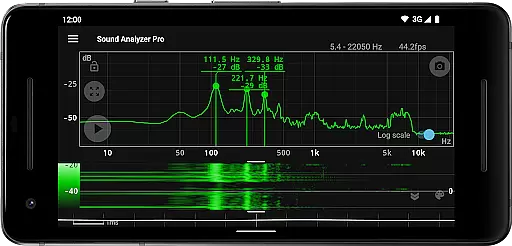
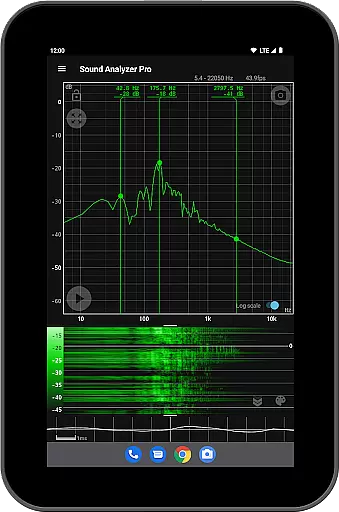
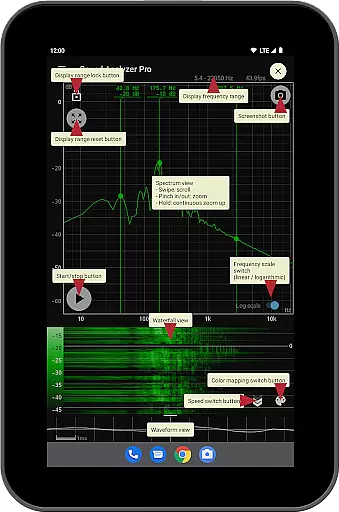
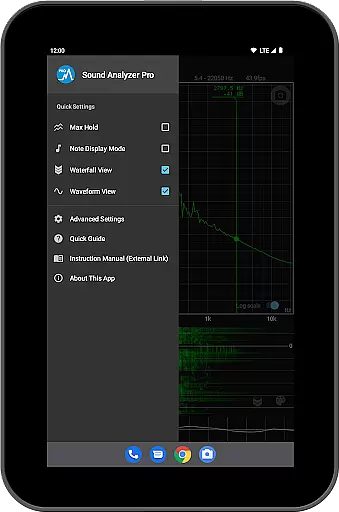
Sound Analyzer is a sophisticated audio analysis tool designed for both professionals and enthusiasts in the music and audio field. The app's core functionality lies in its ability to display real-time frequency (Hz) and amplitude (dB) spectra directly on your mobile device. This makes it an invaluable tool for sound engineers, musicians, and anyone needing precise audio measurements.
Beyond basic spectrum analysis, Sound Analyzer offers advanced features like waterfall view for tracking spectral changes over time, and waveform view for visualizing sound waveforms. With measurement accuracy within 0.1 Hz in quiet environments, the app delivers professional-grade precision. Its comprehensive feature set includes peak frequency display, logarithmic/linear scale switching, max hold function, and musical note display - all without advertisements to interrupt your workflow.
This application proves particularly useful in studio settings or during live performances where real-time audio monitoring is crucial. The ability to capture screenshots with timers and analyze high-frequency spectra up to 96 kHz (on supported devices) demonstrates its versatility across various audio analysis scenarios.
Sound Analyzer distinguishes itself through its comprehensive suite of audio analysis tools. The app's most notable feature is its dual-view system, simultaneously displaying frequency spectra while tracking their temporal changes through the waterfall view. This combination allows users to monitor both instantaneous audio characteristics and their evolution over time.
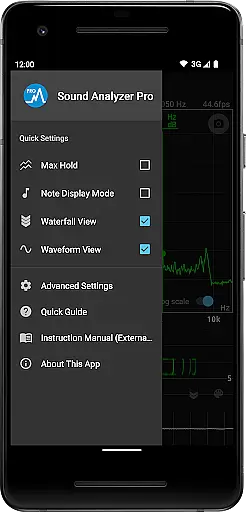
The application implements several innovative features that enhance usability and precision. Its touch-based display range adjustment provides intuitive control over analysis parameters, while the switchable frequency axis scale accommodates different analysis requirements. The inclusion of a max hold function ensures critical peaks aren't missed during monitoring sessions. Furthermore, the unique note display mode translates technical measurements into musician-friendly pitch information, showing notes from A to G♯ along with cent accuracy.
Professional users will appreciate the app's screenshot functionality with timer support, enabling precise documentation of audio events. The absence of advertisements maintains an uninterrupted workflow, while the app's high measurement accuracy (within 0.1 Hz under optimal conditions) ensures reliable data collection. These features collectively make Sound Analyzer a powerful tool for both technical audio analysis and musical applications.
Sound Analyzer does not focus on providing a vast music library but rather emphasizes the analysis of audio signals. This app allows users to analyze audio in real time, displaying frequency and amplitude spectra without the need for additional hardware. The main value lies in its powerful analytical capabilities rather than a repository of copyrighted tracks.
The application supports high-frequency spectrum analysis up to 96 kHz, although this is more suited for specialized devices. For most users, the standard settings provide accurate measurements within a 22 kHz range, ensuring reliable data acquisition without unnecessary noise interference.
While it doesn't offer an extensive music database, Sound Analyzer ensures that all features are free from advertisements, enhancing user experience by focusing on functionality and precision over content volume or licensing.
One of Sound Analyzer's standout features is its ability to deliver exceptional audio quality options through detailed spectral analysis. Users can view changes in sound spectra over time with the waterfall view and observe waveforms using the waveform view, both of which contribute to a comprehensive understanding of audio characteristics.
The app provides flexibility with switchable frequency axis scales between logarithmic and linear, catering to different analytical needs. Additionally, the peak frequency display function highlights prominent spectral components in real time, offering precise insights into audio signals with minimal measurement error.
For those requiring advanced functionalities, Sound Analyzer includes a note display mode that translates pitch into musical notes, further enriching the user's toolkit for audio analysis. These robust features ensure that users have access to high-quality, actionable data tailored to their specific requirements.
High measurement accuracy
No advertisements
Real-time spectrum analysis
Multiple viewing modes
Intuitive touch controls
Complex for beginners
Device compatibility issues
Advanced features require high-end hardware
Limited high-frequency analysis on older devices
Steep learning curve

Equalizer, Bass Booster and Volume Booster (Eq & Bass) improve sound quality
 4.30
4.30
Formerly known as Spotistats! View your top tracks, artists, albums and more!
4.40
DJ Music Mixer - DJ Remix: remix songs, make beat music & record mix of DJ.
4.40
Powerful beat maker & DJ mixer to remix tracks, make music, & perform DJ mix
3.70
Bass Booster Pro takes auto-equalizing to the next level!
4.30
Music Streaming suite for Ampache, Nextcloud Music and compatible backends.
4.5
Offline Music Player&MP3 Player with themes, equalizer, lyrics, music play mode
4.60
One-tap booster for max volume - enjoy powerful sound with this audio booster
4.50
Play your music offline without limits
4.80
JBL PartyBox APP works with 110/310/710/120/320/520/Encore/Encore 2/Encore Ess 2
4.80
Responsive piano with great sounds, graphics, and songs
4.80
The best music and audio player, with beautiful UI, music search and equalizer.
4.60
Bass Booster & Volume Equalizer Pro improves your music and video sound quality
4.60
Reverse your voice & songs instantly! Fun singing challenge with cool effects.
4.60
Full featured mp3 and audio player with Chromecast and Android Auto support.
4.40
Offline and always ad-free - stream in the highest quality available.
4.10
The Skullcandy App Experience
3.20
The Minimalistic Premium Music Player. Handmade with passion for music
2.20
Remove ads permanently from Music Visualizer
4.3


User Reviews