
AutoRemote is a powerful productivity tool that enables users to remotely control their devices, including phones, PCs, and web services. With seamless IFTTT integration, it allows for sophisticated automation and remote messaging capabilities. The app facilitates push notifications between devices, which can be managed through Tasker or standalone AutoRemote apps, providing an unprecedented level of control.
Whether you're looking to manage your Android device from a PC, control your PC from afar, or integrate with hundreds of web services like Facebook or Twitter, AutoRemote makes it possible. Its flexibility lets you customize how things work remotely, opening up endless possibilities for personal and professional use.
The true value of AutoRemote lies in its ability to connect different platforms and devices effortlessly. Imagine sending your phone's location to another device or sharing content directly from one screen to another for a better viewing experience. It's the ultimate solution for those who require seamless connectivity and smart automation across their digital ecosystem.
AutoRemote stands out with its advanced features designed for power users seeking extensive control over their digital environment. One of its core functionalities is the ability to send and receive messages from virtually anywhere - be it a web browser, desktop, or integrated platforms like EventGhost and Zapier. This bi-directional messaging system allows for complex interactions between multiple devices.
What sets AutoRemote apart is its flexible command system and advanced matching options. Users can set up specific commands that trigger actions on other devices. For example, requesting your phone's location could display it on a map on your tablet or PC. Additionally, the app supports direct sharing of links or text via Android's Share menu, enhancing cross-device collaboration.
Moreover, AutoRemote offers customizable use cases limited only by your imagination. From creating a 'lost-my-phone' command to having your device audibly remind you of a shopping list at a set time, the potential applications are vast. These innovative features make AutoRemote an indispensable tool for anyone interested in smart home integration and personalized automation solutions.
Task management is a cornerstone of productivity applications, and AutoRemote excels in this area. This feature allows users to create, assign, and track tasks across multiple devices seamlessly. By integrating with Tasker, it enables complex automation scenarios that can handle everything from simple reminders to sophisticated workflows.
The app's ability to send push notifications ensures that no task goes unnoticed. Users can set up profiles within Tasker to react to these messages, creating a dynamic environment where tasks are not only managed but acted upon immediately. This real-time interaction enhances the overall efficiency of task handling.
AutoRemote's flexibility extends to its command system, which supports advanced matching options. This means users can define specific triggers for different tasks, ensuring that each action is both precise and relevant. Whether it's a location-based reminder or a time-sensitive alert, the system responds accurately every time.
Ultimately, AutoRemote transforms how users approach task management by providing tools that adapt to their unique needs. From finding a lost phone to managing shopping lists, the possibilities are endless. This level of customization empowers users to optimize their daily routines and focus on what truly matters.
Cross-device synchronization is vital for maintaining consistency and accessibility across various platforms. AutoRemote offers robust solutions that ensure data integrity and availability, regardless of the device being used. This reliability is achieved through seamless integration with Tasker and other compatible applications.
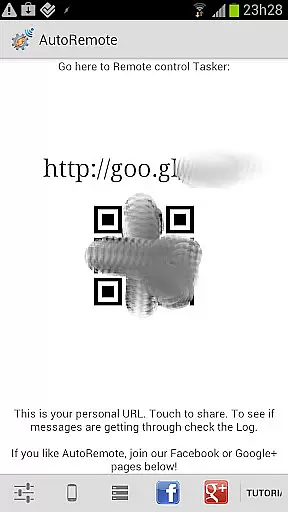
One of the standout features is the ability to send messages between devices using a simple URL call. This functionality facilitates instant communication and updates, allowing users to stay connected whether they're at home, in the office, or on the go. The bi-directional messaging capability further enhances this experience by enabling full interaction between devices.
Moreover, AutoRemote supports sharing links or text directly via Androidu2019s Share menu. Imagine discovering a YouTube video on your phone and instantly opening it on a larger tablet screen for better viewing. This kind of effortless transition between devices underscores the app's commitment to enhancing user convenience and productivity.
In summary, AutoRemote's cross-device synchronization is designed to keep users productive and informed. By leveraging advanced technologies and intuitive interfaces, it delivers a reliable and efficient way to manage tasks and communications across multiple platforms. This ensures that users never miss an important update or opportunity to streamline their workflow.
User-friendly interface
IFTTT integration
Cross-platform support
Flexible command system
Advanced automation
Steep learning curve
Requires Tasker
Limited free features
Complex setup
Premium cost

Client for Nextcloud Deck
 4.60
4.60
Experience Reading - Night Mode for Documents
4.40
Protect and view your important info on your phone and tablet with eWallet®
4.80
Simple and reliable communication between inmates, friends and family
3.20
Find and delete junk files & block unwanted notifications & manage files
3.70
The AI assistant that thinks with you - write, code, and solve complex tasks
4.60
Great calculator for Android named one of USA TODAY's "25 Essential Apps".
4.90
The ultimate file manager for rooted devices. The original and still the best.
4.00
Access your phone's notifications, calls, apps, photos & texts on your PC
3.90
Scientific calculator for Android - looks and operates like the real thing!
4.90
Android Wallet Password Manager
4.80
Subscribe to Webcal & .ics calendars and keep them up-to-date!
4.50
Enjoy classic gameplay with customizable features and retro-style graphics.
4.30
Activate Two Factor Authentication (2FA or Multi OTP), Password manager and more
4.10
Wake up & get tasks done! Add alarms & reminders on the Clock Launcher.
4.00
* block pre-roll ads, pop-up and forced redirect ads * Samsung certification app
4.00
Mega cloud explorer plugin for Solid Explorer
3.80
Remotely view listen control and record cameras.
3.70
IP Camera Viewer - Android TV : RTSP Surveillance camera viewer for Android TV
4.1


User Reviews