
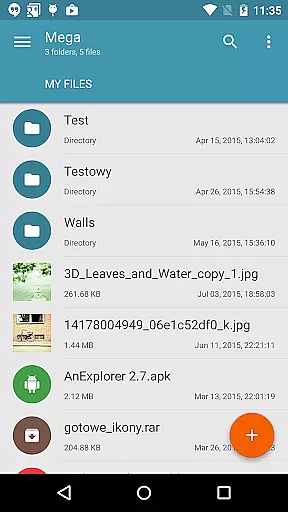
Mega Plugin for Solid Explorer is a productivity-focused extension that seamlessly integrates with your Solid Explorer file manager. This plugin enables users to directly connect their Mega cloud storage accounts, allowing for efficient file management without leaving the Solid Explorer interface. With this app, you can perform essential file operations such as copying, moving, renaming, and viewing files, as well as downloading and uploading content.
One of the standout features is its ability to stream music and videos directly from your Mega cloud storage. Whether you're managing documents for work or accessing media files on the go, this plugin provides a smooth experience across Android devices. The integration simplifies cloud storage management, making it an ideal tool for users who rely on both Solid Explorer and Mega for their digital organization needs.
The Mega Plugin offers a comprehensive set of features designed to enhance productivity. First and foremost, it allows users to perform a wide array of file management tasks including copying, moving, renaming, and viewing files directly within Solid Explorer. Additionally, it supports downloading and uploading files, ensuring seamless synchronization between your device and Mega cloud storage.
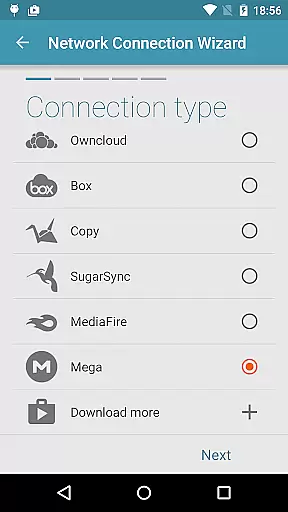
Another notable feature is the ability to stream music and videos without needing to download them first. This functionality not only saves storage space but also provides instant access to your media library. By following a few simple steps - tapping the + button, choosing 'Cloud connection,' selecting Mega, and entering login credentials - users can quickly establish a secure connection to their cloud storage. This makes the plugin a versatile tool for anyone looking to streamline their cloud-based workflows.
Task management is a critical aspect of productivity applications, especially when dealing with cloud storage services. Mega Plugin for Solid Explorer excels in this area by offering comprehensive task handling features.
This plugin allows users to perform a wide array of file operations directly within their Mega account. You can copy, move, rename, and view files with ease, streamlining your workflow significantly.
In addition to basic file management, the plugin supports downloading and uploading files, making it a versatile tool for managing your digital assets across devices. This ensures that your files are always up-to-date and accessible wherever you are.
The ability to stream music and videos directly from your Mega account adds another layer of convenience. By integrating these features, Mega Plugin for Solid Explorer enhances productivity by reducing the need to switch between different apps or download files unnecessarily.
Cross-device synchronization is essential for maintaining consistency and accessibility of your files. Mega Plugin for Solid Explorer provides reliable synchronization capabilities that ensure your data remains current across all your devices.
By connecting your Mega account through this plugin, you gain seamless access to your files without worrying about manual updates or transfers. Any changes made on one device are automatically reflected on others, promoting efficient collaboration and personal productivity.
The process of connecting to Mega is straightforward. After tapping the + button and choosing 'Cloud connection,' you simply select the Mega option and enter your login credentials. Once connected, your cloud drive becomes an integral part of your file management system.
This synchronization reliability extends to various file operations such as copying, moving, renaming, and viewing files. Whether you're working on documents, media files, or other types of content, Mega Plugin for Solid Explorer ensures that your actions are accurately mirrored across all linked devices.
Seamless integration
Comprehensive file management
Instant media streaming
User-friendly setup
Secure cloud connection
Limited to Mega users
Requires Solid Explorer
No standalone functionality
Potential sync delays
Subscription fees may apply

A lightweight JSON & XML files creator, editor and viewer (Premium Version)
 4.40
4.40
⏰ Finally a timer app which can run multiple timers simultaneously on your watch
3.90
IP Camera Viewer - Android TV : RTSP Surveillance camera viewer for Android TV
4.4
Customizable calendar widget for seamless event sync, planning & scheduling.
4.00
The AI assistant that thinks with you - write, code, and solve complex tasks
4.60
Subscribe to Webcal & .ics calendars and keep them up-to-date!
4.50
Best Tool for the professionals Electrician, Electrical contractors, etc.
4.90
Experience and share your SolidWorks designs on your Android® phone and tablet.
2.50
AI Chatbot and AI writing assistant powered by ChatGPT.
4.60
Direct Chat without saving contacts & Dual WA Account on Single Device
4.70
App Lock with fingerprint, password: Lock apps & hide photos with lock screens
4.60
PDF scanner & converter for files, photos, lottery, QR codes. One swipe away!
4.50
Tally and goal counter for Wear OS & mobile
4.50
Total remote control for your Android device, PC and cloud services (IFTTT)!
4.20
Professional calendar app for Google Calendar, MS Outlook & Exchange
4.20
Intelligent AI Assistant
4.10
Remotely view listen control and record cameras.
3.70
Find and delete junk files & block unwanted notifications & manage files
3.70
Make your handwriting beautiful, even more than pen on paper.
3.60


User Reviews