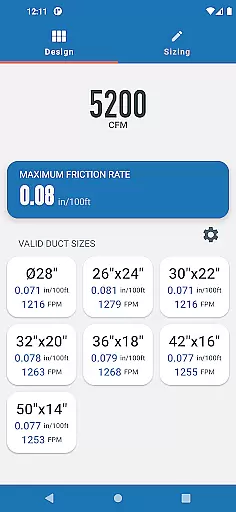
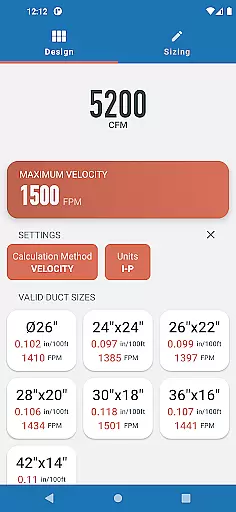
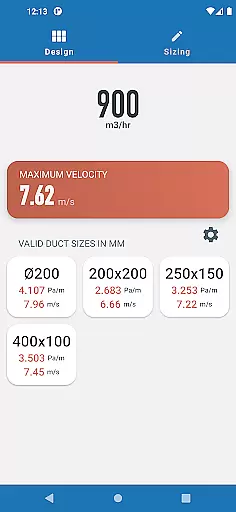
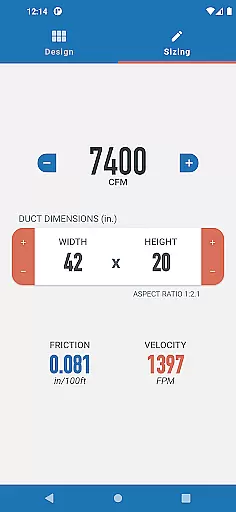
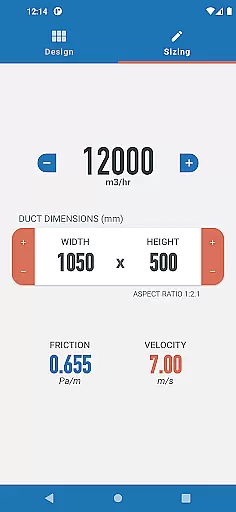
Ductulator is a productivity-focused app designed specifically for HVAC engineers and professionals. This innovative tool serves as a digital equivalent to traditional duct sizing charts, offering faster calculations and greater versatility. The app allows seamless switching between Imperial and SI units, catering to global engineering standards.
The application features two primary modes: Design Mode and Sizing Mode. In Design Mode, users can input parameters such as maximum friction rate or velocity to receive a range of suitable duct sizes. In Sizing Mode, the app functions like a digital ductulator, enabling real-time adjustments to duct dimensions and airflow rates while automatically updating friction and velocity values. These features make it an essential tool for both designing new duct systems and analyzing existing ones.
Engineers will find Ductulator particularly valuable when working with standard air conditions in galvanized steel ducts, as all calculations are based on industry-standard parameters. Whether you're designing new ductwork or evaluating existing systems, this app streamlines complex calculations and enhances productivity in HVAC system design.
Ductulator distinguishes itself through its comprehensive feature set tailored specifically for HVAC professionals. The app's most notable feature is its dual-mode functionality, allowing users to switch between Design Mode for new system creation and Sizing Mode for existing system analysis. This flexibility makes it more versatile than traditional physical ductulators or static sizing charts.
The automatic calculation engine is another key feature, providing instant feedback on friction rates and velocities as users adjust duct dimensions and airflow parameters. The app maintains industry-standard calculations based on 0.075 lb/ft3 (1.2 kg/m3) standard air conditions in clean galvanized steel ducts, ensuring accuracy and reliability in all computations.
Additional features include seamless unit conversion between Imperial and SI systems, making it suitable for international use. The app also incorporates user feedback-driven improvements, such as the Sizing Mode, which was added based on professional engineers' suggestions. These features collectively create a powerful tool that significantly enhances productivity in HVAC system design and analysis.
In the realm of productivity applications, core task management is pivotal for organizing and executing tasks efficiently. Ductulator excels in this area by offering two distinct modes tailored to the needs of HVAC engineers.
In Design Mode, users can input parameters such as maximum friction rate or velocity to receive a list of suitable duct sizes. This feature streamlines the selection process, providing both rectangular and circular duct options along with their associated friction rates and velocities.
Switching to Sizing Mode, the app mimics a traditional ductulator, allowing real-time adjustments to duct dimensions and airflow rates. As users modify these variables, they receive instant feedback on the resulting friction and velocity, which proves invaluable when analyzing existing systems.
This dual-mode functionality ensures that whether planning new designs or evaluating current installations, Ductulator's task management capabilities cater to the dynamic requirements of ductwork engineering.
Cross-device synchronization is essential for professionals who rely on consistent data access across multiple platforms. While specific details about Ductulator's synchronization features are not provided, its design suggests a reliable user experience.
The app is engineered based on surveys from engineers, indicating a strong foundation in practical usability. Its ability to swiftly switch between Imperial and SI units hints at an adaptable system architecture capable of handling diverse datasets.
Although explicit mention of cloud services or sync protocols is absent, the app's reliance on standard air calculations and clean galvanized steel duct specifications implies a stable computational framework. Such consistency is crucial for dependable cross-device operations.
By focusing on precision and user-centric features, Ductulator likely maintains high standards of synchronization reliability, ensuring that engineers have seamless access to critical information regardless of their device.
User-friendly interface
Real-time calculations
Dual-mode functionality
Unit conversion flexibility
Industry-standard accuracy
Limited to standard air
No offline support
Specific to HVAC
Requires technical knowledge
Premium pricing model

Auto-shutoff Alarm with Sunrise, Sunset & Fixed Options.
 3.50
3.50
Total remote control for your Android device, PC and cloud services (IFTTT)!
4.20
Unlock AutoNotification
4.00
Professional calendar app for Google Calendar, MS Outlook & Exchange
4.20
Wake up & get tasks done! Add alarms & reminders on the Clock Launcher.
4.00
Easily read and manage all your PDF files
4.10
Android Wallet Password Manager
4.80
Intelligent AI Assistant
4.10
Daily processing of PDF documents.
4.40
Simple notepad & memo. Take notes, to-do list, shopping list with reminders.
4.80
App lock - lock apps with fingerprint, password, pin or pattern, protect privacy
4.70
The Pro Version of Android's tiniest Notepad app. Just 0.3MB but feature-packed!
4.60
App Lock with fingerprint, password: Lock apps & hide photos with lock screens
4.60
Send files, sync SMS, notifications & clipboard across devices via local network
4.40
CalenGoo is a very flexible and feature-rich calendar app
4.40
Access, manage and transfer files on Android, PC, Mac, NAS and cloud storages.
4.30
Device's storage information in a simple and clear graphical form (infographics)
4.10
All in one sketching tool. Technical and General drawing. Online Maps support.
3.70
IP Camera Viewer - Android TV : RTSP Surveillance camera viewer for Android TV
4.4


User Reviews