
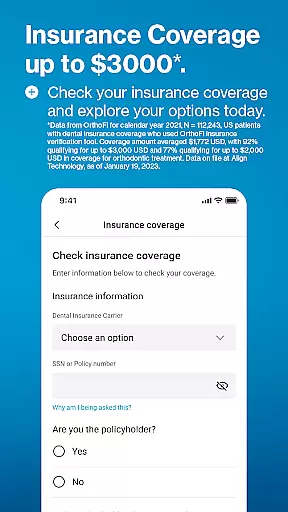
My Invisalign is a comprehensive application designed specifically for users of the advanced clear aligner system, providing both prospective and current patients with an all-in-one solution. The app serves as a pivotal tool in managing and supporting the journey to achieving a healthier and more beautiful smile.
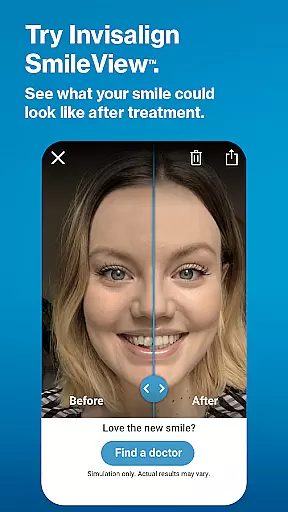
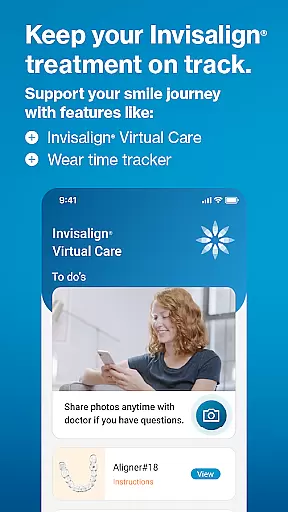
For those considering Invisalign treatment, the app offers educational resources about the benefits of clear aligners, includes a SmileView simulation tool for visualizing potential results, and assists in finding nearby specialists for consultations. Current Invisalign patients can utilize features like virtual care check-ins, wear-time tracking, personalized treatment calendars, and progress sharing capabilities. By integrating with Wear OS, it extends its functionality to smartwatches, ensuring that users have constant access to their treatment data.
This app is particularly useful for individuals who are looking for a convenient way to manage their orthodontic treatment from their mobile device, enhancing patient engagement and adherence to prescribed routines, ultimately leading to better outcomes.
The My Invisalign app boasts a variety of sophisticated features tailored to enhance the user's treatment experience. A standout feature is the SmileView simulation tool, which allows users to preview their potential new smile and share these simulations with others, aiding in the decision-making process before committing to treatment.
Current patients benefit from functionalities such as ClinCheck treatment plan viewing, subject to doctor invitation, enabling them to follow their progress closely. The Virtual Care feature facilitates remote communication with healthcare providers through photo sharing and feedback. Additionally, the app provides detailed wear-time analytics, customizable treatment calendars, timely reminders for aligner changes, and options to document and share progress videos and images.
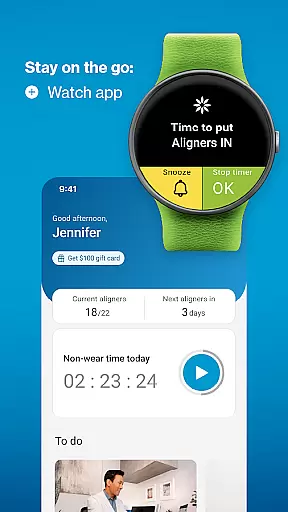
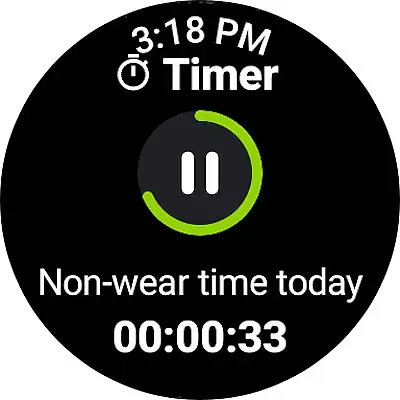
By connecting with Wear OS devices, the app ensures that users can conveniently track their aligner usage directly from their wrist. These features collectively contribute to a seamless and interactive treatment process, empowering users to take an active role in their dental health journey.
Companion app integration is crucial for users who want a seamless experience between their mobile devices and wearables. The My Invisalign app excels in this area by offering comprehensive features that sync with its Wear OS counterpart.
Through the companion app, users can access the custom aligner tracker directly on their smartwatches, ensuring they never miss an update on their treatment progress. This synchronization allows for real-time data sharing, making it easier to monitor wear-time and receive timely reminders.
The benefit of such integration is immense. Users can enjoy the convenience of having all their treatment information accessible from their wrist, which enhances the overall user experience. It ensures that patients stay on track with their treatment plans without needing to constantly check their phones.
This level of connectivity not only improves adherence to treatment protocols but also empowers users by providing them with instant access to critical information, thus enhancing their journey towards achieving a healthier, more beautiful smile.
Ensuring compatibility with Wear OS and various devices is essential for apps like My Invisalign, which aims to provide a cohesive user experience across multiple platforms. The app supports a range of devices, allowing users to connect their Wear OS smartwatches effortlessly.
By integrating with Wear OS, the My Invisalign app extends its functionality beyond smartphones. Users can utilize the custom aligner tracker on their watches, which provides quick access to vital treatment data and notifications. This compatibility ensures that no matter what device a user prefers, they can still benefit from the app's full suite of features.
The advantage of this broad compatibility is clear. Patients undergoing Invisalign treatment can maintain their routines without disruption, knowing that their app will work seamlessly across different devices. This flexibility enhances user satisfaction and engagement.
Ultimately, the My Invisalign app's commitment to Wear OS and device compatibility underscores its dedication to delivering a superior user experience. By supporting a wide array of devices, it ensures that every user can effectively manage their treatment, leading to better outcomes and higher patient satisfaction.
User-friendly interface
Comprehensive treatment tools
Remote doctor communication
Customizable reminders
Wear OS integration
Limited to Invisalign patients
Some features need doctor approval
Premium features may require payment
Dependent on smartphone compatibility
Requires consistent user input

Rose gold watch face with festive lights & customizable features.
 4.60
4.60
MyNISSAN® lets you remotely control your car from your phone.*
4.50
A heartwarming Christmas scene featuring a cute image of Santa and Rudolf
4.0
Nutrition, Macro tracker: Food, fitness & healthy diet tracking for weight loss
4.60
Daily Weather forecast with 15 weather images for Day & Night plus Big Bold time
4.10
Fast and smart typing with Emojis, GIFs, and more
4.50
Your local weather forecast, storm tracker, radar maps & live weather news
3.40
Want to take charge of your health? Let Google Fit help you reach your goals.
3.50
Back up your contacts & access them anywhere
4.30
Beautiful, colorful and practical watch face. For Wear OS devices.
5.00
Period, ovulation & pregnancy tracker. Fertility insights & menstrual calendar.
4.90
Easy Voice Recorder is your everyday companion to record important moments.
4.70
Monitor health with the stress test and pulse checker in the heart rate app.
4.60
A realistic hybrid watch face with many customization options.
4.60
Let's celebrate Thanksgiving - Wear Os watch face
4.20
Connect, create, and collaborate with Gmail, part of Google Workspace.
4.10
Hyper-Realistic Airplane Dashboard Watch Face With 10 Skins and Custom AOD
4.00
Authentic military-tactical design with ZULU time! Realistic and functional!
3.80
Watch the sharpness of the sky on your wrist..
3.70


User Reviews