
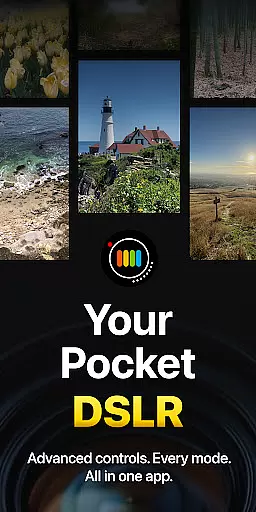
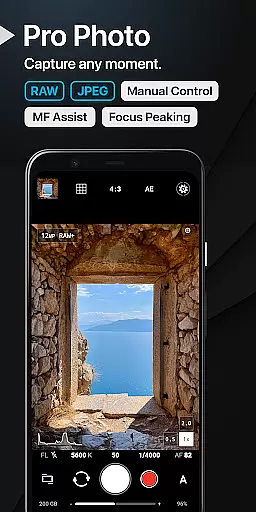
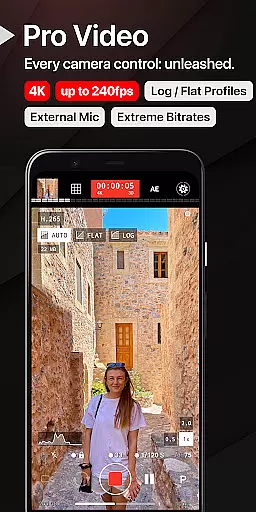
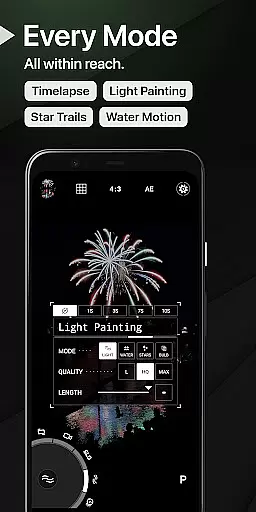
ProShot is a professional-grade photography and filmmaking application designed for Android users who demand full creative control over their mobile photography experience. This app offers an expansive feature set that rivals DSLR cameras, providing both manual and automatic controls to capture perfect shots in any situation. With its unique Dual Dial system, users can swiftly adjust camera settings while taking advantage of advanced options like RAW (DNG) shooting, HEIC support, and specialized modes such as Light Painting and Bulb mode.
The app caters to photographers of all levels, from beginners to seasoned professionals. It includes comprehensive video features with up to 8K recording capabilities, LOG/FLAT color profiles for enhanced dynamic range, and real-time audio level monitoring. ProShot also emphasizes user privacy by not collecting or transmitting personal data, ensuring your images and videos remain secure on your device. Whether capturing stills or creating cinematic films, ProShot delivers a complete solution for mobile content creation.
ProShot stands out with its extensive array of features tailored for serious photographers. The app provides multiple shooting modes including Auto, Program, Manual, and two Custom modes akin to those found in DSLRs. Users have precise control over exposure settings such as ISO, shutter speed, white balance, and more. Additionally, it supports various file formats like RAW (DNG), JPEG, and even HEIC on compatible devices, allowing for maximum flexibility in post-processing.
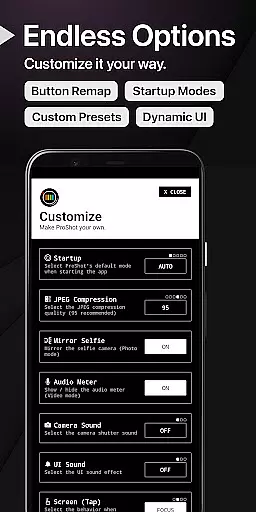
One of the standout features is the ability to record high-quality video with full camera control available in Photo mode. This includes up to 8K video recording with extreme bitrate options, adjustable frame rates from 24 FPS to 240 FPS, and support for external microphones. Advanced functionalities like focus peaking, histogram display with three modes, and customizable accent colors further enhance the user experience. Moreover, ProShot integrates a seamless camera roll into the viewfinder and offers a customization panel where users can tailor startup modes, remap volume buttons, set filename formats, and much more.
Real-time capture and preview functionality is essential for photographers who need precision and control over their shots. ProShot offers a seamless experience by leveraging the full capabilities of the camera2 API, ensuring that what you see on the screen is exactly what you get in your final image.
The app provides manual controls akin to those found on DSLR cameras, allowing users to adjust settings such as ISO, shutter speed, white balance, and focus with immediacy. This real-time control ensures that photographers can make instant adjustments based on changing lighting or movement conditions without missing a beat.
Moreover, ProShot's interface is designed for efficiency, featuring unique systems like Dual Dials for swift navigation through settings. Users can switch between different modes including Auto, Program, Manual, and Custom setups effortlessly, which translates into capturing the perfect moment without delay.
This level of responsiveness not only enhances the photography experience but also empowers users to experiment with creative techniques such as light painting and bulb mode. With ProShot, every adjustment is reflected instantly, giving photographers confidence in their creative decisions and enabling them to produce professional-quality work directly from their Android device.
While ProShot does not specifically market itself with AI beauty enhancements, it excels in providing tools that allow for natural photo improvements. The emphasis on manual controls means photographers have the power to enhance images authentically, without relying on artificial intelligence to dictate aesthetic outcomes.
ProShot includes features such as noise reduction, tone mapping, and sharpness adjustments, which are crucial for achieving a polished yet natural look. These tools enable users to refine their photos while maintaining the integrity of the original scene, avoiding the over-processed appearance that can result from aggressive AI-based enhancements.
Additionally, ProShot supports shooting in RAW format, which captures all image data recorded by the sensor. This allows for extensive post-processing flexibility, where natural enhancements can be applied with precision using advanced editing software. Photographers can fine-tune aspects like exposure, contrast, and color balance without degrading image quality.
By focusing on delivering authentic photographic experiences rather than automated enhancements, ProShot ensures that each photograph reflects the true vision of its creator. The app's dedication to preserving the natural essence of captured moments makes it an ideal choice for photographers seeking genuine expression through their work.
Full manual controls
RAW image capture
Advanced video features
User privacy protection
Customizable interface
Steep learning curve
High system requirements
Premium price tag
Limited beginner guidance
Complex UI for casual users

Gallery show photo, video, slideshow, is perfect 3D effect private photo albums.
 4.80
4.80
1M influencer's special filter
4.60
Professional video recording application with manual controls for filmmakers!
2.80
How old age camera Gender Swap App Face Shape Hairstyle App Hair Styler App fun!
4.00
A reflected light meter with spot metering and incident light metering.
4.40
live datamoshing
4.00
Snap photos remotely using your Garmin watch as the camera trigger
4.5
Try an anime version, cartoon yourself, and generate AI hug or aging videos!
3.70
Photo & Video Gallery app to manage albums and save WA Status easily.
4.70
Amazing Photo Effects - The most fun you can have with your photos!
4.70
Unblur, enhance & restore photos with powerful AI photo enhancer tools.
4.60
Add Watermark - Sign your pictures with a text or logo. Effective, quick, easy!
4.50
Edit like a pro with Hypic. Apply filters, AI effects, & magic touch.
4.40
Natural Beauty, Selfie Retouch
4.30
All-in-One Editor & AI Photo Enhancer, Collage, Cartoonify, Funny Stickers & BGS
4.10
The #1 app for B&W film developing featuring an advanced darkroom timer.
4.10
Gallery Slideshow is slideshow maker app for slideshow from your gallery photos.
3.90
Turn photos into cartoons & avatars! - Photo Editor, Cartoon Face!
3.90
Superimpose one photo on top of another using the original Superimpose app!
3.20


User Reviews