


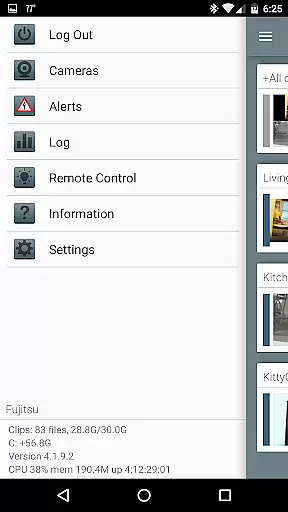
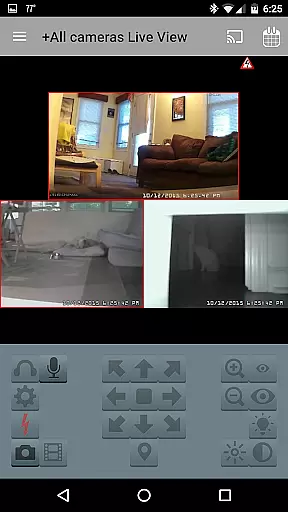

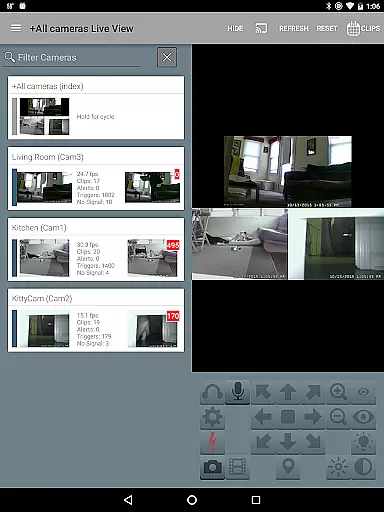
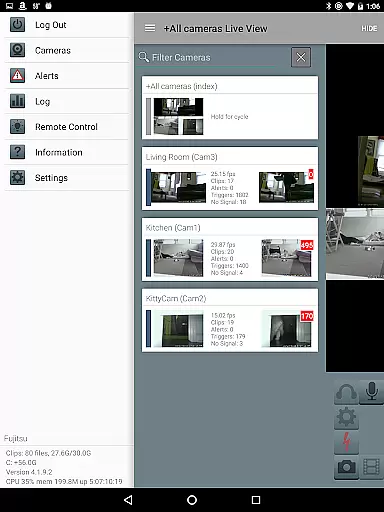
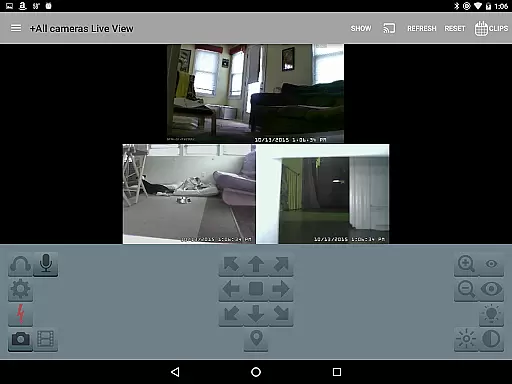
Blue Iris is a specialized client application designed to work seamlessly with the Blue Iris Windows PC software version 5.x. This app serves as a secure gateway to your home camera network, eliminating the need to expose individual cameras directly to the internet. By establishing a session-based protocol connection to the Blue Iris PC software, users can conveniently manage their entire surveillance system from their mobile devices.
The app offers comprehensive control over multiple Blue Iris installations, including management of traffic signals, scheduling, and profile selection. With support for fast H.264 streaming, PTZ (pan-tilt-zoom) control, audio communication, and Android push alerts for triggered events or critical status updates, Blue Iris provides a complete remote monitoring solution. Additionally, users can review and manage recordings stored on their Blue Iris PC with playback speeds up to 64x, making it an invaluable tool for both home security enthusiasts and professional surveillance operators.
Blue Iris stands out with its robust feature set tailored specifically for managing advanced home security systems. The app's key strength lies in its ability to securely connect to multiple Blue Iris installations without transmitting passwords in plain text. This security-conscious approach extends to its push notification system, which instantly alerts users to triggered cameras or important system messages.
Advanced functionality includes precise control over PTZ cameras, IR settings, and DIO output signals on compatible devices. The intuitive interface allows users to navigate between cameras through simple tap and swipe gestures while providing two-way audio communication capabilities for supported cameras. Notably, the app enables efficient review of recorded footage with variable speed playback up to 64x, along with selective deletion options for managing storage space on the Blue Iris PC server.
These features collectively create a powerful remote management solution that maintains the high standards expected from professional-grade security systems while remaining accessible through mobile devices.
Video format compatibility is a crucial feature for any video player and editor, ensuring that users can work with a wide range of video files without the need for conversion. Blue Iris supports an impressive array of formats, making it versatile for different user needs.
The app provides fast H.264 streaming, which is one of the most commonly used video codecs today. This ensures smooth playback and efficient use of bandwidth, allowing users to manage their home camera network effectively.
With Blue Iris, there's no need to insecurely open individual cameras to the Internet. The app connects using a secure and session-based protocol, enhancing the safety of your video streams while maintaining compatibility.
Users benefit from the ability to review recordings stored on the Blue Iris PC at speeds up to 64x, offering flexibility in how they interact with their video content. This functionality underscores the app's commitment to providing comprehensive video management solutions.
AI-powered editing features represent the cutting edge of video editing technology, enabling users to enhance their videos with minimal effort. While Blue Iris focuses primarily on security and camera management, it incorporates intelligent functionalities that simplify video handling.
One standout feature is the remote control of DIO output signals on compatible devices, which showcases an integrated approach to managing your video feeds and connected hardware. This allows for sophisticated interactions within your home camera network.
Additionally, Blue Iris offers Android push alerts when a camera is triggered or thereu2019s a critical status message. This AI-driven alert system ensures you're always informed about important events in real-time, adding another layer of utility beyond traditional editing capabilities.
While not a conventional video editor, Blue Iris leverages smart technologies to provide unique advantages such as PTZ (pan-tilt-zoom), IR control, and audio communication with supported cameras. These features collectively contribute to a more dynamic and responsive video management experience.
User-friendly interface
Secure connection protocol
Comprehensive camera control
Fast video streaming
Multi-installation management
Requires Windows PC
No standalone functionality
Complex setup process
Limited OS compatibility
Dependent on main software

Client application for NextPVR software
 3.00
3.00
You can play SWF format file!
2.50
IPTV-Smarters Player Pro M3U - Watch Live Stream TV Channels with Chromecast
4.00
HD video & music player - All format support with floating & PIP mode!
3.80
Your media, on your terms.
4.10
Watch full episodes of your favorite Cartoon Network and Cartoonito shows!
3.50
HD video maker with no watermark, no ads & vlog maker with music, PIP, text
4.50
Cast to Smart TV, Fire TV. Cast video, photo - Fast & Stable!
3.90
Download Hub, easy and private way to download and enjoy your videos offline
4.80
Pro video editor app for Instagram, edit video with song, AI, effect & slowmo.
4.80
GENRAL PRO - General Pro is the best video player that fully supports all formats.
4.70
Video Player - Unlimited features, 30 days money back guarantee.
4.60
?100% FREE! Download & save videos? safely in this app. All formats supported.
4.60
Watch a large amount of high-definition short drama content
4.60
Watch IPTV on your Android device
4.60
Photo and Music Video Creator into Stunning Videos—Effortlessly
4.40
Online Videos Player
3.90
Capture images & record videos for USB Camera, Webcam, Microscopes, Endoscopes
3.80
Save photos and videos from social apps in one tap.
3.60
VLC vs MX Player compared side-by-side: formats, subtitles, ads, privacy, and performance. Find out which free Android video player is right for you.



User Reviews