
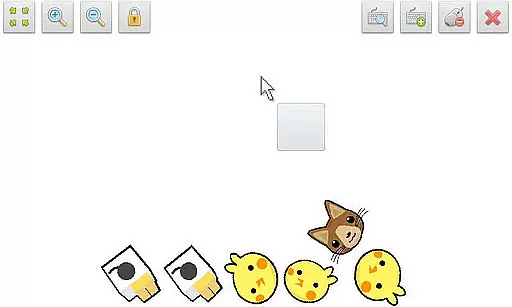
SWF Player Pro is a specialized video player designed for SWF format files, enabling users to enjoy Flash content on their Android devices. The app supports playback through both Android AIR and Ruffle engines, ensuring compatibility with various SWF files.
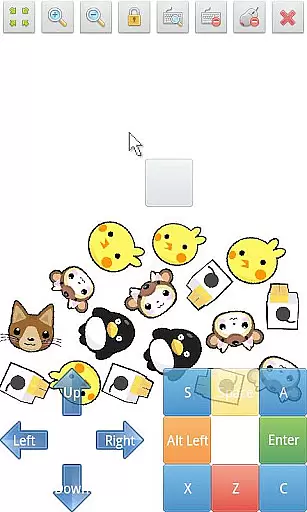
With features like zoom in/out, play/stop controls, fullscreen mode, and multi-touch virtual keypad, the app provides a comprehensive and user-friendly interface. Advanced settings such as wmode, background color, wake-lock, rotation, quality, and scale allow for a customizable viewing experience tailored to individual preferences.
Ideal for users who need to view legacy Flash animations or games, SWF Player Pro offers a practical solution in an era where native Flash support has been largely discontinued.
SWF Player Pro stands out with its robust feature set tailored specifically for SWF file playback. The app leverages both Android AIR and Ruffle engines, providing reliable performance across different types of Flash content.
Users can take advantage of advanced playback controls including zoom functionality, play/stop options, and fullscreen display. The inclusion of a multi-touch virtual keypad and virtual mouse enhances interactivity, making it suitable for both animations and interactive Flash applications.
Customization is a key strength, with options to adjust wmode, background color, wake-lock settings, rotation, quality, and scaling. These features ensure that users can optimize their viewing experience according to their specific needs and device capabilities.
SWF Player Pro offers extensive video format compatibility, primarily supporting SWF files. This ensures that users can enjoy a wide range of multimedia content without worrying about format restrictions.
The application leverages two powerful SWF engines - Android AIR and Ruffle - to provide optimal playback performance. These engines ensure smooth rendering and high-quality display of SWF content on various devices.
With additional features like zoom in/out, play/stop controls, and fullscreen support, the app enhances user experience by offering versatile viewing options. The multi-touch virtual keypad and virtual mouse further improve accessibility and ease of use.
Advanced settings such as wmode, background color adjustments, wake-lock, rotation, quality, and scale make this player highly customizable. Users can fine-tune these parameters to suit their preferences, ensuring an unparalleled video playback experience tailored to individual needs.
While SWF Player Pro focuses primarily on video playback, it incorporates AI-powered features that enhance the overall user experience. These smart functionalities help optimize video rendering and ensure seamless operation across different devices.
The app's support for advanced settings like wake-lock and rotation is driven by intelligent algorithms that adapt to user behavior. This ensures that videos play smoothly without unnecessary interruptions or battery drain.
Although not a traditional video editor, SWF Player Pro offers tools that allow users to customize their viewing experience. The ability to adjust background colors, quality, and scaling demonstrates the application's commitment to providing flexible viewing options.
These AI-driven enhancements, combined with traditional features like file browsing and multi-touch controls, create a comprehensive video playback solution. The result is an application that not only plays SWF files but also intelligently adapts to various user needs and device capabilities.
Supports multiple SWF engines
Advanced customization options
User-friendly interface
Comprehensive playback controls
Multi-touch virtual keypad
Limited to SWF format
No native iOS support
Requires technical knowledge for setup
Occasional compatibility issues
Interface may feel outdated

Fast, private downloading, video saving, social media
 4.50
4.50
Video player with powerful streaming playback and various convenient features.
2.10
KMPlayer Plus (Divx Codec) officially support Divx codec.
4.30
Turn your phone into a wireless camera!
4.20
Pro video editor app for Instagram, edit video with song, AI, effect & slowmo.
4.80
Powerful Video Editor & Photo Editing App —— Quick Edits & Stunning Effects!
4.30
Make your own Animations, Video and Photo Edits, Visual Effects, and more!
4.00
Browser for Samsung TV to stream webvideos, online movies and livestreams in HD
4.10
A Simple app to download Video & Music from the Internet.
4.70
Browser + Remote for Roku to stream webvideos, online movies and livestreams
4.60
Seamlessly connect and control your smart devices, anytime, anywhere with ease.
4.60
Cast to Chromecast, Xbox, Fire Stick, Roku, DLNA, Smart TV & No Feature Limited!
4.50
Fast video downloader & private browser. Save HD clips to watch offline.
4.40
Full HD Video mp3 Player, MP4 player play 1080p, File manager, Video Downloader
4.40
Video player, file manager for all formats, 4K/HD media player supports subtitle
4.30
Movie maker & video editing app with AI effects and green screen
4.30
Livestream, news, & gaming content. Watch, chat, and upload. Join Rumble today!
3.80
IPTV Player - Watch live TV from m3m & m3u8 playlist, stream IPTV on mobile
3.30
The essential companion to your Blue Iris PC software
2.50
VLC vs MX Player compared side-by-side: formats, subtitles, ads, privacy, and performance. Find out which free Android video player is right for you.



User Reviews