

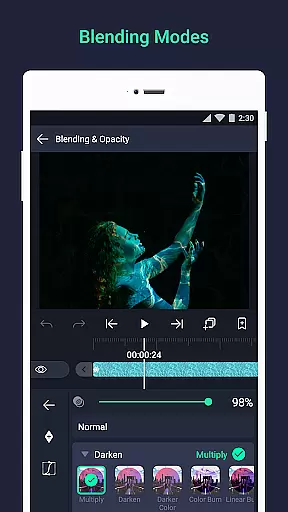
Alight Motion is a pioneering motion design application that brings professional-quality animation and video editing capabilities to your mobile device. As the first app of its kind, it offers an extensive suite of features including motion graphics, visual effects, and video compositing. Whether you're creating animations for social media or producing detailed motion graphics for professional projects, Alight Motion provides the tools necessary to bring your vision to life.
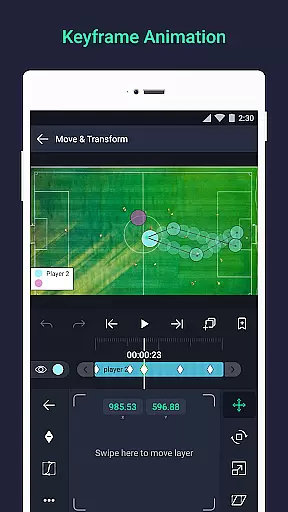
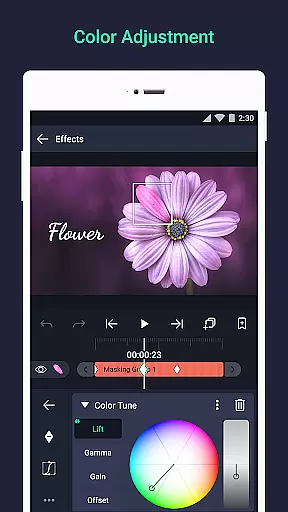
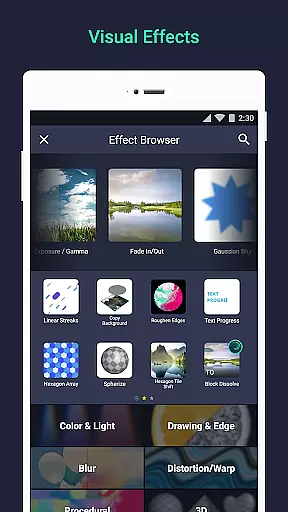
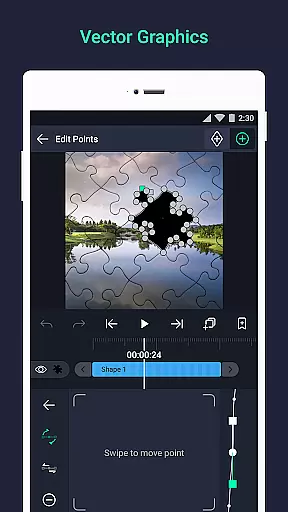
The app supports multiple layers of graphics, video, and audio, allowing for complex compositions. With vector and bitmap support, users can edit vector graphics directly on their phone. The availability of 160+ basic effect building blocks enables creators to craft sophisticated visual effects. Keyframe animation, parenting layers, character rigging, and camera controls with focus blur and fog effects offer advanced animation capabilities. Additionally, color adjustments, easing options for fluid motion, and velocity-based motion blur ensure polished final products.
Ideal for content creators, marketers, and designers, Alight Motion facilitates the production of high-quality animations and videos. Its comprehensive feature set empowers users to create everything from simple animations to intricate motion designs, making it an invaluable tool for anyone looking to enhance their digital content with dynamic visuals.
Alight Motion stands out with its rich array of features tailored for professional motion design. One of its core strengths is the ability to add multiple layers of graphics, video, and audio, enabling complex and layered compositions. This layering capability, combined with vector and bitmap support, allows users to edit vector graphics directly on their mobile devices, providing unparalleled flexibility in design.
The app includes over 160 basic effect building blocks, which can be combined to create sophisticated visual effects. These effects range from simple color adjustments to complex animations involving keyframes, parenting layers, and character rigging. The inclusion of cameras with pan, zoom, and focus blur capabilities adds depth and realism to animations. Grouping layers, creating masks, and adjusting colors further expand creative possibilities.
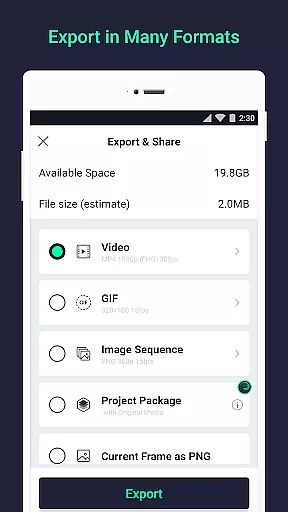
Another notable feature is the animation easing options that allow for more fluid motion. Users can choose from presets or build custom timing curves, ensuring precise control over how animations unfold. Velocity-based motion blur enhances the smoothness of videos, while export options for MP4 video, GIF animation, PNG sequences, and stills provide versatility in output formats. Sharing project packages and saving favorite elements for future use streamline workflows, making Alight Motion a powerful ally for efficient and creative motion design.
Video format compatibility is a crucial feature for any video editing application, including Alight Motion. This functionality ensures that users can import, edit, and export videos in various formats, making the app versatile and adaptable to different user needs.
Alight Motion supports an extensive range of video formats, allowing creators to work with MP4 video, GIF animation, PNG sequences, and stills. The inclusion of vector and bitmap support further enhances its compatibility, enabling users to edit vector graphics directly on their mobile devices.
The ability to handle multiple layers of graphics, video, and audio adds another dimension to its video format compatibility. Users can seamlessly integrate different media types into their projects, experimenting with creative composites and sophisticated visual effects without worrying about format restrictions.
By offering such comprehensive video format compatibility, Alight Motion empowers content creators to focus on their artistic vision rather than technical limitations. Whether producing professional-quality animations or engaging social media clips, users benefit from a flexible and robust platform that caters to diverse multimedia projects.
AI-powered editing features represent the cutting-edge advancement in video editing technology, automating complex tasks and enhancing creativity. In Alight Motion, these intelligent tools assist users in achieving professional results with minimal effort, setting a new standard for mobile video editors.
Among its AI-driven capabilities, Alight Motion offers animation easing for more fluid motion, providing presets or customizable timing curves. This feature simplifies the process of creating natural-looking animations, allowing users to focus on storytelling rather than intricate keyframe adjustments.
Another standout AI-powered feature is the velocity-based motion blur, which ensures smooth video playback by simulating realistic motion effects. Additionally, the app's advanced effect building blocks enable users to combine over 160 options to craft sophisticated visual effects effortlessly.
These AI-powered editing features not only streamline the editing process but also open up new creative possibilities. By leveraging artificial intelligence, Alight Motion makes professional-grade video editing accessible to everyone, regardless of their experience level, thus democratizing content creation.
User-friendly interface
Extensive effect library
Advanced animation tools
Professional-grade output
Versatile export options
Subscription fees apply
High system requirements
Learning curve for beginners
Limited free features
Occasional performance issues

A full editing room to accompany your Insta360 cameras and handheld gimbals.
 3.30
3.30
HD Video player all format, HD Videos, Cast & Subtitle. No annoying ads.
4.60
Watch full episodes of your favorite Cartoon Network and Cartoonito shows!
3.50
Video Trimmer, Video to MP3 Converter. Extract music from video, Easy & Fast.
4.80
Tik & Story Saver-Download ALL social media videos, photos & reels no watermark.
4.80
An easy-to-use and all-round screen recorder with audio
4.80
Livestream, news, & gaming content. Watch, chat, and upload. Join Rumble today!
3.80
Fast & Private HD Video Downloader with Built-in Proxy Browser and Video Player.
4.50
Screen recorder with audio to take live videos & Screenshot in high quality!
4.70
Pro video editor app for Instagram, edit video with song, AI, effect & slowmo.
4.80
GENRAL PRO - General Pro is the best video player that fully supports all formats.
4.70
Add date and time watermark to photos and videos
4.50
Photo and Music Video Creator into Stunning Videos—Effortlessly
4.40
Fast & Private Video Downloader App. Save all videos easily from the Internet.
4.40
Web Browser for LG TV to stream webvideos, online movies and livestreams in HD
4.20
Your media, on your terms.
4.10
LumaFusion: The Ultimate Storytelling Experience for Video Editing
4.10
Powerful, professional, versatile teleprompter. Developed by an active film crew
4.00
Manage your IPTV live channels and VOD playlists (no playlist included)
3.80
VLC vs MX Player compared side-by-side: formats, subtitles, ads, privacy, and performance. Find out which free Android video player is right for you.


User Reviews