
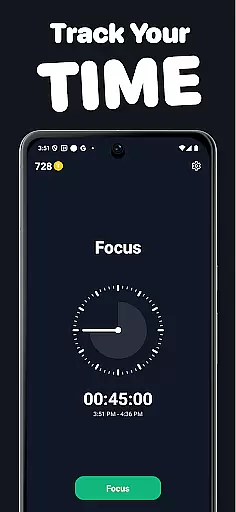
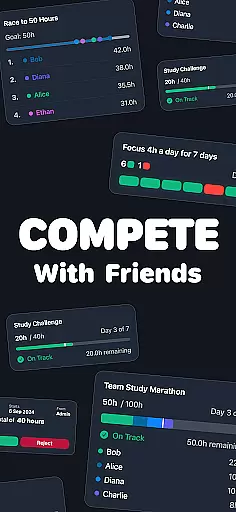
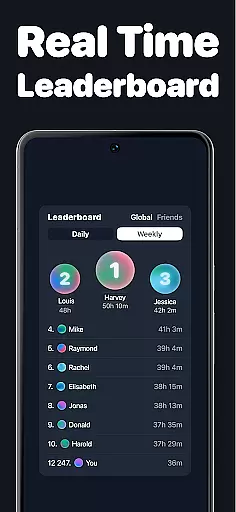
Timero is a productivity app designed to help users build better habits and enhance focus through friendly competition. The app allows you to track your working hours, join various challenges, and maintain consistency with friends. Whether you're studying, working, or training, Timero turns your productive time into a competitive yet collaborative experience.
With features like real-time time logging, progress visualization, and different challenge types such as solo goals, races, team goals, and streaks, Timero ensures that you stay motivated and accountable. By integrating social elements, the app fosters a community-driven environment where users can support each other in achieving their goals.
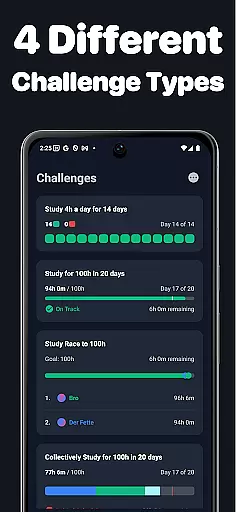
Timero offers a variety of features aimed at boosting productivity and accountability. One of its core functionalities is the ability to join different types of challenges, including personal targets, races to log a set number of hours, team-based goals, and maintaining daily streaks. These challenges cater to various motivational triggers, ensuring sustained engagement.
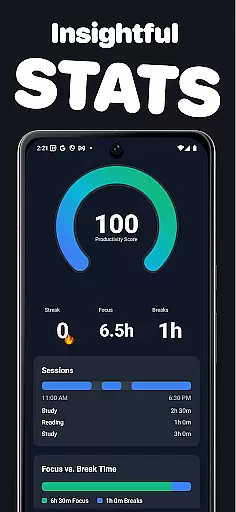
The app provides clear progress tracking with real-time logging and weekly stats visualization. Users can see exactly how they spend their time and measure their consistency. Additionally, Timero's social integration allows users to create or join challenges with friends, view live progress updates, and draw motivation from a community focused on productivity.
Task management is a cornerstone of productivity applications, and Timero excels in this area by providing users with tools to track and manage their time effectively. The app allows users to log time in real-time, ensuring that every moment spent on tasks is accurately recorded.
Timero offers various challenge types such as solo goals, races, team goals, and streaks. These challenges are designed to keep users engaged and motivated, helping them to achieve personal targets over days or weeks, compete with others, collaborate with friends, or maintain daily activities without breaking the chain.
By visualizing weekly stats and streaks, users can clearly see their progress and consistency. This feature not only helps in tracking what you spend time on but also encourages better habits by providing insights into how consistent you are with your tasks.
In today's interconnected world, reliable cross-device synchronization is crucial for any productivity tool. Timero ensures that all your data is seamlessly synced across devices, allowing you to access your progress and continue tasks from anywhere.
The app supports real-time updates, meaning any time logged or changes made on one device will instantly reflect on all others. This ensures that whether you're studying, working, reading, or training, your information remains up-to-date and consistent.
With Timero, thereu2019s no need to worry about losing track of your hours or progress. The robust synchronization system guarantees that all your activities, including those in challenges with friends, are updated live, keeping everyone motivated and accountable.
User-friendly interface
Real-time progress tracking
Variety of challenge types
Strong social integration
Focus-oriented design
Limited customization options
No advanced reporting features
Premium features may be costly
Dependent on community engagement
May lack appeal for solo users

Auto-shutoff Alarm with Sunrise, Sunset & Fixed Options.
 3.50
3.50
Direct Chat without saving contacts & Dual WA Account on Single Device
4.70
Android Wallet Password Manager
4.80
CalenGoo is a very flexible and feature-rich calendar app
4.40
Make apps & sites with natural language prompts
4.10
Simple and reliable communication between inmates, friends and family
3.20
Tally and goal counter for Wear OS & mobile
4.50
Ultimate Virtual AI Character for immersive Roleplay Chat. Perfect Companion
3.90
Understand anything with a personalized AI research assistant
4.80
Scientific calculator for Android - looks and operates like the real thing!
4.90
The long-awaited modern gallery app for your Nextcloud server
4.70
PDF scanner & converter for files, photos, lottery, QR codes. One swipe away!
4.50 4.20
4.20
All in One PDF Reader: Manage, Read and Edit your Documents
4.20
Wake up & get tasks done! Add alarms & reminders on the Clock Launcher.
4.00
Smart PDF reader & editor to view, organize and manage PDF documents easily.
3.70
Find and delete junk files & block unwanted notifications & manage files
3.70
Make your handwriting beautiful, even more than pen on paper.
3.60
Easiest event planning, volunteer signups & parent teacher conference scheduling
2.20


User Reviews