


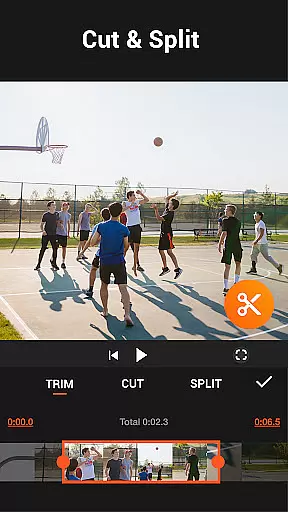
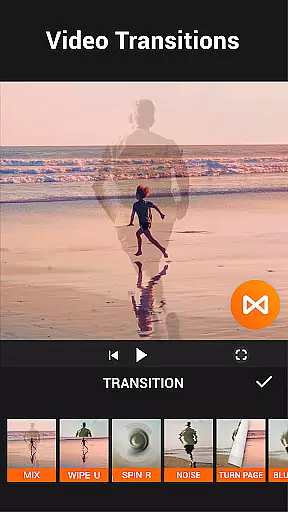





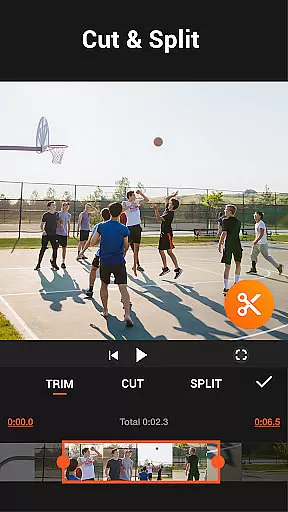
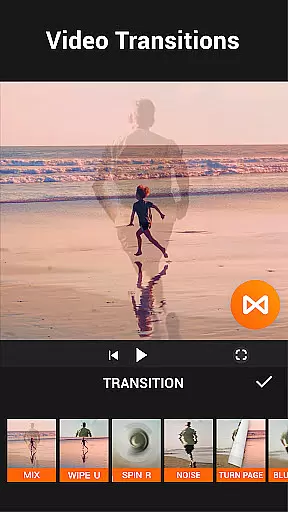


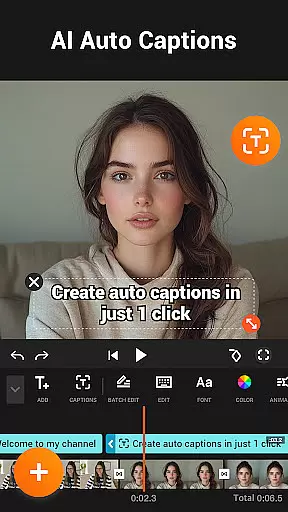
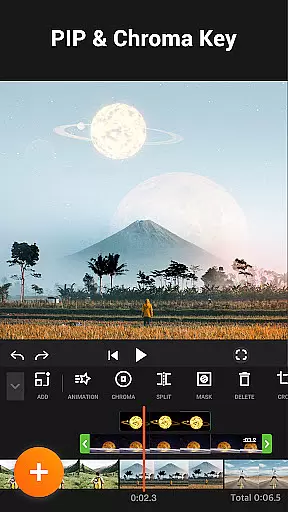

YouCut stands as a premier free video editing app, offering users the ability to create professional-quality videos with ease. It includes powerful tools such as AI Video Boost for auto captions and background removal, alongside traditional editing features like cutting, trimming, and merging videos. The app is designed for social media content creators who need quick and efficient edits without compromising on quality.
With its user-friendly interface, YouCut supports multi-layer timelines and chroma key effects, making it possible to produce cinematic videos. Its standout feature of no watermark preservation ensures that creators can share their work on platforms like YouTube and Instagram without any branding distractions, maintaining the originality of their content.
YouCut offers an extensive suite of features tailored for both amateur and professional video editors. One of its core functionalities is the AI Video Boost, which revolutionizes editing with capabilities like auto captions and instant background removal. This feature not only saves time but also enhances the overall production value of videos, making them more engaging for audiences.
In addition to AI enhancements, YouCut provides classic editing tools such as video slicing, speed control, and color adjustments. Users can fine-tune every aspect of their videos, from brightness and contrast to custom filters and effects. These robust features ensure that whether you're creating a photo slideshow or a high-definition film, YouCut delivers the precision and flexibility needed for top-tier video production.
Video format compatibility is a crucial feature for any video editing application, ensuring that users can work with a wide range of video files without conversion hassles. YouCut excels in this area by supporting multiple formats, allowing creators to import and export videos in their desired resolutions and codecs.
The app's ability to handle high-resolution videos up to 4K ensures that professionals and enthusiasts can maintain top-notch quality across different devices and platforms. This flexibility empowers users to create content for various social media channels without worrying about format restrictions or quality loss.
YouCut also offers a built-in video compressor that reduces file size by over 90% while preserving visual integrity. This functionality is particularly beneficial for users who need to share large video files quickly or store numerous projects on their devices without running out of space.
Additionally, the app provides options to adjust aspect ratios, crop videos, and apply custom filters, making it a versatile tool for adapting content to specific platform requirements. These features collectively enhance the user experience by streamlining the editing process and expanding creative possibilities.
AI-powered editing features are revolutionizing the way users approach video creation, offering intelligent tools that simplify complex tasks and enhance productivity. YouCut incorporates several AI-driven functionalities that set it apart from traditional video editors, providing users with advanced capabilities at their fingertips.
One standout feature is the AI Video Boost, which includes auto captions generated through speech-to-text technology. This tool automatically transcribes spoken content, making videos more accessible and engaging for diverse audiences. The background removal function allows creators to produce professional-looking content with transparent backgrounds or custom settings instantly.
The app's enhancement tools utilize artificial intelligence to improve video and photo quality with a single tap. Users can enjoy buttery-smooth slow-motion effects and optimized visuals without requiring technical expertise. These smart features save time while delivering impressive results that rival professional-grade productions.
Furthermore, YouCut's AI templates offer pre-designed styles and effects that adapt to different video types, enabling even novice editors to craft visually stunning content. By integrating these sophisticated AI-powered tools, YouCut empowers creators to focus on storytelling while the software handles technical aspects, ultimately elevating the overall quality of mobile video production.
User-friendly interface
Advanced AI editing tools
No watermark on exports
High-quality video output
Comprehensive editing features
Limited advanced features in free version
Occasional performance lags
Ads present in some sections
Export times can be lengthy
Learning curve for beginners

Fast, private downloading, video saving, social media
 4.50
4.50
?100% FREE! Download & save videos? safely in this app. All formats supported.
4.60
Fast video downloader & private browser. Save HD clips to watch offline.
4.40
Full HD Video mp3 Player, MP4 player play 1080p, File manager, Video Downloader
4.40
Live TV, anywhere in your home
3.80
Support 1000+ Video Format, Subtitle Download, mp3 & Background Play, Cast On TV
4.60
Download website videos fast&privacy
4.40
Fast private browser with secure, seamless access & supported video downloads!
4.00
Enjoy your favorite videos and channels with the official YouTube app.
3.90
Screen recorder with audio to take live videos & Screenshot in high quality!
4.70
All in one HD video downloader & player for multiple formats with full privacy
4.70
Cast Videos from Web Browser, IPTV to Roku, Chromecast, DLNA, Smart TV +more
4.60
Watch IPTV on your Android device
4.60
Cast to Chromecast, Xbox, Fire Stick, Roku, DLNA, Smart TV & No Feature Limited!
4.50
VLC for Android is the best open source video and music player, fast and easy!
4.10
HD video & music player - All format support with floating & PIP mode!
3.80
Kodi media center, a free and open source cross-platform entertainment hub
3.60
Video player with powerful streaming playback and various convenient features.
2.10
Powerful HD video player with support for all formats & subtitles.
4.3
VLC vs MX Player compared side-by-side: formats, subtitles, ads, privacy, and performance. Find out which free Android video player is right for you.



User Reviews