




XPlay Browser is a cutting-edge mobile application designed for users seeking a fast, private, and video-focused browsing experience. This browser stands out with its lightweight design, ensuring smooth performance even on older devices. It offers a clean user interface and instant navigation, making web browsing intuitive and efficient.
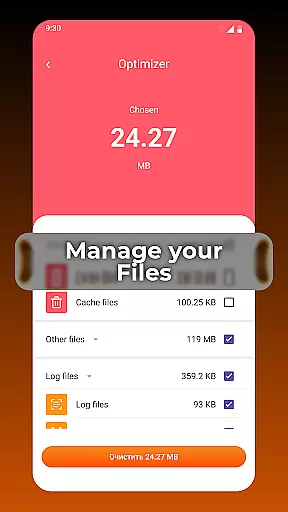
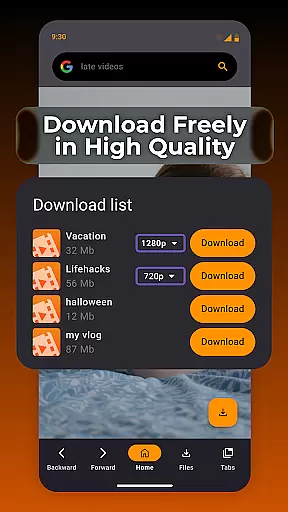
One of the key highlights of XPlay Browser is its Private Browsing Mode, which ensures your online activities remain confidential by not storing any history. Additionally, the app allows easy saving of videos from supported websites, enabling offline viewing without the need for extra applications. With smart file management features, it helps keep your device storage organized, enhancing overall efficiency.
XPlay Browser boasts an array of innovative features tailored to enhance your browsing experience. Its fast and smooth browsing capability ensures that pages load quickly, providing a seamless experience. The browser's modern and lightweight architecture makes it ideal for devices with limited resources, offering a comfortable and efficient browsing flow.
Privacy is a top priority, and XPlay Browser's Private Mode ensures secure sessions by using only essential permissions and not storing any browsing history. For those who enjoy consuming video content, the app provides an effortless way to download videos directly from supported websites. Furthermore, its smart file management system helps you maintain a clutter-free device by highlighting unnecessary files, thus optimizing storage space.
Video format compatibility is a crucial feature for any video player, ensuring that users can access their favorite content without limitations. XPlay Browser excels in this area by supporting a wide range of video formats, making it versatile and convenient.
The app's advanced decoding technology allows seamless playback of popular formats such as MP4, AVI, and MKV, as well as less common ones. This ensures that no matter the source of your video files, XPlay Browser can handle them with ease.
For users, this means freedom and flexibility. Whether you're streaming online videos or managing a local library, you won't be hindered by format restrictions. The browser automatically detects and adjusts to the correct format, providing uninterrupted viewing experiences.
Moreover, XPlay Browser's commitment to compatibility extends to its user-friendly interface, where video management becomes intuitive and efficient. This dedication to both performance and usability sets it apart in the realm of video players and editors.
AI-powered editing features are revolutionizing how users interact with multimedia content, offering smart tools that simplify complex tasks. XPlay Browser incorporates these innovations to enhance video management and editing capabilities.
With AI-driven functionalities, users can effortlessly trim, merge, and convert videos directly within the app. The intelligent system analyzes video content to suggest optimal edits, saving time and effort while maintaining professional-quality results.
This integration benefits users by streamlining workflows and eliminating the need for multiple applications. Whether you're creating short clips or managing extensive libraries, XPlay Browser's AI assistance ensures precision and efficiency at every step.
Furthermore, the app continuously updates its AI algorithms to adapt to emerging trends and user needs, solidifying its position as a forward-thinking solution in the video players and editors category.
Fast page loading
Private browsing
Easy video downloads
Smart file management
Battery efficient
Limited video sites
No desktop mode
Few customization options
Occasional bugs
Ads in free version

Auto video maker with music & exclusive filters. Video editing made simple.
 4.50
4.50
Video player with powerful streaming playback and various convenient features.
2.10
IPTV Loader, loads your own Playlist. DOES NOT CONTAIN ANY LIST OR CHANNELS
4.60
All in one multi protocols stream receiver for AirPlay, Cast and DLNA.
3.60
The essential companion to your Blue Iris PC software
2.50
Browser for Samsung TV to stream webvideos, online movies and livestreams in HD
4.10
Powerful video player with advanced hardware acceleration and subtitle supports
4.20
Screen recorder with audio to take live videos & Screenshot in high quality!
4.70
Capture the moment and Cut
3.40
A Quick and Pro Video Editor
4.70
Video Player - Unlimited features, 30 days money back guarantee.
4.60
Search & download videos from net with all video downloader, auto-detect & safe.
4.60
Video Downloader, Multiple Resolution Options, Video Player
4.50
Fast & Private HD Video Downloader with Built-in Proxy Browser and Video Player.
4.50
Full HD Video mp3 Player, MP4 player play 1080p, File manager, Video Downloader
4.40
KMPlayer Plus (Divx Codec) officially support Divx codec.
4.30
VLC for Android is the best open source video and music player, fast and easy!
4.10
AI Video Editor:AI Music, Text to Video,Text to Speech,Auto Caption,Video Effect
4.00
AirMirror is Receiver for Screen Mirroring and Casting from Apple Devices.
3.60
VLC vs MX Player compared side-by-side: formats, subtitles, ads, privacy, and performance. Find out which free Android video player is right for you.



User Reviews