
VN is a powerful yet user-friendly video editing application designed for both professional and amateur creators. The app offers an intuitive interface that simplifies the video editing process, making it accessible even to beginners. With its comprehensive set of features, VN allows users to create high-quality videos without any watermarks.
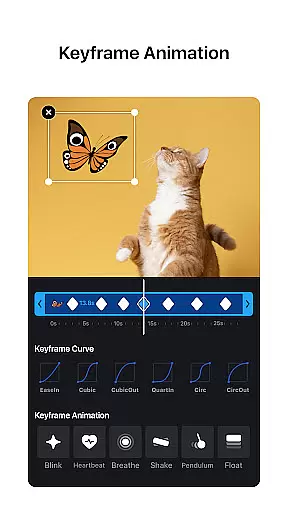
The app includes advanced tools such as multi-track timeline editing, keyframe animations, and color grading filters. These features enable users to produce professional-grade content with ease. Whether you're looking to add music beats, transitions, or cinematic effects, VN provides all the necessary tools in one place.
One notable use case is creating engaging social media content. VN's precise editing capabilities and rich filter options make it perfect for producing visually stunning videos tailored for platforms like Instagram and YouTube. This versatility makes VN an invaluable tool for content creators seeking to enhance their digital presence.
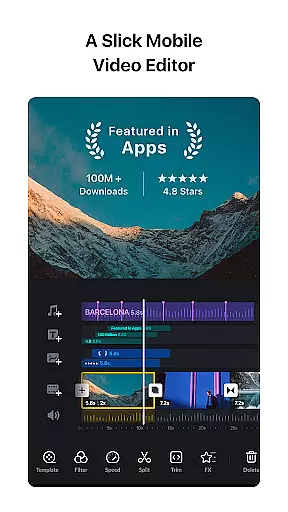
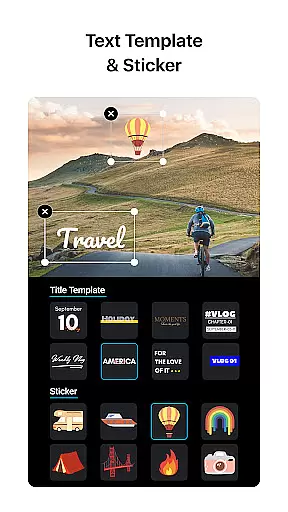
VN stands out with its robust feature set tailored for video editing enthusiasts. The app's multi-track timeline allows seamless integration of various media elements including picture-in-picture videos, photos, stickers, and texts. Its intuitive design enables users to zoom in/out materials and select keyframes with precision as short as 0.05 seconds.
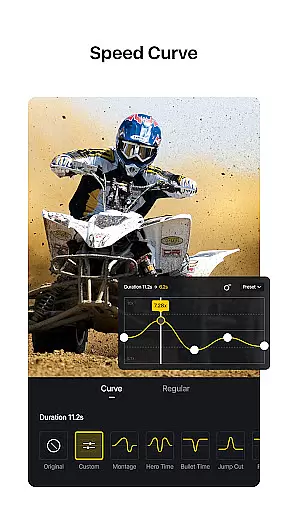
Another remarkable feature is the Speed Curve tool, which functions similarly to Time Remapping in Adobe Premiere Pro. This allows users to control video playback speed with six preset curves available for selection. Additionally, VN offers rich cinematic filters through LUT (.cube) file imports, enhancing visual storytelling capabilities.
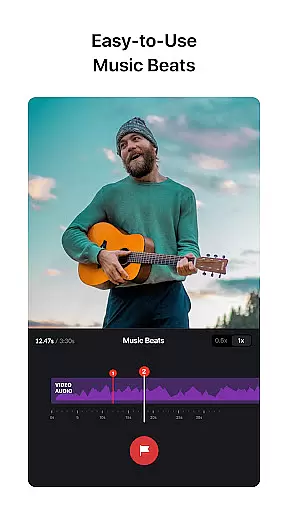
The app also excels in audio editing with its Music Beats feature, enabling users to synchronize video cuts with music rhythms effortlessly. Combined with convenient voice-over recording options, VN ensures that audio complements visuals perfectly. These comprehensive features collectively empower users to craft compelling narratives within their videos.
One of the standout features of VN is its extensive video format compatibility, ensuring that users can work with a wide array of file types without any hitches. This flexibility allows creators to import videos from different sources and devices seamlessly.
The app supports popular formats such as MP4, AVI, MOV, and many others, making it versatile for various video editing needs. Whether you're working with footage from a professional camera or clips captured on your smartphone, VN handles them all with ease.
This broad compatibility not only simplifies the editing process but also enhances productivity by reducing the time spent on format conversions. Users can focus more on the creative aspects of video production, knowing that their files will be compatible with the app's robust editing tools.
Moreover, VN ensures high-quality output across different formats, preserving the integrity of the original footage while applying edits. This feature is crucial for content creators who need to deliver professional-grade videos consistently.
VN incorporates advanced AI-powered editing features that revolutionize how users interact with their video projects. These intelligent tools assist in automating complex tasks, allowing editors to achieve professional results with minimal effort.
Among these features is the AI-driven music beat synchronization, which automatically aligns video cuts with the rhythm of the background music. This capability enhances the overall flow and energy of the video, creating a more engaging viewer experience.
In addition to music beats, VN offers AI-based color grading filters that apply cinematic effects to videos instantly. By analyzing the footage, the app suggests optimal filter settings that enhance visual storytelling without manual adjustments.
The integration of AI technologies not only streamlines the editing workflow but also opens up new creative possibilities for users at all skill levels. With VN's smart editing features, producing high-quality content becomes accessible and efficient for everyone.
User-friendly interface
Professional-grade tools
No watermark on exports
Intuitive multi-track editor
Rich cinematic filters
Limited advanced features
Occasional performance lag
Fewer tutorials available
Basic color correction
Restricted export formats

Tik & Story Saver-Download ALL social media videos, photos & reels no watermark.
 4.80
4.80
VLC Remote lets you control your VLC Media Player on Mac, PC or Linux.
4.60
High-Quality USB Camera Viewer & HDMI Display
4.70
Explore the largest library of free GIFs, Stickers & Memes - or create your own!
3.90
Fast & easy HD video downloader for all formats, support 4K playback & download.
4.60
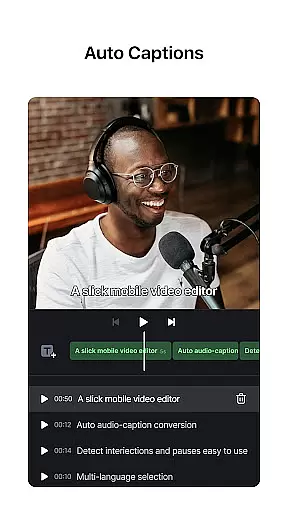
AI Video Editor:AI Music, Text to Video,Text to Speech,Auto Caption,Video Effect
4.00
Make your own Animations, Video and Photo Edits, Visual Effects, and more!
4.00
All in one multi protocols stream receiver for AirPlay, Cast and DLNA.
3.60
Watch IPTV on your Android device
4.60
A Simple app to download Video & Music from the Internet.
4.70
Support 1000+ Video Format, Subtitle Download, mp3 & Background Play, Cast On TV
4.60
Browser + Remote for Roku to stream webvideos, online movies and livestreams
4.60
Cast movies, tv shows and live streams to Chromecast, Roku, DLNA, Fire TV & more
4.60
Auto video maker with music & exclusive filters. Video editing made simple.
4.50
Photo and Music Video Creator into Stunning Videos—Effortlessly
4.40
This app was created to edit the metadata of music files.
4.20
Connect 2 UVC devices for recording and broadcast video/audio stream
3.90
Cast to Smart TV, Fire TV. Cast video, photo - Fast & Stable!
3.90
AirMirror is Receiver for Screen Mirroring and Casting from Apple Devices.
3.60
VLC vs MX Player compared side-by-side: formats, subtitles, ads, privacy, and performance. Find out which free Android video player is right for you.



User Reviews