


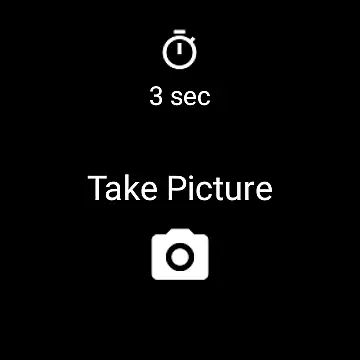
Camera Remote Watch is a smart photography app that allows users to remotely control their phone's camera shutter directly from a smartwatch. This innovative solution enables hands-free picture taking, making it perfect for group photos, selfies, or capturing moments discreetly.
The app works seamlessly with both Android and Wear OS smartwatches. After setting up the camera view on your phone, you can trigger the camera shutter from your watch. The captured photo is saved in your phone's gallery, while a copy is also displayed on the watch for instant review. This ensures you can retake shots if needed, providing greater flexibility in photography.
Whether you're an amateur photographer or simply looking for convenience, Camera Remote Watch enhances your photography experience by eliminating the need to physically touch your phone to take pictures.
Camera Remote Watch offers several standout features that make it a valuable tool for smartwatch users. First, its core functionality allows users to trigger the phone's camera shutter directly from their smartwatch, ensuring a seamless remote photography experience.
The app supports both Android and Wear OS devices, expanding its compatibility across various platforms. Once a photo is taken, it is automatically stored in the phone's gallery, while a duplicate image is sent to the watch for immediate review. This dual-display feature allows users to check their photos instantly and decide whether to retake them.
Additionally, the app provides clear instructions through its FAQ section and tutorial videos available on its official website. These resources help users troubleshoot common issues, such as connectivity problems or slow photo downloads on the watch. Overall, Camera Remote Watch combines practicality with innovation, offering a unique solution for hands-free photography.
Real-time capture and preview functionality is essential for ensuring that every photo taken meets the user's expectations. Camera Remote Watch excels in this area by allowing users to remotely control their phone's camera from a smartwatch. This feature eliminates the need to physically interact with the phone, making it easier to take pictures from various angles and distances.
The app provides an intuitive interface on the smartwatch, where users can trigger the camera shutter with a simple tap. Once the picture is taken, it is immediately stored in the phone's photo gallery. Simultaneously, a copy of the photo is displayed on the smartwatch, enabling users to review the image and decide if another shot is necessary. This instant feedback loop ensures that users can make real-time adjustments to capture the perfect moment.
Moreover, the app supports Wear OS smartwatches, broadening its compatibility and usability across different devices. Users are advised to ensure their watch and phone are connected before starting a photoshoot. Patience is key, as the download process to the watch might be slow, and the display could go black during this time. However, a simple tap can reactivate the screen. Overall, Camera Remote Watch offers a seamless experience for capturing and reviewing images in real time.
While Camera Remote Watch does not explicitly market itself as an AI beauty and enhancement tool, it inherently offers features that contribute to the natural enhancement of photos. The ability to remotely trigger the camera shutter allows users to capture images without the distortion often caused by touching the phone. This results in clearer and more stable photographs, which is the first step towards achieving natural-looking enhancements.
After capturing the photo, users can review it directly on their smartwatch. This immediate preview function enables quick assessments of the image quality, allowing users to retake the photo if necessary. Although the app does not apply AI-driven filters or effects, the clarity and stability provided by its remote capture capability lay a solid foundation for any subsequent editing processes.
Furthermore, the app's compatibility with various devices, including Wear OS smartwatches, ensures that a wide range of users can benefit from its features. It is important to note that while the app may not support phones that are not officially recognized by Android, it still delivers a reliable performance on supported devices. By focusing on providing a stable and user-friendly remote capture experience, Camera Remote Watch indirectly enhances the natural beauty of photos, making it a valuable tool for photography enthusiasts looking to improve their craft.
Hands-free operation
Wide device support
Instant photo review
User-friendly interface
Enhanced photography flexibility
Slow photo download
Limited unsupported phones
Requires stable connection
Watch display issues
No advanced camera settings

Remote control of the phone camera from your Wear OS smartwatch
 3.70
3.70
AI portrait generator and polaroid AI selfie, fun AI generated AI photo creator!
4.30
Cut and paste photo editor & eraser to customize photos easy and swap faces fun
4.50
Photo editor: AI filters, photo enhancer, pic collage maker, AI art generator.
4.80
Light-weight Media Gallery app for Android made with Jetpack Compose
4.60
Future baby face generator: AI kids generator, kid face! What my baby look like?
4.40
Use AI Video Generator to turn your words to ai generated videos.
4.50
live datamoshing
4.00
Photo & Video Gallery app to manage albums and save WA Status easily.
4.70
Android Native system HD camera app. Never been so simple and faster.
4.70
Take videos and pictures with the popular TikTok TIME WARP SCAN filter.
4.60
A must-have app for landscape photographers
4.60
Photo Exif Editor allows to view, add and modify EXIF data of multiple photos
4.50
RAW video capture with advanced controls
4.40
Luminar: Photo Editor - easy picture editing with AI
4.20
A light meter for true photographers.
4.20
Pet Camera
3.70
Application for remote controlling DSLR
3.00
HD Photo gallery and photo manager to edit, hide private photos, videos & albums
4.2


User Reviews