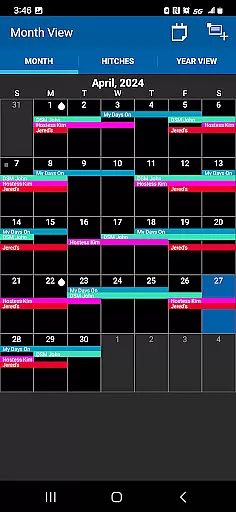
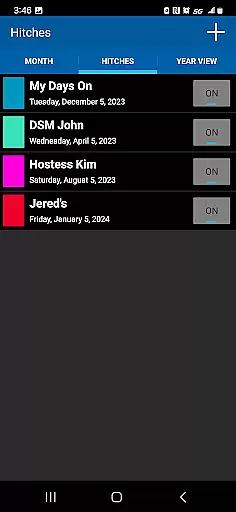
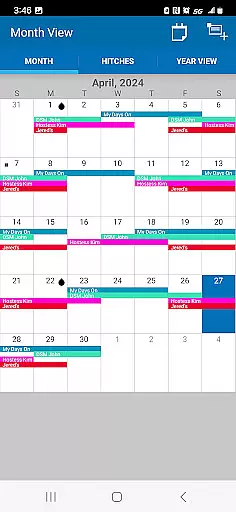
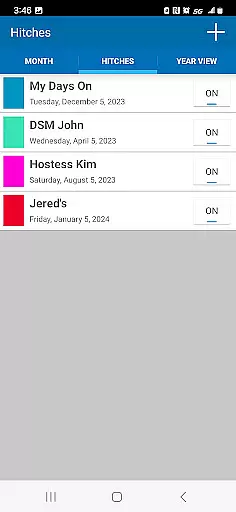
Oilfield Calendar is a productivity app designed specifically for oilfield workers, helping them efficiently manage their demanding work schedules. The app offers an intuitive interface that allows users to customize their hitches, view holidays marked with oil drops, and plan ahead using detailed month and year views.
One of the standout features is the ability to create and compare multiple schedules, which can then be printed or shared in PDF format. This functionality is particularly useful for drilling, production, and facility workers who need to coordinate complex work routines. Additionally, knowing when supervisors are on tour helps vendors optimize their operations.
The app also serves as an essential planning tool for personal events, enabling workers to check if important dates like Christmas or birthdays fall on their days off. With its comprehensive scheduling capabilities, Oilfield Calendar ensures that both professional and personal time is well-organized, making it an indispensable tool for anyone working in the oilfield industry.
Oilfield Calendar boasts a range of features tailored to meet the unique needs of oilfield professionals. Users can easily create and modify new hitches through the hitch editor, allowing for maximum flexibility in managing work schedules. The app's month view highlights holidays with oil drop icons, providing a quick visual reference for important dates.
Another key feature is the ability to generate multiple schedules, which can be compared side-by-side to find the optimal work plan. These schedules can be exported as PDF files, making it easy to share them with colleagues or print them for personal reference. The app also includes practical tools such as DSM tracking, which helps vendors determine the best times to submit tickets.
For those working in challenging oilfield environments, having the right tools is crucial. Oilfield Calendar complements essential safety gear like hardhats and steel-toed boots by providing a reliable way to keep both work and personal life organized. Its user-friendly design and robust functionality make it an invaluable asset for anyone in the oil and gas industry.
Task management is essential for productivity applications, especially in demanding environments like the oilfield industry. Oilfield Calendar excels in this area by providing specialized tools tailored to the unique scheduling needs of oilfield workers.
The app allows users to create and modify work schedules through an intuitive hitch editor. This feature enables precise planning of on-duty and off-duty periods, ensuring optimal time management. The ability to generate multiple schedule variations and compare them side-by-side proves invaluable for both workers and vendors.
Oilfield Calendar goes beyond basic scheduling by incorporating industry-specific elements such as DSM tracking and holiday markers represented by oil drops in the month view. These features help users maintain professional commitments while planning personal events around their demanding schedules.
Users benefit from the app's comprehensive approach to task management, which includes PDF export capabilities for sharing schedules and a year-view feature for long-term planning. This functionality ensures that both personal and professional obligations are effectively coordinated and easily communicated to relevant parties.
In today's interconnected world, reliable cross-device synchronization is crucial for maintaining productivity. Oilfield Calendar addresses this need by implementing robust synchronization features that ensure schedule consistency across multiple devices.
The application maintains real-time updates across all authorized devices, allowing oilfield workers to access their schedules whether they're at home, in the office, or on-site at the rig. This seamless synchronization ensures that any changes made to the calendar are immediately reflected across all platforms.
Particularly valuable for vendors and DSM coordinators, the app's synchronization capabilities enable efficient coordination between different parties. When schedule adjustments occur, all stakeholders receive updated information simultaneously, reducing communication errors and enhancing operational efficiency.
The reliability of Oilfield Calendar's synchronization system extends to its backup and restore functions, providing users with peace of mind regarding their critical scheduling data. This comprehensive approach to data management ensures that users can focus on their demanding jobs without worrying about schedule discrepancies or data loss.
User-friendly interface
Customizable hitches
Multiple schedule comparison
Holiday visualization
PDF export capability
Limited to oilfield workers
No automatic schedule syncing
Basic free version
Occasional bugs reported
Learning curve for new users
A customizable calendar for your Wear OS watch
 4.20
4.20
Create study competitions, track your hours, and stay consistent with friends
4.1
Professional calendar app for Google Calendar, MS Outlook & Exchange
4.20
Android Wallet Password Manager
4.80
Automates browsing any website and notifies you of important changes or events
4.30
The AI assistant that thinks with you - write, code, and solve complex tasks
4.60
* block pre-roll ads, pop-up and forced redirect ads * Samsung certification app
4.00
Access your phone's notifications, calls, apps, photos & texts on your PC
3.90
Seamlessly read, manage, and organize all your PDF files solution in one place
4.40
Native client for Forgejo and Gitea
5.00
Best Tool for the professionals Electrician, Electrical contractors, etc.
4.90
QuickBooks Workforce lets teams view pay info and track time in one place.
4.70
App Lock with fingerprint, password: Lock apps & hide photos with lock screens
4.60
To do list widget with a notebook organizer, checklist, simple shopping list
4.60
PDF scanner & converter for files, photos, lottery, QR codes. One swipe away!
4.50
Translate text/voice/photos in 150+ languages. Offline & fast translator app.
4.50
Send files, sync SMS, notifications & clipboard across devices via local network
4.40
Easily read and manage all your PDF files
4.10
All in one sketching tool. Technical and General drawing. Online Maps support.
3.70


User Reviews