
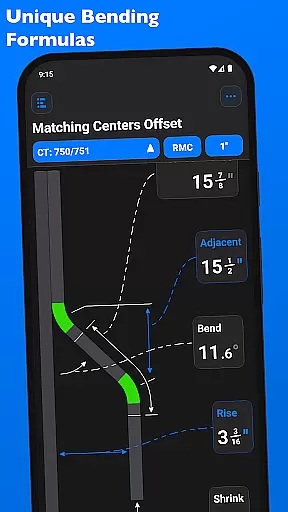
QuickBend is a cutting-edge conduit bending calculator app designed for precision and ease of use. It stands out by offering the most accurate measurements, accounting for shoe and bender radius, conduit type, and size diameter. The app employs a centerline radius algorithm to ensure rigorous and field-tested calculations, making it an essential tool for electricians and DIY enthusiasts alike.
Beyond its core functionality, QuickBend provides comprehensive information and documentation for individual bends, ensuring users avoid common mistakes while saving time and money. Its intuitive interface allows seamless toggling between inches and centimeters, catering to a global audience. With features like QuickCheck, it offers real-time feedback on bend feasibility, enhancing user convenience.
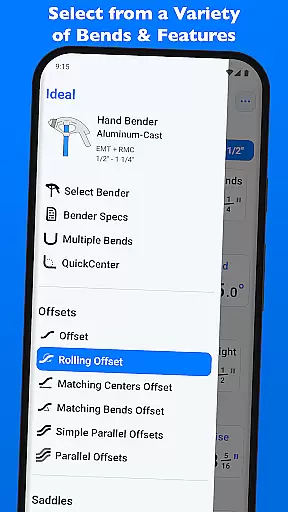
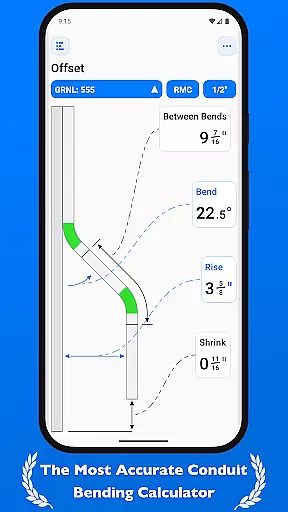
Whether you're a seasoned professional or a novice, QuickBend supports a wide range of bends including Offset, Rolling Offset, and various types of Saddle bends. This versatility makes it invaluable for anyone working with conduits, providing precise calculations and easy navigation through its well-organized interface.
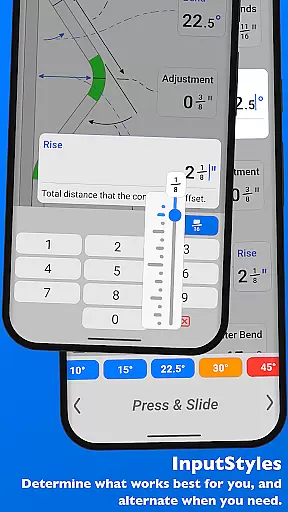
QuickBend boasts an array of sophisticated features tailored for efficiency and accuracy. One standout feature is its ability to input data using either a number pad or a slider bar (Press & Slide), catering to different user preferences. This flexibility ensures that users can swiftly enter values and receive immediate, precise feedback on their bending projects.
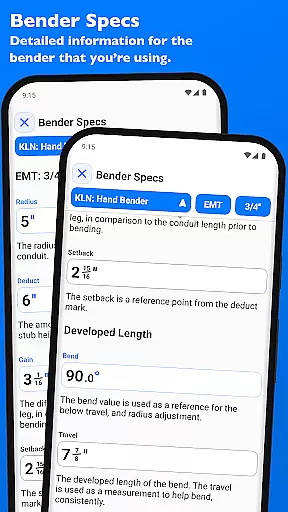
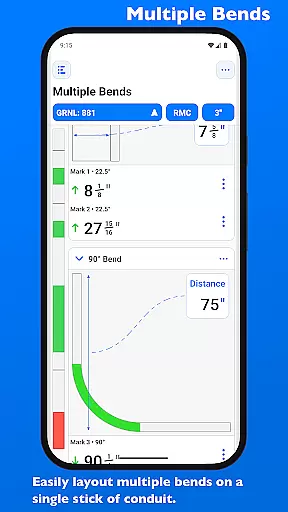
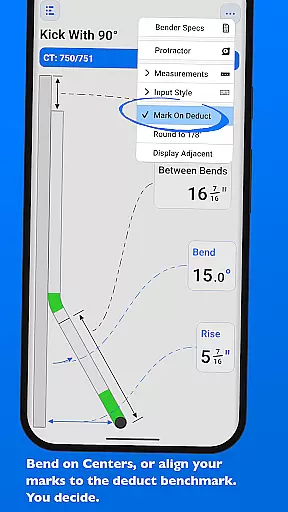
The app's support for multiple bend types, such as Offset, Three-Point Saddle, and Compound 90° bends, showcases its comprehensive utility. Each supported bend type comes with detailed measurement options, allowing users to layout multiple bends on a single conduit accurately. Additionally, QuickBend’s advanced visualization tools enable users to edit and view bender specifications, including centerline radius and setback details.
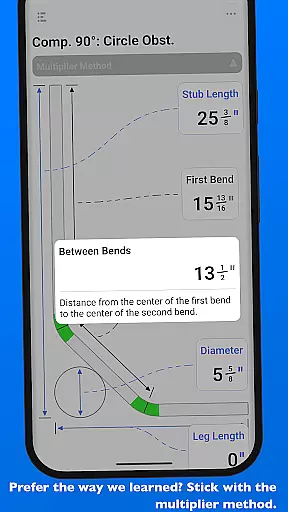
QuickBend also excels in customization and convenience. Users can pin frequently used benders for quick access and easily switch between them without excessive scrolling. The inclusion of manufacturer-specified bender details and the option to use a multiplier method further enhance its adaptability, making QuickBend an indispensable tool for productivity in conduit bending tasks.
Core task management in QuickBend is designed to streamline the conduit bending process for electricians and DIY enthusiasts alike. This app allows users to input data using either a number pad or a slider bar, catering to different preferences and offering flexibility in how measurements are entered. The ability to toggle between inches and centimeters ensures that users can work with their preferred measurement system.
QuickBend supports an extensive list of bend types, including Offset, Rolling Offset, and various Saddle bends among others. Each type is calculated using the centerline radius algorithm, ensuring precision and reliability. Users can layout multiple bends on a single conduit and receive accurate measurements for each mark, which can be flipped individually or as a set per bend.
The true power of QuickBend's task management lies in its intuitive interface that allows for seamless switching between different benders and shoe sizes without complex navigation. With the option to pin frequently used benders, users save time by quickly accessing their go-to tools. This feature not only enhances productivity but also reduces the likelihood of errors during critical projects.
Cross-device synchronization reliability is crucial for professionals who rely on consistent data across multiple devices. QuickBend addresses this need by providing detailed specifications for each bender within the app. Users can edit and view all bender specs, including centerline radius, deduct, gain, setback, travel, and radius adjustments up to 90u00b0 bends. These visualizations ensure that every device used reflects identical settings and calculations.
QuickCheck, integrated into QuickBend, adds another layer of reliability through real-time feedback on bend feasibility. Text color changes indicate whether a bend is impossible (red) or unlikely (orange), allowing users to adjust inputs before finalizing calculations. This preemptive check helps maintain consistency when transitioning from planning to execution phases across devices.
Moreover, QuickBendu2019s comprehensive support for various conduit types and sizes ensures uniformity in project requirements regardless of the device being used. By meticulously processing and field-testing all measurements, QuickBend guarantees that every calculation remains accurate and dependable, fostering trust in cross-device operations. This level of detail-oriented design empowers users to focus on their work with confidence.
User-friendly interface
Accurate calculations
Versatile bend support
Real-time feedback
Customizable settings
Complex for beginners
Requires device space
Premium cost
Limited free version
Occasional bugs

Native client for Forgejo and Gitea
 5.00
5.00
Unlock AutoNotification
4.00
Send files, sync SMS, notifications & clipboard across devices via local network
4.40
Easiest event planning, volunteer signups & parent teacher conference scheduling
2.20
App Lock with fingerprint, password: Lock apps & hide photos with lock screens
4.60
Secure, open-source, SPICE and SSH Remote Desktop for QEMU KVM virtual machines
4.00
A simple Whisper AI keyboard for reliable speech transcription and rewording
4.60
This small app MUST BE INSTALLED after purchase, else license won't work
4.40
AT&T Internet customers can use this app to personalize their Wi-Fi network.
4.40
We're working to become the best machining app on the market! www.cncdirt.com
4.80
Stay on top of your to-dos with Google Tasks, part of Google Workspace.
4.60
CalenGoo is a very flexible and feature-rich calendar app
4.40
Secure your apps with lock screens, use custom themes and different features.
4.40
When you Focus, so will your Bean in this cozy focus timer
4.30
A customizable calendar for your Wear OS watch
4.20
The ultimate file manager for rooted devices. The original and still the best.
4.00
Access your phone's notifications, calls, apps, photos & texts on your PC
3.90
Smart PDF reader & editor to view, organize and manage PDF documents easily.
3.70
ID.me Authenticator is a simple and free Two Factor Authentication solution
3.50


User Reviews